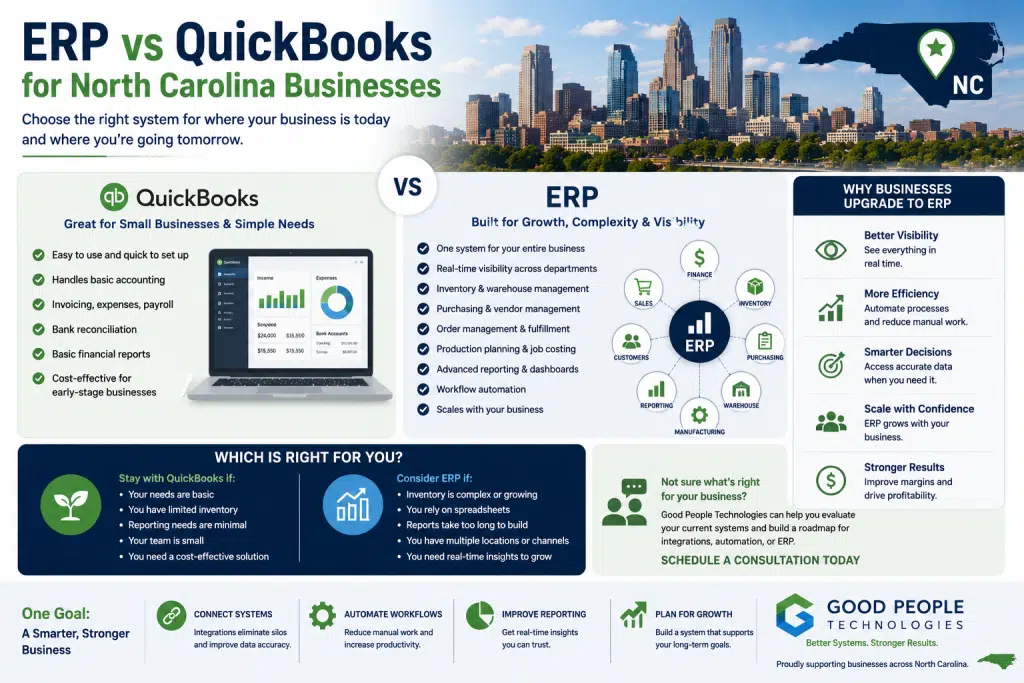
ERP vs QuickBooks for North Carolina businesses becomes an important question when a company starts to outgrow simple accounting workflows and needs better visibility across inventory, operations, purchasing, reporting, customer data, and financial performance. QuickBooks can be a strong tool for many small businesses, but growing companies often reach a point where accounting software alone cannot support the full complexity of daily operations.
For businesses across Charlotte, Raleigh, Durham, Greensboro, Winston-Salem, Asheville, and other parts of North Carolina, this decision usually does not happen overnight. A company may use QuickBooks successfully for years before operational issues become visible. Reports take longer to prepare. Inventory becomes harder to trust. Employees rely on spreadsheets. Order processing requires more manual work. Finance spends too much time reconciling information from disconnected systems.
At that stage, the question is not whether QuickBooks is good or bad.
The better question is whether QuickBooks is still enough for the way the business now operates.
This article explains the difference between QuickBooks and ERP, when QuickBooks still makes sense, when ERP becomes necessary, and how growing North Carolina businesses can decide which path is right.
QuickBooks Is Often the Right Starting Point
QuickBooks is popular for a reason.
It is accessible, familiar, and useful for many small businesses. Companies use it to manage invoices, expenses, payments, payroll, bank reconciliation, basic reporting, and financial records.
For early-stage companies, QuickBooks often provides exactly what is needed.
A small business may not have complex inventory, multiple locations, advanced purchasing workflows, production planning, or complicated reporting needs. In that situation, a full ERP system may be unnecessary.
QuickBooks can work well when:
- the business has simple accounting needs
- inventory is limited or easy to manage
- reporting requirements are basic
- order volume is manageable
- the team is small
- workflows are not heavily cross-departmental
- leadership mainly needs financial visibility
Many North Carolina businesses should not rush into ERP too early.
A local service business, small retailer, startup e-commerce brand, or early-stage professional firm may be perfectly fine with QuickBooks and a few supporting tools.
The problem appears when the business grows beyond what basic accounting software was designed to manage.
Where QuickBooks Starts to Show Its Limits
QuickBooks is primarily an accounting system.
That matters.
It can help manage financial records, but it is not always built to manage the full operational complexity of a growing business.
A product-based company may need connected inventory, purchasing, fulfillment, customer orders, vendor management, and financial reporting. A manufacturer may need production planning, raw material tracking, work-in-progress visibility, and job costing. A distributor may need warehouse management, purchase planning, order fulfillment, and multi-location inventory control.
QuickBooks may still support accounting, but the rest of the business often starts depending on spreadsheets, manual work, and disconnected systems.
Common signs of strain include:
- inventory numbers do not match
- reports require manual exports
- finance waits on operations for data
- purchasing decisions are reactive
- employees enter the same data more than once
- customer records are spread across systems
- spreadsheets become essential to daily workflows
- leadership lacks real-time visibility
- order processing requires manual coordination
These issues do not always mean QuickBooks must be replaced immediately.
However, they do suggest that the business needs a broader systems conversation.
That is why ERP vs QuickBooks for North Carolina businesses is usually not a simple software comparison. It is a question about operational maturity.
What ERP Does Differently
ERP stands for Enterprise Resource Planning.
An ERP system is designed to manage multiple core areas of the business within one connected environment.
Depending on the company and platform, ERP may support:
- accounting
- inventory management
- purchasing
- order management
- production planning
- warehouse operations
- CRM
- reporting
- project management
- job costing
- supplier management
- workflow automation
The main difference is scope.
QuickBooks mainly helps manage financial activity. ERP connects finance with operations.
This connection becomes important as a business grows.
For example, inventory affects accounting. Purchasing affects cash flow. Fulfillment affects customer experience. Production affects delivery timelines. Sales activity affects forecasting. Reporting depends on data from multiple departments.
When those areas are disconnected, employees must manually connect the information.
ERP helps reduce that friction by centralizing data and workflows.
A growing business does not choose ERP just to get “more features.” It chooses ERP because the company needs a more connected operating system.
ERP vs QuickBooks for North Carolina Businesses
ERP vs QuickBooks for North Carolina businesses should be evaluated based on complexity, not company size alone.
A business with 20 employees may need ERP if it manages complex inventory, manufacturing workflows, multiple sales channels, or detailed job costing. Another company with 80 employees may still operate well with QuickBooks if its workflows are simple and reporting needs are limited.
The right decision depends on the way the business operates.
QuickBooks may still be enough if the company mainly needs accounting, invoicing, expense tracking, payroll, and basic reports.
ERP becomes more relevant when the business needs one system to connect financial data with operational activity.
For example, a manufacturer near Greensboro may need ERP because production planning, purchasing, inventory, and accounting all depend on each other. An e-commerce company in Charlotte may need ERP when Shopify, fulfillment, inventory, and finance no longer sync cleanly. A distributor near Raleigh may need ERP because warehouse visibility and purchasing decisions are too important to manage manually.
The decision is not about replacing QuickBooks because it failed.
In many cases, QuickBooks helped the business reach its current stage.
ERP becomes the next step when the company needs more structure, visibility, automation, and scalability.
Sign 1: Inventory Is Becoming Harder to Trust
Inventory problems are one of the clearest signs that a business may be outgrowing QuickBooks.
This is especially true for manufacturers, e-commerce companies, retailers, wholesalers, and distributors.
A company may start with simple inventory tracking. Over time, the product catalog grows, sales channels expand, and purchasing becomes more complex.
Inventory data may begin living across several places:
- QuickBooks
- Shopify
- spreadsheets
- warehouse systems
- fulfillment platforms
- purchasing records
- manual reports
When different systems show different numbers, teams stop trusting the data.
Customer service may need to check with operations before answering questions. Purchasing may reorder too early or too late. Finance may struggle with inventory valuation. Leadership may not know how much cash is tied up in stock.
QuickBooks can support some inventory workflows, but growing product-based businesses often need deeper inventory visibility.
ERP can help centralize inventory data and connect it with purchasing, accounting, sales, fulfillment, and reporting.
For companies where inventory accuracy affects customer experience and cash flow, ERP may become a better long-term foundation.
Sign 2: Reporting Takes Too Long
Reporting delays are another common sign that the business needs stronger systems.
Leadership may want to know:
- which products are most profitable
- which customers drive the most revenue
- where margins are shrinking
- how much inventory is available
- which orders are delayed
- what cash flow looks like
- how departments are performing
- where operational bottlenecks exist
If those answers require manual exports, spreadsheet cleanup, and input from several departments, reporting is too dependent on manual work.
QuickBooks can provide financial reports, but many growing companies need operational reporting as well.
They need to connect financial data with inventory, sales, fulfillment, production, customer activity, and purchasing.
ERP helps by bringing more of that data into one environment.
The business can move from delayed reporting toward more real-time visibility.
This does not mean every company needs ERP as soon as reporting takes extra time. Sometimes reporting can be improved through integrations or dashboards. Still, slow reporting is a strong signal that the current system environment should be reviewed.
Sign 3: Spreadsheets Are Running Core Operations
Spreadsheets are useful business tools.
They are flexible, fast, and familiar.
The problem begins when spreadsheets become the unofficial operating system.
A growing company may use spreadsheets for:
- inventory planning
- sales forecasting
- purchasing
- production schedules
- order exceptions
- financial reporting
- customer notes
- project profitability
- fulfillment tracking
At first, these spreadsheets solve immediate problems. Later, they create risk.
Files may become outdated. Formulas can break. Multiple versions may circulate. One employee may become the only person who understands the workflow. Data may not connect with the systems that actually run the business.
If spreadsheets are supporting analysis, that is normal.
When spreadsheets are required for daily operations, the company may need a more structured system.
A useful way to think about ERP vs QuickBooks for North Carolina businesses is this: QuickBooks may handle accounting, but ERP can help replace operational spreadsheets with connected workflows.
That shift can reduce errors, improve visibility, and make the business less dependent on manual workarounds.
Sign 4: Accounting and Operations Are Disconnected
Accounting should not be isolated from operations.
In a growing business, financial performance is connected to what happens across the company.
Inventory affects cash flow.
Purchasing affects margins.
Fulfillment affects revenue timing.
Production affects cost.
Customer orders affect forecasting.
When accounting and operations are disconnected, finance teams spend too much time reconciling data instead of analyzing it.
A finance employee may need to compare QuickBooks records against sales data, inventory spreadsheets, warehouse reports, and payment processor exports. This creates delays and increases the chance of errors.
ERP can help by connecting financial data with operational workflows.
Instead of accounting receiving information after the fact, finance can work from a system that reflects what is happening in the business more directly.
This is especially valuable for companies with inventory, purchasing, production, fulfillment, or project costing complexity.
If finance is constantly cleaning operational data, the company may need more than accounting software.
Sign 5: Manual Data Entry Keeps Increasing
Manual data entry is one of the most expensive hidden costs in growing businesses.
Employees may manually enter orders, invoices, customer records, inventory adjustments, purchase orders, payment details, shipping updates, and report data.
Each task may feel small.
Repeated across departments, the workload becomes significant.
Manual data entry creates three problems.
It wastes time. Employees spend hours moving information between systems instead of doing higher-value work.
Accuracy also suffers. A typo, missed update, wrong quantity, or outdated customer record can create downstream problems.
Information moves slowly. Data does not reach the right system until someone manually transfers it.
QuickBooks may still be part of the workflow, but if employees are constantly copying data into or out of it, the business should review integrations or ERP.
Sometimes targeted automation is enough. In other cases, ERP becomes necessary because the company needs one central system to reduce duplicate entry.
Sign 6: The Business Is Adding More Tools to Fix Gaps
Many companies respond to system limitations by adding more software.
A new reporting tool is added.
Then a shipping platform.
After that, a CRM.
Next comes an inventory app.
A spreadsheet fills the remaining gaps.
This can help temporarily, but it can also create more complexity.
The business may end up with several tools that each solve one problem but do not create a connected operation.
Employees then spend time managing the gaps between systems.
That is often the moment when leadership should step back and review the entire technology environment.
More software is not always the answer.
Sometimes the company needs better integrations. In other situations, ERP can reduce complexity by centralizing important workflows.
The decision around ERP vs QuickBooks for North Carolina businesses should include a review of the full software stack, not only the accounting tool.
Sign 7: Growth Is Creating More Administrative Pressure
Growth should create leverage.
A larger business should be able to handle more activity with better systems, clearer processes, and stronger data.
If growth creates more manual work at every step, the company has a scalability problem.
Order volume may increase, while order processing becomes harder. More customers may create more internal coordination. Additional products can make inventory more difficult to manage. Expanded sales channels may add reporting complexity.
Revenue may be growing, but the operating model becomes heavier.
Hiring may help, but adding people to manage inefficient workflows is not always the best answer.
ERP can help when growth requires a stronger operational foundation.
Integrations and automation may also reduce pressure before a full ERP move is needed.
The goal is to create systems that allow the team to handle more complexity without every new layer of growth creating more administrative work.
When QuickBooks Is Still the Right Fit
ERP is not always the right answer.
QuickBooks may still be the best fit when a business has relatively simple operations.
It may work well when:
- accounting is the main need
- inventory is simple
- reporting requirements are basic
- the team does not need deep operational visibility
- order volume is manageable
- there are few systems to connect
- manual work is limited
- spreadsheets are used for analysis, not operations
A company should not move to ERP just because it sounds more advanced.
ERP requires planning, implementation, training, process design, and ongoing management. If the business does not need that level of structure, ERP may create unnecessary complexity.
The right question is not “Is ERP better than QuickBooks?”
The better question is “What does the business actually need to operate efficiently?”
For some companies, QuickBooks plus a few integrations is enough.
Others need ERP because the operational environment has become too complex for accounting software and spreadsheets.
When ERP Is the Better Fit
ERP becomes the better fit when the company needs connected operational control.
This may include:
- inventory management
- purchasing
- order management
- production planning
- warehouse workflows
- job costing
- project profitability
- supplier management
- reporting
- workflow automation
- financial visibility
A business may be ready for ERP when employees no longer trust the data, reports take too long, manual work keeps increasing, and leadership cannot see what is happening across departments.
ERP is especially useful when financial performance depends on operational activity.
For example, a North Carolina manufacturer needs accurate material costs, production schedules, inventory visibility, and financial reporting. An e-commerce business needs order, inventory, fulfillment, accounting, and customer data connected. A distributor needs purchasing, warehouse, sales, and finance working together.
When these areas depend on each other, ERP can create a stronger foundation.
Composite Example: A Charlotte E-Commerce Business Outgrowing QuickBooks
Consider a growing e-commerce company in Charlotte.
The business uses Shopify for online sales, QuickBooks for accounting, spreadsheets for inventory planning, and a fulfillment provider for shipping.
For several years, the setup works well enough.
Then sales increase.
Order volume grows. Inventory becomes harder to trust. Finance spends more time reconciling Shopify, payment processor, and QuickBooks data. Customer service checks multiple systems before answering order questions. Leadership wants better visibility into product profitability, but reports take too long to prepare.
The company first considers hiring another operations coordinator.
After reviewing workflows, leadership realizes the real issue is disconnected systems.
The first improvement may be integrations between Shopify, QuickBooks, fulfillment, and reporting tools. However, as complexity continues to grow, ERP becomes a more serious option.
For this company, ERP vs QuickBooks for North Carolina businesses is not just a software decision. It is a question about whether the company needs accounting support or a more complete operational system.
Composite Example: A Greensboro Manufacturer Needing Operational Visibility
A manufacturer near Greensboro faces a different situation.
The company uses QuickBooks for accounting, spreadsheets for production planning, and separate files for purchasing and inventory.
As the business grows, problems become more frequent.
Raw material counts are not always accurate. Production scheduling depends on manual updates. Purchasing is reactive. Finance does not always have timely cost information. Leadership struggles to see margins by product line.
QuickBooks still supports basic accounting, but it does not provide the operational visibility the company needs.
In this case, ERP may be a better long-term fit because manufacturing requires connected data across production, inventory, purchasing, accounting, and reporting.
A phased implementation may still be best. The company may begin by cleaning data, mapping workflows, and improving integrations before moving fully into ERP.
What to Do Before Moving From QuickBooks to ERP
A company should not move from QuickBooks to ERP without preparation.
Important steps include:
- Map current workflows
Understand how orders, inventory, purchasing, accounting, reporting, and customer data move through the business. - Identify manual processes
Document where employees copy, paste, export, import, reconcile, or update information manually. - Review reporting gaps
Clarify which reports leadership needs and why current reporting is insufficient. - Clean important data
Customer records, product data, vendor information, inventory counts, and financial records should be reviewed before migration. - Define system ownership
Decide which system should own inventory, accounting, customer data, order data, and reporting. - Plan integrations early
ERP may need to connect with CRM, e-commerce, warehouse, shipping, payment, or reporting tools. - Involve the right teams
Finance, operations, sales, warehouse, customer service, and leadership should all be part of the planning process. - Choose outcomes before choosing software
The business should define what ERP needs to improve before selecting a platform.
Good ERP planning starts with operations, not demos.
If your company is unsure whether QuickBooks, integrations, or ERP should be the next step, Good People Technologies can help review your current workflows and identify the most practical path forward.
How Good People Technologies Helps Businesses Evaluate ERP Readiness
Good People Technologies helps growing businesses evaluate systems, reduce manual work, improve integrations, and determine whether ERP is the right next step.
This can include:
- reviewing current QuickBooks workflows
- identifying spreadsheet dependency
- mapping operational bottlenecks
- improving system integrations
- evaluating ERP readiness
- automating repetitive tasks
- improving reporting visibility
- supporting ERP implementation or optimization
The goal is not to push every business into ERP.
Some companies need better integrations around QuickBooks. Others need automation first. More complex businesses may need ERP to create a stronger operating foundation.
Good People Technologies helps companies understand the difference between a tool problem and a process problem.
That distinction matters because buying new software will not fix unclear workflows by itself.
A better technology decision starts with understanding where the business is losing time, accuracy, and visibility.
Final Thoughts
ERP vs QuickBooks for North Carolina businesses should not be framed as a question of which software is universally better.
QuickBooks is a strong accounting tool for many small businesses. It can support companies effectively when operations are simple and reporting needs are limited.
ERP becomes more valuable when the business needs connected visibility across accounting, inventory, purchasing, operations, reporting, and customer workflows.
The right timing depends on complexity.
A company should consider ERP when spreadsheets become essential, reporting takes too long, manual data entry increases, inventory becomes difficult to trust, and leadership lacks visibility across departments.
For growing North Carolina businesses, the goal is not to use more advanced software for its own sake.
The real goal is to build systems that make growth easier to manage.
Frequently Asked Questions
What is the main difference in ERP vs QuickBooks for North Carolina businesses?
The main difference is scope. QuickBooks is primarily accounting software, while ERP connects accounting with operations, inventory, purchasing, order management, reporting, and workflow automation.
When should a business move from QuickBooks to ERP?
A business should consider moving from QuickBooks to ERP when manual work, spreadsheet dependency, inventory issues, reporting delays, and disconnected operations begin limiting growth.
Is QuickBooks enough for a growing business?
QuickBooks may be enough if the business has simple accounting needs, limited inventory, basic reporting, and few operational workflows. As complexity increases, ERP or integrations may become necessary.
Can QuickBooks integrate with other systems?
Yes. QuickBooks can integrate with many platforms, including e-commerce, CRM, reporting, and inventory tools. Integrations may help extend QuickBooks before a business moves to ERP.
Does every business that uses QuickBooks eventually need ERP?
No. Not every business needs ERP. Companies with simple operations may use QuickBooks successfully for many years. ERP becomes more relevant when operational complexity grows.
Is ERP better than QuickBooks for inventory management?
ERP is often stronger for complex inventory management, especially when inventory connects with purchasing, production, accounting, fulfillment, and reporting. QuickBooks may work for simpler inventory needs.
What should a company do before implementing ERP?
Before implementing ERP, a company should map workflows, clean data, define reporting needs, identify manual processes, review integrations, and clarify business outcomes.
Can ERP reduce manual data entry?
Yes. ERP can reduce manual data entry by centralizing information and connecting workflows across departments. Integrations and automation can further reduce repetitive work.
Should businesses try integrations before ERP?
Sometimes, yes. If QuickBooks still works for accounting but other systems do not connect well, integrations may solve the immediate problem before ERP is needed.
How can Good People Technologies help with ERP readiness?
Good People Technologies helps businesses review current systems, identify bottlenecks, improve integrations, automate workflows, evaluate ERP readiness, and build practical technology roadmaps.

Roman is a B2B marketing specialist focused on technology, ERP systems, business automation, and digital growth strategies. At Good People Technologies, he helps translate complex technology solutions—such as ERP integrations, system integrations, and business process automation—into clear insights for founders, operators, and growing companies.
His work focuses on content strategy, SEO, and thought leadership that helps businesses understand how the right technology infrastructure can support scalable operations and sustainable growth.
At Good People Technologies, Roman contributes to content that explores ERP implementation, automation strategies, and system integration best practices for companies navigating rapid growth and operational complexity.