
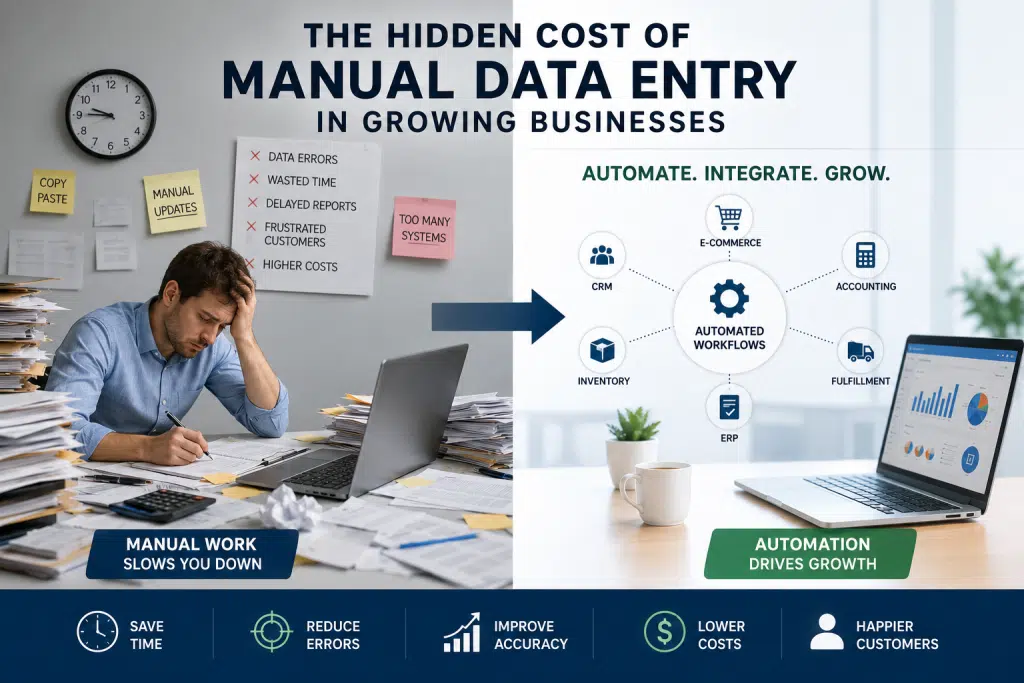
Manual data entry is rarely treated as a strategic problem. In many companies, it is seen as “just part of the process.” Yet that mindset is exactly why the problem becomes expensive. When employees spend hours moving data between disconnected systems, the business is not only paying for labor. It is also paying for delays, rework, reporting errors, customer issues, and missed opportunities.
At Good People Technologies, we often see this pattern in growing companies that rely on e-commerce platforms, accounting software, ERP systems, CRMs, fulfillment tools, spreadsheets, and reporting platforms that do not communicate properly. The real issue is not usually one bad tool. Instead, the problem is a technology environment that requires humans to act as the integration layer between systems.
In this article, we’ll break down the cost of manual data entry, why it grows as businesses scale, what research tells us about error rates and productivity loss, and how integrations, automation, and ERP improvements can reduce the burden.
Why Manual Data Entry Becomes a Growth Problem
Manual work can be manageable when a business is small.
If a company processes a few orders per day, manually updating spreadsheets or copying information between platforms may not feel painful. However, the same workflow becomes much more expensive when the company begins processing hundreds or thousands of transactions.
For example, manual work often appears in places like:
- copying orders from an e-commerce platform into accounting software
- updating customer records in a CRM
- manually reconciling inventory numbers
- transferring invoice information into ERP
- entering shipping details into fulfillment systems
- cleaning spreadsheet exports before reporting
- copying sales data into dashboards
Each task may only take a few minutes. However, when repeated hundreds of times per week, the cost of manual data entry compounds quickly.
Even worse, manual data entry does not scale cleanly. As volume increases, companies often respond by hiring more people or asking existing employees to work faster. Unfortunately, this usually increases the risk of mistakes.
That is why manual data entry is not just an administrative issue. It is a scaling issue.
The Cost of Manual Data Entry Is Bigger Than Labor
Many businesses calculate manual work only in terms of employee hours.
That is too narrow.
The true cost includes several layers:
- time spent entering data
- time spent checking data
- time spent correcting mistakes
- delays caused by inaccurate information
- customer service time spent resolving issues
- reporting problems caused by inconsistent data
- decisions made from incomplete or outdated information
Because of this, the cost of manual data entry is often hidden across departments.
Operations feels it as delays.
Finance feels it as reconciliation work.
Sales feels it as inaccurate customer or product information.
Customer service feels it as complaints.
Leadership feels it as unreliable reporting.
When these costs are spread across the organization, they become harder to see. However, they still reduce performance.
What Research Says About Manual Errors
Manual data entry creates risk because humans make mistakes, especially when tasks are repetitive, time-sensitive, or spread across multiple systems.
Research on operational spreadsheets1 found measurable error rates2 in formula cells, with some errors having meaningful business impact. Other studies of data processing methods have found that database and entry-related errors can vary widely depending on process design and validation methods. In clinical and operational settings, published research has reported error rates that show how quickly small mistakes can enter structured data workflows.
Industry benchmarks commonly place manual data entry error rates around 1% to 4% of fields, depending on the task, process complexity, and level of verification. Even a 1% error rate can be expensive at scale. If a business processes 10,000 data fields per week, a 1% error rate means roughly 100 incorrect fields every week.
Some mistakes are minor. Others can trigger larger problems.
A wrong SKU can create a fulfillment issue.
A wrong quantity can distort inventory planning.
Even a wrong customer address can delay delivery.
A wrong invoice value can create accounting problems.
A missed update can cause reports to show the wrong numbers.
This is why the cost of manual data entry grows faster than many leaders expect.
The Productivity Drain Nobody Owns
Manual data entry also consumes time that could be spent on higher-value work.
Research and workplace surveys consistently show that employees spend a significant portion of their time on repetitive administrative tasks. Smartsheet has reported that more than 40% of workers surveyed spend at least a quarter of their workweek on manual, repetitive tasks3, including data collection and data entry.
That matters because growing businesses need their teams focused on work that improves the business:
- improving customer experience
- optimizing fulfillment
- analyzing trends
- improving processes
- solving strategic problems
- building better systems
Instead, manual workflows keep people stuck in reactive work.
The problem becomes even worse when employees need to search for information across disconnected tools. Research often cited from IDC4 found that knowledge workers can spend a large portion of their day searching for and consolidating information. Whether the exact number varies by organization or role, the business problem is clear: fragmented information environments waste time.
When employees become the bridge between systems, growth creates more manual work instead of more leverage.
Why Growing Businesses Depend on Manual Data Entry
Manual data entry usually does not appear overnight.
It builds gradually.
A company adds Shopify. Then QuickBooks. Then a CRM. Later, it adds a fulfillment provider, an inventory tool, a warehouse system, a reporting platform, and a few spreadsheets to fill the gaps.
Each tool solves a specific problem. However, if the tools are not properly integrated, employees must move data between them manually.
Over time, manual workflows become part of the company’s operating system.
This often happens for several reasons.
1. Systems Were Added Without an Integration Plan
Many businesses choose software reactively.
They buy tools when problems appear.
At first, this works. However, after several years, the business may have a technology stack that includes strong individual platforms but weak connectivity between them.
As a result, employees spend hours copying data between systems that were never designed to work together.
2. Spreadsheets Become Hidden Infrastructure
Spreadsheets are useful, flexible, and familiar.
However, they often become a workaround for missing integrations.
Teams may use spreadsheets to track:
- inventory adjustments
- order exceptions
- customer requests
- pricing changes
- purchasing plans
- reconciliation notes
- reporting calculations
The issue is not that spreadsheets are bad. The issue is that spreadsheets are often disconnected from the systems that run the business.
Consequently, every spreadsheet update becomes another opportunity for delay or error.
3. Teams Don’t Trust the Data
When systems show different numbers, employees start creating manual checks.
They export reports.
They compare spreadsheets.
Verify numbers by hand? They can do it too.
Although this may improve confidence in the short term, it also creates more manual work. Eventually, the company develops a culture where people trust their personal spreadsheet more than the system.
That is a warning sign.
4. Integrations Exist, But They Are Incomplete
Some businesses already have integrations, but manual work remains.
This often happens when integrations are:
- one-way instead of two-way
- delayed instead of real time
- missing key fields
- difficult to monitor
- not connected to reporting
- not designed around actual workflows
In these cases, the business technically has integrations, but employees still need to fix gaps manually.
5. ERP Was Implemented, But Processes Were Not Optimized
ERP systems can reduce manual work significantly. However, ERP alone does not guarantee efficiency.
If ERP workflows are not configured properly, teams may still rely on manual uploads, workarounds, spreadsheets, and duplicate data entry.
This is why ERP optimization matters. A system can be powerful and still underperform if the workflows around it are not designed well.
A Real Example: Faster ERP Operations and Less Manual Work
Good People Technologies has worked on technology environments where improving ERP performance, integrations, and automation created measurable operational improvements.
In one Good People Technologies case-study5 example, the team helped achieve a 10x increase in ERP operational speed while saving thousands of staff hours yearly. The work also streamlined website integrations, reduced manual work, and lowered customer service calls.
That type of improvement matters because manual data entry problems often appear as “people problems,” when they are actually systems problems.
If a team spends too much time entering data, waiting for systems, reconciling reports, or correcting errors, the answer is not always “work harder.” More often, the answer is better architecture.
When systems communicate properly, employees can spend less time moving data and more time using data.
Composite Example: The E-Commerce Team That Became the Integration Layer
Consider a growing e-commerce business selling through Shopify, Amazon, and wholesale channels.
The company uses:
- Shopify for online orders
- Amazon Seller Central for marketplace sales
- QuickBooks for accounting
- a fulfillment provider
- a spreadsheet for inventory planning
- a reporting dashboard updated manually every Friday
At first, the setup seems manageable.
However, after growth accelerates, several problems appear.
Orders from Shopify need to be manually checked before entering accounting.
Amazon sales are reconciled separately.
The fulfillment provider sends updates by file export.
Inventory planning depends on a spreadsheet that only one person fully understands.
Finance waits until the end of the week for accurate numbers.
Customer service sometimes gives customers outdated shipping information.
Nothing is completely broken. However, everything depends on people manually keeping systems aligned.
The business begins to feel slower as it grows.
This is the hidden cost of manual data entry: not one catastrophic failure, but hundreds of small frictions that quietly limit scale.
The solution may include:
- integrating e-commerce, accounting, and fulfillment systems
- automating order and inventory updates
- reducing spreadsheet-based workflows
- creating a central source of truth for operational data
- improving reporting dashboards
- evaluating whether ERP should become the operational hub
In many cases, these improvements reduce manual work without requiring the business to replace every tool immediately.
How Manual Data Entry Damages Reporting
One of the biggest risks of manual data entry is unreliable reporting.
Leadership teams rely on accurate data to make decisions about:
- inventory
- hiring
- purchasing
- customer service
- marketing
- cash flow
- operations
However, if reports depend on manual exports, spreadsheet cleanup, or delayed updates, leadership may be looking at outdated or incomplete information.
This creates a dangerous situation.
The business may appear healthier than it is.
Inventory may look available when it is not.
Revenue may not match fulfillment reality.
Operational problems may remain invisible until customers complain.
Because of this, the cost of manual data entry is not only operational. It is strategic.
Bad data leads to bad decisions.
How Manual Data Entry Affects Customer Experience
Customers rarely see the internal process.
They only see the outcome.
If an order is delayed, they do not care whether the problem came from a spreadsheet, a disconnected platform, or a manual workflow.
They only know that the experience was poor.
Manual data entry can affect customer experience through:
- incorrect order details
- delayed shipping updates
- wrong addresses
- inaccurate inventory availability
- slow refunds
- inconsistent customer records
- duplicate communication
Over time, these issues damage trust.
In competitive e-commerce and service environments, operational accuracy becomes part of the customer experience.
How to Reduce Manual Data Entry
Fixing manual work starts with understanding where it happens.
Many businesses know they have manual processes, but they have never mapped them clearly.
A practical improvement process usually includes the following steps.
Step 1: Identify Every Manual Data Transfer
Start by documenting every place where employees copy, paste, export, import, clean, or re-enter information.
Look across:
- sales
- finance
- operations
- fulfillment
- customer service
- reporting
- inventory
- purchasing
This exercise often reveals more manual work than expected.
Step 2: Calculate the Real Cost
Estimate:
- how often the task happens
- how long it takes
- who performs it
- how often errors occur
- what happens when errors are discovered
- how much rework is required
This helps transform manual data entry from an invisible annoyance into a measurable business issue.
If your team is spending hours every week reconciling systems, Good People Technologies can help identify where automation or integrations could reduce that workload.
Step 3: Find the Source of Truth
Every business needs clarity around where important data should live.
For example:
- customer data may live in CRM
- financial data may live in accounting or ERP
- inventory data may live in ERP or a warehouse system
- order data may originate in e-commerce platforms
When no system owns the truth, manual work increases.
Step 4: Improve Integrations
Integrations are often the fastest way to reduce manual work.
They can connect:
- e-commerce platforms
- accounting systems
- ERP platforms
- CRM systems
- warehouse systems
- fulfillment tools
- reporting dashboards
As a result, information can move automatically between systems instead of relying on human transfer.
Step 5: Automate Repetitive Workflows
Not every workflow needs a full ERP implementation.
Some problems can be solved with targeted automation.
For example:
- automatically creating invoices from orders
- syncing customer records between platforms
- updating inventory after fulfillment
- sending order status updates
- generating recurring reports
- routing exceptions to the right team
Automation works best when the process is clearly defined first.
Automating a broken workflow can create faster mistakes.
Step 6: Evaluate Whether ERP Optimization Is Needed
Some businesses eventually need more than integrations.
If manual work continues because core operations are spread across too many tools, ERP may provide a better long-term foundation.
ERP can centralize:
- accounting
- inventory
- purchasing
- order management
- fulfillment
- reporting
However, the right answer depends on the business. Some companies need ERP. Others need integrations. Some need automation layered on top of existing systems.
A practical systems review can determine which path makes sense.
When Manual Data Entry Is a Sign of a Bigger Problem
Manual data entry is not always bad.
Some manual work is normal.
However, it becomes a serious issue when:
- the same data is entered multiple times
- reports require manual cleanup
- teams do not trust system data
- customer issues come from data mistakes
- employees maintain shadow spreadsheets
- leadership waits days for accurate reporting
- hiring more people becomes the only way to handle growth
At that point, manual data entry is no longer just an administrative task.
It is a sign that the business needs better systems.
Final Thoughts
The cost of manual data entry is easy to underestimate because it is spread across people, departments, workflows, and systems.
However, growing businesses eventually feel the impact.
Manual data entry slows teams down, increases errors, weakens reporting, frustrates customers, and limits scalability. More importantly, it often hides a deeper issue: disconnected systems that require employees to act as the glue between platforms.
Fortunately, this problem is fixable.
With the right integrations, automation workflows, ERP improvements, and process design, businesses can reduce manual work and create a more reliable operational foundation.
The goal is not just to save time.
The goal is to build systems that make growth easier instead of harder.
If manual data entry is slowing down your team, Good People Technologies can help review your systems, identify bottlenecks, and recommend the right mix of integrations, automation, and ERP improvements.
Frequently Asked Questions
The cost of manual data entry includes employee time, error correction, reporting delays, customer issues, rework, and missed opportunities. For growing businesses, the true cost is often much higher than the labor cost alone.
Manual data entry becomes a problem because it does not scale efficiently. As transaction volume increases, teams spend more time copying data, correcting mistakes, reconciling systems, and managing disconnected workflows.
Businesses can reduce manual data entry by identifying repetitive workflows, improving system integrations, automating data transfer, creating a clear source of truth, and optimizing ERP or operational systems.
Manual data entry problems often happen between e-commerce platforms, accounting software, ERP systems, CRM platforms, inventory systems, fulfillment tools, reporting dashboards, and spreadsheets.
Automation can significantly reduce manual data entry, but it may not eliminate every manual task. The best goal is to automate repetitive, high-risk, and high-volume workflows while keeping human review where it adds value.
- Research on operational spreadsheet errors found measurable error rates in business spreadsheets, with some errors affecting important spreadsheet outputs.
https://arxiv.org/abs/0801.0715 ↩︎ - Clinical data repository research found field error rates ranging from 0.5% to 6.4%, with an overall error rate of 2.8% across fields.
https://bmjopen.bmj.com/content/3/5/e002406 ↩︎ - Smartsheet reported that more than 40% of surveyed workers spend at least a quarter of their workweek on manual, repetitive tasks such as data collection and data entry.
https://www.smartsheet.com/content-center/product-news/automation/workers-waste-quarter-work-week-manual-repetitive-tasks ↩︎ - IDC-related research summaries report that knowledge workers can spend a large share of the workday searching for and consolidating information.
https://www.linkedin.com/pulse/knowledge-workers-information-hunting-problem-keeps-rik-van-bruggen-htede ↩︎ - Good People Technologies’ technology case studies page describes ERP speed improvements, staff hours saved, automation improvements, and reduced manual work.
https://goodpeopletech.com/technology-case-studies/ ↩︎

Roman is a B2B marketing specialist focused on technology, ERP systems, business automation, and digital growth strategies. At Good People Technologies, he helps translate complex technology solutions—such as ERP integrations, system integrations, and business process automation—into clear insights for founders, operators, and growing companies.
His work focuses on content strategy, SEO, and thought leadership that helps businesses understand how the right technology infrastructure can support scalable operations and sustainable growth.
At Good People Technologies, Roman contributes to content that explores ERP implementation, automation strategies, and system integration best practices for companies navigating rapid growth and operational complexity.