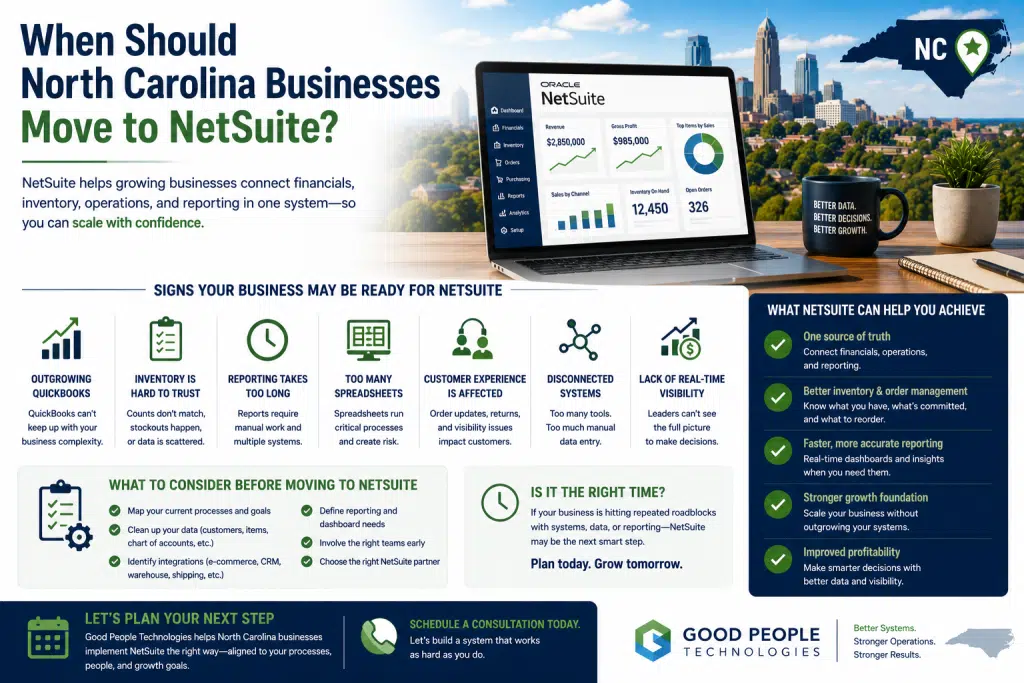
North Carolina NetSuite implementation becomes a serious consideration when a growing business can no longer manage operations with QuickBooks, spreadsheets, disconnected tools, manual reporting, and department-by-department workarounds. For many companies, the move to NetSuite is not about wanting “more software.” It is about needing a more connected operational foundation for accounting, inventory, purchasing, order management, fulfillment, reporting, and long-term growth.
A business may use QuickBooks successfully for years. The team may also rely on Shopify, warehouse tools, CRM software, spreadsheets, and manual processes to keep daily operations moving. At an early stage, that kind of system environment can work well enough.
Growth changes the equation.
As sales increase, more data moves through the business. Inventory becomes harder to track. Reports take longer to prepare. Finance spends more time reconciling information. Customer service needs better order visibility. Leadership wants faster answers, but the company’s systems cannot always provide them.
That is when NetSuite often enters the conversation.
NetSuite can help businesses centralize financials, inventory, purchasing, order management, workflows, reporting, and operational visibility. However, moving to NetSuite should not be rushed. A company should evaluate timing, readiness, data quality, process maturity, integration needs, and business goals before making the decision.
This article explains when North Carolina businesses should move to NetSuite, which signs matter most, what to prepare before implementation, and how companies can decide whether NetSuite, integrations, automation, or another ERP path makes sense.
NetSuite Is Usually a Growth-Stage Decision
NetSuite is not usually the first system a business uses.
Most companies start with simpler tools because they are easier to adopt, less expensive, and enough for the early stage of operations. QuickBooks may handle accounting. Shopify may manage e-commerce. Spreadsheets may support inventory planning. A CRM may organize customer relationships. A warehouse or fulfillment tool may support shipping.
This setup can be practical.
Problems begin when these tools no longer give the business one reliable view of operations.
A growing company needs more than individual software platforms. It needs systems that work together. Finance needs operational data. Operations needs inventory accuracy. Customer service needs order visibility. Purchasing needs supplier and stock information. Leadership needs reporting that reflects the whole business.
When those functions are disconnected, the team compensates manually.
Employees export reports, clean spreadsheets, copy data, compare numbers, and check with other departments before making decisions. That creates operational drag.
NetSuite becomes relevant when the business needs a more unified system instead of more disconnected tools.
The decision is not just about company size. A 30-person product-based business with complex inventory may need ERP before a 100-person service business with simple workflows. Complexity matters more than headcount.
Why Timing Matters Before Moving to NetSuite
Timing is one of the most important parts of any ERP decision.
Moving too early can create unnecessary complexity. A company may not have enough operational volume, process maturity, or internal readiness to justify a full ERP implementation.
Waiting too long creates a different risk.
If a business spends years building manual workarounds, messy spreadsheets, disconnected reports, and unclear data ownership, implementation becomes harder later. NetSuite can still help, but the project may require more cleanup, training, process redesign, and change management.
The best timing usually appears when problems become consistent, not occasional.
One reporting delay may not justify NetSuite.
Recurring reporting delays across finance, operations, inventory, and leadership are different.
A single inventory mismatch may be normal.
Frequent inventory uncertainty across sales channels, warehouse systems, and accounting tools suggests a deeper issue.
Manual data entry is expected in some workflows.
Constant duplicate entry between accounting, inventory, e-commerce, and fulfillment platforms is a sign the systems are not scaling.
A North Carolina NetSuite implementation should happen when the company has enough operational complexity to benefit from ERP, but before the business becomes so dependent on workarounds that change becomes painful.
Sign 1: QuickBooks Is No Longer Enough
QuickBooks is a strong accounting tool for many small businesses.
It can support invoicing, expenses, payments, bank reconciliation, payroll, and basic financial reporting. For companies with simple operations, QuickBooks may be the right fit for a long time.
The issue begins when the business needs more than accounting.
A growing company may need connected visibility across:
- inventory
- purchasing
- sales orders
- fulfillment
- customer records
- warehouse activity
- project or job costing
- supplier performance
- multi-channel sales
- operational reporting
QuickBooks may still handle financial records, but the rest of the business may depend on spreadsheets and disconnected systems.
Finance often feels this pressure first.
The team may need to reconcile sales from Shopify, payments from processors, inventory adjustments from warehouses, and manual spreadsheets before reports can be trusted. This slows reporting and increases the risk of errors.
A business should evaluate NetSuite when accounting and operations need to work together more closely.
For example, a product-based company in Charlotte may need real-time visibility between online sales, inventory, fulfillment, and accounting. A manufacturer in Greensboro may need purchasing, production, inventory, and financial reporting connected. A distributor near Raleigh may need better warehouse visibility and order management.
In these cases, the question is not whether QuickBooks is bad. It is whether the business has outgrown accounting-only software.
Sign 2: Inventory Is Becoming Harder to Trust
Inventory problems are one of the strongest reasons companies consider NetSuite.
This is especially true for e-commerce businesses, manufacturers, distributors, wholesalers, retailers, and product-based brands.
Inventory issues often appear when different systems show different numbers.
Shopify may show one count. The warehouse system may show another. QuickBooks may reflect something else. A spreadsheet may become the unofficial source of truth.
When teams do not know which number to trust, decision-making slows down.
Customer service may need to confirm stock manually before answering customers. Purchasing may reorder too late or too early. Sales may promise inventory that is already committed. Finance may struggle with inventory valuation. Leadership may not know how much cash is tied up in stock.
Inventory visibility becomes even more important when the business manages:
- multiple SKUs
- multiple warehouses
- wholesale commitments
- online sales channels
- returns and exchanges
- raw materials
- finished goods
- supplier lead times
- seasonal demand
- backorders
NetSuite can help centralize inventory and connect it with purchasing, fulfillment, accounting, and reporting.
A North Carolina NetSuite implementation may be worth evaluating when inventory accuracy starts affecting customer experience, cash flow, fulfillment speed, or purchasing decisions.
Sign 3: Reporting Takes Too Long
Growing businesses need fast, reliable reporting.
Leadership may want to know:
- which products are most profitable
- which customers are driving growth
- how inventory is moving
- where margins are shrinking
- which sales channels perform best
- what orders are delayed
- how much cash is tied up in inventory
- whether operations can support more growth
If those answers require manual exports, spreadsheet cleanup, and input from several departments, the company has a reporting problem.
Slow reporting is not just inconvenient.
It affects decision-making.
A business may miss inventory risks, fulfillment delays, margin problems, or cash flow issues because the data is not available soon enough. When reports take days to prepare, leadership is often looking backward instead of managing in real time.
NetSuite can improve reporting by bringing financial and operational data into a more connected system. Dashboards, saved searches, custom reports, and role-based visibility can help teams access information faster.
However, better reporting still depends on good data and clean processes.
Before starting a North Carolina NetSuite implementation, a company should define which reports matter most, who needs them, and what decisions those reports should support.
Sign 4: Manual Data Entry Keeps Increasing
Manual data entry is one of the clearest signs that systems are disconnected.
Employees may copy customer records, orders, invoices, inventory updates, purchase orders, shipping information, and payment details between tools.
At low volume, this may seem manageable.
Once the business grows, the cost becomes harder to ignore.
Manual data entry creates several problems:
- employees lose time on repetitive work
- errors become more likely
- data is delayed
- reports become less reliable
- customers receive slower updates
- teams depend on manual checks
- growth creates more administrative pressure
A business should pay attention to any workflow where the same information is entered more than once.
That usually means systems are not communicating properly.
NetSuite can reduce manual work by centralizing key workflows and connecting departments around shared data. Integrations can also help by connecting NetSuite with e-commerce, CRM, warehouse, shipping, and reporting tools.
Not every manual task requires ERP immediately. Sometimes targeted automation or integrations can solve the most painful issue first. Still, if manual work keeps increasing every time the company grows, NetSuite may become a stronger long-term option.
Sign 5: Spreadsheets Have Become Core Infrastructure
Spreadsheets are useful business tools.
They help with planning, analysis, forecasting, and temporary organization.
Problems begin when spreadsheets become essential to daily operations.
A company may use spreadsheets for:
- inventory planning
- purchasing decisions
- sales forecasting
- order exceptions
- production schedules
- wholesale commitments
- financial reports
- project profitability
- customer records
- fulfillment tracking
These files often start as practical solutions. Later, they become operational risks.
A spreadsheet can become outdated quickly. Multiple versions may circulate. Formulas can break. Important knowledge may live with one employee. Data may not connect to the systems that run the business.
When employees trust spreadsheets more than official systems, the company has a visibility problem.
NetSuite can help replace spreadsheet-dependent workflows with more structured processes. The goal is not to eliminate every spreadsheet. Many companies will still use spreadsheets for analysis. The real goal is to stop using spreadsheets as the operating system.
A North Carolina NetSuite implementation becomes more relevant when spreadsheets are required to understand inventory, orders, purchasing, finance, or operational performance.
Sign 6: Customer Experience Is Affected by Internal Systems
Customers do not see internal software problems.
They see the outcome.
If inventory is wrong, customers experience canceled orders or delays. When fulfillment updates are not connected, customers wait longer for answers. If billing data is inaccurate, customers see confusion. Poor internal visibility can become a customer-facing issue very quickly.
Customer service teams often feel this first.
They may need to check multiple systems before answering a basic question. Sales may not know whether inventory is available. Account managers may need updates from operations before communicating with clients.
This slows the customer experience.
NetSuite can help by giving teams better access to accurate operational information. When orders, inventory, fulfillment, customer records, and financial data are connected, customer-facing teams can respond faster and with more confidence.
For growing businesses, better customer experience often depends on better internal systems.
A company should consider NetSuite when customer communication, delivery timelines, order accuracy, or service quality are being affected by disconnected tools.
Sign 7: Multi-Channel Sales Are Getting Harder to Manage
Many North Carolina businesses grow through multiple sales channels.
A product-based company may sell through Shopify, Amazon, wholesale accounts, retail partners, marketplaces, and direct sales. A distributor may manage different customer groups, price levels, and fulfillment rules. A manufacturer may serve both custom orders and standard product lines.
Multi-channel growth creates complexity.
Each channel may have different data, pricing, inventory requirements, fulfillment steps, tax considerations, and reporting needs.
If the systems are not connected, teams spend too much time keeping channels aligned.
Inventory may be oversold. Wholesale commitments may conflict with online availability. Finance may struggle to reconcile channel performance. Leadership may not know which channel is most profitable.
NetSuite can help businesses manage multi-channel operations with stronger visibility across orders, inventory, customers, fulfillment, and reporting.
Integrations are still important. NetSuite may need to connect with Shopify, Amazon, CRM systems, warehouse tools, shipping platforms, or other business applications.
The system architecture matters as much as the ERP itself.
Sign 8: The Business Needs Better Process Control
Growth often exposes weak processes.
A small team can rely on informal communication. As the company grows, informal workflows become risky.
Approvals may happen through email. Purchase requests may be handled inconsistently. Order exceptions may depend on one person’s judgment. Inventory adjustments may not follow a standard process. Reports may be built differently by different departments.
Process inconsistency creates confusion.
NetSuite can support better process control through structured workflows, approvals, permissions, saved searches, reporting, and role-based access.
This helps companies standardize important operations.
Stronger process control is especially useful for businesses with multiple departments, locations, product lines, or customer groups.
A company does not need bureaucracy. It needs repeatable workflows that support scale.
If the business depends too heavily on informal processes, NetSuite may help create a more reliable operating model.
Sign 9: Leadership Lacks Real-Time Visibility
Leadership needs visibility into the business.
Not just financial visibility.
Operational visibility matters too.
Business owners and executives need to understand sales, inventory, fulfillment, purchasing, cash flow, profitability, workload, customer activity, and system bottlenecks.
When information lives across disconnected tools, leadership often receives delayed or incomplete answers.
That creates risk.
A company may continue growing revenue while margin problems go unnoticed. Inventory may become a cash flow issue before leadership sees the full picture. Fulfillment delays may affect customer retention before reporting reveals the pattern.
NetSuite can help leadership see more of the business from one connected environment.
The value is not simply dashboards.
The value is better decision-making.
When data is cleaner and more current, leaders can respond earlier, prioritize better, and manage growth with more confidence.
North Carolina NetSuite Implementation: When the Timing Is Right
North Carolina NetSuite implementation is usually right when the cost of disconnected systems becomes greater than the cost of improving the operational foundation.
The business does not need to be in crisis.
In fact, waiting until everything feels chaotic can make implementation harder.
The strongest timing often appears when the company sees repeated signs:
- QuickBooks is no longer enough
- inventory is difficult to trust
- reporting takes too long
- manual data entry keeps increasing
- spreadsheets run core workflows
- customer experience is affected
- multi-channel operations are harder to manage
- process control is inconsistent
- leadership lacks real-time visibility
These signs suggest the business needs a more connected system.
However, moving to NetSuite should still be planned carefully.
The company should understand current workflows, define requirements, clean important data, review integrations, and prepare teams for change. NetSuite can create major value, but only when the implementation is aligned with real business needs.
NetSuite vs Integrations: What Should Come First?
Not every business that struggles with disconnected systems needs NetSuite immediately.
Sometimes the best first step is integration.
If the company already has useful tools, but those tools do not share data properly, integrations may solve the most urgent problems.
For example, a company may need to connect:
- Shopify and QuickBooks
- CRM and accounting software
- warehouse systems and e-commerce platforms
- inventory tools and reporting dashboards
- fulfillment providers and customer service systems
Integrations can reduce manual work, improve data accuracy, and make reporting easier without moving immediately into ERP.
NetSuite becomes more relevant when the company needs one central system for finance, inventory, purchasing, orders, fulfillment, and reporting.
For many businesses, the best path is phased.
Improve urgent data flows first. Automate repetitive workflows. Clean core records. Then move toward NetSuite when the business is ready for a stronger operating foundation.
If your company is unsure whether to start with integrations, automation, or NetSuite, Good People Technologies can help review your systems and identify the most practical next step.
What to Prepare Before Moving to NetSuite
A successful NetSuite project should begin before software configuration.
Preparation matters.
Companies should review the business from the inside out.
Important preparation steps include:
- Map current workflows
Understand how orders, inventory, purchasing, accounting, fulfillment, reporting, and customer data move through the business today. - Identify manual processes
Document where employees copy, paste, export, import, reconcile, or update information manually. - Review data quality
Customer records, vendor lists, product data, inventory counts, pricing, chart of accounts, and historical records should be cleaned before migration. - Define system ownership
Decide which system should own customer data, inventory data, financial data, order data, and reporting data. - Clarify reporting needs
Identify which reports leadership, finance, operations, sales, and customer service need most. - Plan integrations early
NetSuite may need to connect with Shopify, CRM, warehouse systems, shipping tools, payment platforms, or reporting dashboards. - Involve the right teams
Finance, operations, sales, fulfillment, customer service, warehouse, and leadership should all help define requirements. - Decide what success looks like
The company should know what NetSuite needs to improve before the project begins.
Skipping preparation increases risk.
A business should not simply recreate messy old workflows inside a new ERP system. The move to NetSuite is an opportunity to improve processes, not just transfer them.
Composite Example: A Charlotte E-Commerce Business Moving Toward NetSuite
Consider a growing e-commerce company in Charlotte.
The business sells through Shopify, wholesale accounts, and regional retail partners. It uses QuickBooks for accounting, spreadsheets for inventory planning, and a fulfillment partner for shipping.
For several years, this setup works.
Then growth accelerates.
Order volume increases. Inventory becomes harder to trust. Wholesale commitments are tracked separately. Finance spends more time reconciling payments, orders, and inventory. Customer service needs to check multiple systems before answering order questions. Leadership wants better reporting by product, channel, and margin.
The company first considers hiring more operations staff.
After reviewing workflows, leadership realizes that the deeper problem is system fragmentation.
The first improvements may include stronger integrations between Shopify, fulfillment, accounting, and reporting. However, the company also sees that NetSuite may become necessary as the central system for inventory, financials, order management, purchasing, and reporting.
This business does not need to move blindly.
A phased roadmap helps it clean data, reduce manual work, improve integrations, and prepare for NetSuite when the timing is right.
For this company, North Carolina NetSuite implementation becomes a growth-stage decision rather than a rushed software purchase.
Composite Example: A Greensboro Manufacturer Outgrowing Spreadsheets
A manufacturer near Greensboro faces a different challenge.
The company uses QuickBooks for accounting, spreadsheets for production planning, manual purchasing records, and separate inventory reports.
Revenue is growing, but operations are becoming harder to manage.
Raw material visibility is limited. Production scheduling depends on one employee’s spreadsheet. Purchasing is reactive. Finance does not always receive timely operational data. Leadership cannot easily see margin by product line or job.
QuickBooks still handles basic accounting, but it does not provide the operational control the business now needs.
NetSuite may help by connecting purchasing, inventory, production-related workflows, accounting, and reporting in a more structured system.
Before implementation, the company needs to clean item records, map production workflows, define purchasing rules, review inventory accuracy, and identify reporting requirements.
The main lesson is simple: ERP readiness depends on operational complexity.
When spreadsheets and disconnected systems start limiting production, purchasing, inventory, and financial visibility, NetSuite becomes worth evaluating.
Common Mistakes to Avoid
Moving to NetSuite can create strong operational improvements, but companies should avoid common mistakes.
The first mistake is choosing software before understanding processes.
A company should not begin with demos alone. It should begin with workflow mapping and business requirements.
Another mistake is underestimating data cleanup.
Messy customer records, product data, vendor lists, inventory counts, and accounting structures can slow implementation and reduce system quality.
Some companies also ignore change management.
Employees need training, clear expectations, and support. If teams continue using old spreadsheets and workarounds after implementation, the business will not get full value from NetSuite.
Integration planning is another common gap.
NetSuite rarely operates alone. It may need to connect with e-commerce platforms, CRM, warehouse systems, shipping tools, payment processors, or reporting systems. These integrations should be planned early.
A final mistake is trying to fix everything at once.
A phased approach is often better. The company can prioritize the highest-impact workflows first, then expand after the foundation is stable.
How Good People Technologies Helps With NetSuite Readiness
Good People Technologies helps growing businesses review systems, identify bottlenecks, improve integrations, automate workflows, and evaluate ERP readiness.
For companies considering NetSuite, this can include:
- reviewing current QuickBooks workflows
- identifying spreadsheet dependency
- mapping inventory and order processes
- improving system integrations
- evaluating data readiness
- identifying reporting gaps
- reducing manual data entry
- planning phased technology improvements
- supporting ERP implementation or optimization
The goal is not to force every company into NetSuite.
Some businesses need better integrations first. Others need automation around existing systems. More complex companies may be ready for ERP now.
Good People Technologies focuses on understanding the business problem before recommending the technology path.
If your company is considering NetSuite but is not sure whether the timing is right, a systems review can help clarify the best next step.
Final Thoughts
North Carolina NetSuite implementation should be considered when a growing business needs more than QuickBooks, spreadsheets, and disconnected tools can provide.
The strongest signs include unreliable inventory, slow reporting, manual data entry, spreadsheet dependency, disconnected finance and operations, customer service friction, multi-channel complexity, and limited leadership visibility.
NetSuite can help companies centralize important workflows and build a stronger foundation for growth.
However, the move should be planned carefully.
A successful NetSuite project starts with workflow clarity, data cleanup, integration planning, reporting goals, and team alignment. The business should know what it wants to improve before choosing how to configure the system.
For North Carolina companies, the right time to move to NetSuite is not when every process has already broken. The right time is when current systems are clearly limiting growth, but the company still has enough control to make thoughtful improvements.
Frequently Asked Questions
When should a North Carolina business move to NetSuite?
A North Carolina business should move to NetSuite when QuickBooks, spreadsheets, disconnected tools, manual data entry, and slow reporting begin limiting growth. NetSuite becomes more useful when the company needs connected visibility across accounting, inventory, purchasing, orders, fulfillment, and reporting.
Is NetSuite better than QuickBooks?
NetSuite is not automatically better for every business. QuickBooks can be a strong fit for simple accounting needs. NetSuite becomes more valuable when a company needs broader operational visibility and connected workflows beyond accounting.
What are signs a company is ready for NetSuite?
Common signs include inventory problems, reporting delays, duplicate data entry, spreadsheet dependency, disconnected departments, multi-channel sales complexity, customer service issues, and leadership visibility gaps.
Do small businesses need NetSuite?
Some small businesses may need NetSuite if their operations are complex. Company size matters less than workflow complexity, inventory needs, reporting requirements, and system limitations.
Should a company try integrations before NetSuite?
Sometimes, yes. If the current tools are useful but disconnected, integrations may solve the most urgent problems. NetSuite becomes more relevant when the company needs a central system for core operations.
How long does NetSuite implementation take?
NetSuite implementation timelines vary depending on business complexity, data quality, integrations, workflows, customization, and training needs. Many projects are best handled in phases.
What should a company prepare before moving to NetSuite?
A company should map workflows, clean data, define reporting needs, identify manual processes, review integrations, clarify system ownership, and involve the right teams before moving to NetSuite.
Can NetSuite help with inventory management?
Yes. NetSuite can help businesses manage inventory, purchasing, order workflows, fulfillment visibility, and reporting in a more connected environment.
Can NetSuite reduce manual data entry?
NetSuite can reduce manual data entry by centralizing workflows and connecting data across departments. Integrations and automation can further reduce repetitive work.
How can Good People Technologies help with NetSuite readiness?
Good People Technologies helps businesses review current systems, identify bottlenecks, improve integrations, reduce manual work, evaluate ERP readiness, and build practical technology roadmaps.
Need hands-on NetSuite help? See our NetSuite implementation and support services.

Roman is a B2B marketing specialist focused on technology, ERP systems, business automation, and digital growth strategies. At Good People Technologies, he helps translate complex technology solutions—such as ERP integrations, system integrations, and business process automation—into clear insights for founders, operators, and growing companies.
His work focuses on content strategy, SEO, and thought leadership that helps businesses understand how the right technology infrastructure can support scalable operations and sustainable growth.
At Good People Technologies, Roman contributes to content that explores ERP implementation, automation strategies, and system integration best practices for companies navigating rapid growth and operational complexity.