
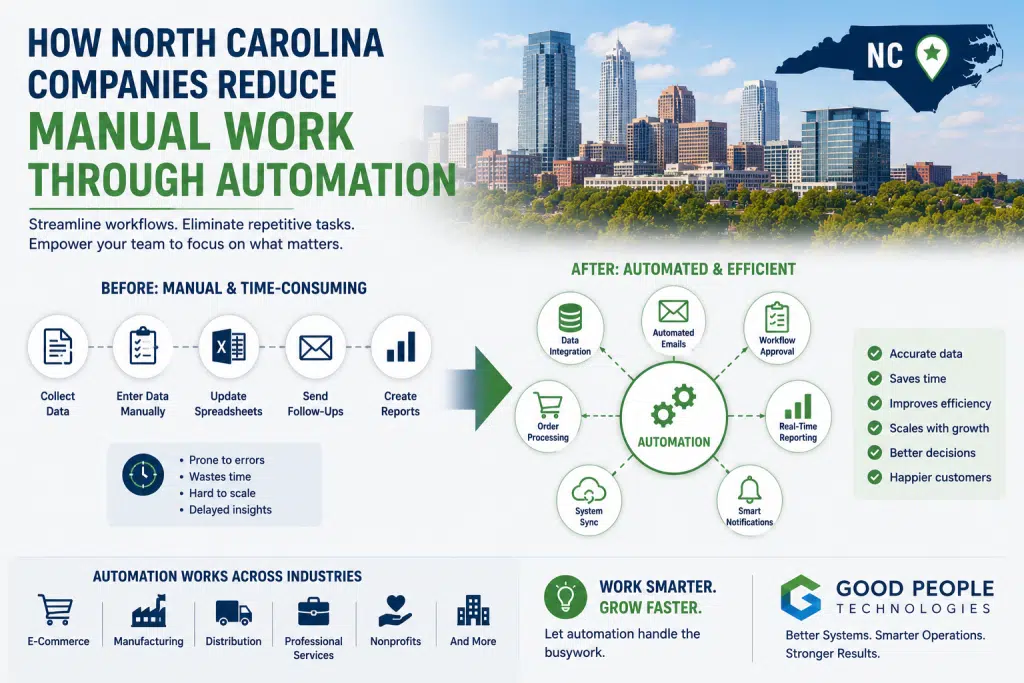
North Carolina workflow automation is becoming one of the most practical ways growing companies reduce manual work, improve accuracy, and scale operations without adding unnecessary administrative pressure. As businesses across Charlotte, Raleigh, Durham, Greensboro, Winston-Salem, Asheville, and other parts of North Carolina expand, many discover that the biggest obstacle to growth is not demand. It is the amount of repetitive work required to keep daily operations moving.
A company may have strong sales, loyal customers, and a capable team, but still struggle because employees spend too much time copying data, updating spreadsheets, checking order status, reconciling reports, sending repetitive emails, and moving information between disconnected systems.
At first, this kind of work feels manageable. One person updates a spreadsheet. Another employee checks customer records. Someone in finance exports reports at the end of the week. A manager manually confirms whether an order has been fulfilled.
Over time, those small tasks become expensive.
Manual work slows down decisions, increases errors, frustrates employees, and makes growth harder to manage. The more the business grows, the more manual tasks multiply. Without better systems, growth creates more administrative work instead of more leverage.
This article explains how North Carolina companies reduce manual work through automation, which workflows are usually the best candidates, when integrations or ERP may be needed, and how businesses can start improving operations without overcomplicating the process.
Why Manual Work Becomes a Growth Problem
Manual work is not always bad.
Every business needs human judgment, problem-solving, customer care, and operational oversight. The issue begins when employees spend too much time on repetitive tasks that could be handled by systems.
Examples include:
- copying data between software platforms
- updating spreadsheets
- creating recurring reports manually
- entering orders into accounting systems
- sending the same customer emails repeatedly
- checking inventory across multiple tools
- reconciling payment records
- manually routing tasks between departments
- confirming order or project status through internal messages
When a company is small, these tasks may not seem serious. A few minutes here and there can feel like normal business activity.
Growth changes the calculation.
Higher order volume creates more data to process. A larger customer base increases communication needs. Additional services, products, locations, or sales channels create more coordination. More employees also introduce more handoffs, approvals, and reporting requirements.
As complexity increases, manual work becomes a bottleneck.
The team may still be working hard, but the system no longer supports efficient growth.
A business owner might think the company needs more staff. Sometimes that is true. However, many companies first need to understand whether they are hiring for real capacity or hiring to maintain inefficient workflows.
If employees are spending hours every week moving information between systems, the business likely has an automation opportunity.
What Manual Work Looks Like in Growing North Carolina Companies
Manual work appears differently depending on the business model.
A manufacturing company may struggle with production updates, purchase order approvals, inventory adjustments, and reporting. An e-commerce brand might spend too much time syncing orders, updating stock, reconciling payments, and responding to customer status requests.
Service businesses face their own version of the same problem. A company may manually transfer customer information from CRM to project management software, then send invoice details to accounting, then prepare reports in spreadsheets.
Professional firms may use email and spreadsheets for approvals, onboarding, scheduling, and client follow-up. Product-based businesses often deal with inventory, fulfillment, purchasing, returns, and accounting workflows that require constant manual attention.
Across North Carolina, these problems often appear in companies that are no longer small but not yet fully systemized.
The business has grown past the stage where one person can keep everything in their head. At the same time, it may not have a dedicated operations technology team or a complete ERP environment.
That middle stage is where automation becomes especially valuable.
Better workflows allow companies to keep growing without letting administrative tasks overwhelm the team.
The Hidden Cost of Manual Work
Manual work is easy to underestimate because it rarely appears as a single large expense.
Instead, the cost is spread across departments.
Operations loses time checking information.
Finance spends hours reconciling reports.
Customer service repeats the same updates.
Leadership waits for reliable numbers.
Employees feel frustrated because they are stuck doing repetitive work instead of higher-value tasks.
The business also pays for manual work through errors.
A wrong order number, incorrect customer detail, missed inventory update, or outdated report can create downstream problems. Some mistakes are small. Others affect customers, revenue, or decision-making.
Manual work also delays information flow.
If a report depends on exports and spreadsheet cleanup, leadership cannot act quickly. When order status requires internal chasing, customer service slows down. If inventory updates happen manually, sales and purchasing teams may work from outdated information.
This is why North Carolina workflow automation should be viewed as an operational improvement strategy, not just a technology upgrade.
The real value is not simply saving a few minutes on a task. It is creating a business that moves faster, makes fewer mistakes, and gives employees better information.
North Carolina Workflow Automation for Growing Companies
North Carolina workflow automation helps companies reduce repetitive work by using software rules, integrations, alerts, triggers, and connected systems to move information automatically.
A workflow can be simple or complex.
A simple automation might send a customer confirmation email after a form submission. A more advanced workflow could move order data from an e-commerce platform into accounting software, update inventory, notify fulfillment, create a reporting entry, and send a customer update.
The best automation does not remove people from important decisions. It removes unnecessary manual steps from predictable processes.
Good candidates for automation usually have three qualities.
First, the task happens repeatedly. If employees perform the same action every day or every week, it may be worth automating.
Second, the workflow follows a clear pattern. Automation works best when the business can define what should happen and when.
Third, the task creates risk when done manually. Data entry, reporting, customer notifications, inventory updates, and approvals are common examples.
A practical North Carolina workflow automation strategy should start with business outcomes. Companies should ask what they want to improve before choosing tools.
Better goals might include:
- reduce manual data entry
- speed up customer responses
- improve reporting accuracy
- reduce inventory mistakes
- shorten approval cycles
- improve order processing
- reduce finance reconciliation time
- make handoffs between departments more reliable
Technology should serve the workflow, not the other way around.
Workflow 1: Automating Data Entry Between Systems
Duplicate data entry is one of the clearest signs that automation is needed.
Employees may enter the same customer, order, invoice, inventory, or project information into multiple systems. This is common when CRM, accounting, e-commerce, ERP, warehouse, and reporting platforms do not communicate.
Duplicate entry wastes time and increases error risk.
A customer name may be spelled differently in two systems. An order total may be entered incorrectly. A payment update might be missed. Inventory adjustments may happen in one place but not another.
Automation can reduce this by syncing data between platforms.
For example:
- CRM records can create new customer records in accounting software
- online orders can generate invoices automatically
- payment status can update across systems
- customer forms can create internal tasks
- fulfillment updates can trigger customer notifications
- inventory changes can sync between platforms
This type of automation often creates immediate value because it removes repetitive daily work.
For many companies, North Carolina workflow automation begins with reducing duplicate data entry because the problem is easy to identify and easy to measure.
Workflow 2: Automating Customer Communication
Customer communication can become overwhelming as a company grows.
Many customer questions are repetitive:
- Did you receive my order?
- Has my shipment gone out?
- When will my appointment be confirmed?
- What is the status of my request?
- Did my payment go through?
- Can I get an update?
If employees answer these questions manually every time, the workload grows quickly.
Automation can improve customer communication by sending timely updates at key moments.
Examples include:
- order confirmation emails
- shipping notifications
- appointment reminders
- project status updates
- payment confirmations
- support ticket acknowledgments
- back-in-stock alerts
- follow-up messages after service completion
- customer onboarding steps
Strong automation does not make communication feel robotic when it is designed carefully. It gives customers basic information faster while allowing employees to focus on more personal or complex situations.
For North Carolina companies that depend on trust and relationships, automation should support better service rather than replace it.
The best customer communication workflows are clear, helpful, and timely.
Workflow 3: Automating Reporting
Reporting is one of the most common manual burdens in growing companies.
Leadership needs visibility into sales, operations, finance, inventory, projects, customer activity, and profitability. Unfortunately, many reports still require exports, spreadsheet cleanup, manual formatting, and cross-checking between systems.
That process slows down decision-making.
By the time a report is finished, the numbers may already be outdated.
Automation can improve reporting by pulling data from connected systems into dashboards or recurring reports. Instead of building the same report from scratch every week, teams can focus on interpreting the information.
Automated reporting can help companies track:
- sales performance
- inventory levels
- fulfillment status
- customer activity
- project profitability
- cash flow indicators
- purchasing needs
- operational bottlenecks
- employee workload
- marketing performance
Accurate reporting depends on clean data. If the underlying systems are disconnected or poorly maintained, automation alone will not solve the problem.
Still, automated reporting can significantly reduce manual effort once data flows are improved.
A company that spends hours every week preparing reports should review whether the process can be streamlined.
Workflow 4: Automating Order Processing
Order processing creates many automation opportunities.
This is especially true for e-commerce companies, wholesalers, distributors, manufacturers, and product-based businesses.
Manual order processing may include:
- reviewing order details
- entering orders into accounting
- checking inventory
- sending fulfillment instructions
- creating invoices
- updating shipping status
- notifying customers
- recording payment details
- updating reports
As order volume increases, this work can overwhelm the team.
Automation helps by moving standard orders through the process more efficiently.
Routine orders can be routed automatically. Exceptions can be flagged for review. Inventory can update after fulfillment. Customers can receive status notifications without someone manually sending each message.
This reduces delays while keeping human attention focused where it matters.
Custom orders, high-value orders, unusual shipping situations, and potential fraud concerns may still require manual review. The benefit of automation is that employees no longer need to treat every order like an exception.
For North Carolina product-based companies, automating order processing can create a major operational advantage.
Workflow 5: Automating Inventory Updates
Inventory workflows are often filled with manual steps.
A business may manually update stock after sales, returns, receiving, warehouse adjustments, transfers, or damaged goods. These tasks may seem small, but they create risk when repeated frequently.
An incorrect inventory update can cause overselling, stockouts, delayed fulfillment, inaccurate purchasing, or poor reporting.
Automation can help by connecting inventory systems with sales channels, warehouses, accounting tools, ERP, and fulfillment providers.
Useful inventory automations may include:
- stock updates after orders
- low-stock alerts
- reorder notifications
- warehouse adjustment syncing
- return inventory routing
- committed inventory tracking
- inventory reporting
- exception alerts when counts do not match
Inventory automation is especially valuable when a company sells through multiple channels.
If online sales, wholesale orders, warehouse activity, and accounting records do not stay aligned, the team will spend too much time checking numbers manually.
Better inventory workflows help the business make faster and more confident decisions.
Workflow 6: Automating Approvals and Internal Handoffs
Internal approvals can slow down operations when they depend on email, messages, or informal reminders.
A purchase request may wait for approval.
A customer discount may need manager review.
A project handoff may be delayed because a task was not assigned.
An invoice may sit unresolved because nobody knows who should approve it.
Automation can create clearer internal handoffs.
For example:
- a purchase request can route to the right manager
- a new customer can trigger onboarding tasks
- a signed contract can create a project folder
- a completed sale can notify operations
- a support issue can escalate after a deadline
- an invoice can move to approval automatically
- a missed task can trigger a reminder
These workflows reduce the chance that important steps get lost.
They also improve accountability.
Instead of relying on someone to remember every handoff, the system helps move work forward.
This is especially helpful for companies with multiple departments, remote teams, or growing customer volume.
Workflow 7: Automating Finance and Accounting Tasks
Finance teams often carry a heavy manual workload.
Common manual finance tasks include:
- invoice creation
- payment reconciliation
- sales tax data collection
- expense categorization
- customer record updates
- subscription billing
- refund tracking
- financial reporting
- matching orders to deposits
- checking accounting records against operational systems
As transaction volume increases, finance can become a bottleneck.
Automation can reduce repetitive finance work by connecting accounting with CRM, e-commerce, ERP, payment processors, and reporting tools.
This allows financial data to move more cleanly through the business.
Finance teams can spend less time cleaning exports and more time analyzing performance.
Better financial automation also helps leadership see business performance faster.
If cash flow, revenue, margin, inventory value, or project profitability depends on manual reporting, decision-making becomes slower than it should be.
When Automation Is Enough
Automation can solve many business problems, but not every issue requires ERP or a major technology overhaul.
Automation may be enough when:
- current tools are still useful
- the main problem is repetitive work
- data needs to move between a few systems
- employees are spending time on predictable tasks
- reporting needs cleaner workflows
- customer communication can be improved with triggers
- approvals and handoffs need structure
For example, a company may not need a new ERP system if its biggest issue is that CRM and accounting data do not sync. A targeted integration may fix the problem.
Another business may not need to replace its project management software if the main issue is task creation and customer onboarding. Workflow automation may be enough.
A good automation plan starts small.
Fix the workflows that waste the most time, create the most errors, or slow down customers. Once those are improved, the company can evaluate deeper system needs.
When Integrations or ERP Become Necessary
Automation is powerful, but it has limits.
If the company’s systems are too disconnected, automation may require better integrations first. If the business has outgrown its entire operating structure, ERP may become necessary.
Integrations are useful when the company has strong systems that need to share data more reliably.
ERP becomes more important when the business needs a central operational platform.
A company may need ERP if:
- accounting and operations are disconnected
- inventory is difficult to trust
- reporting takes too long
- departments maintain separate records
- purchasing is reactive
- order management is too manual
- leadership lacks visibility
- spreadsheets run critical workflows
North Carolina workflow automation can often be part of a broader technology roadmap. A company might start by automating high-friction tasks, then integrate key systems, and later implement ERP if operational complexity continues to grow.
The best path depends on the business model, current systems, growth stage, and operational goals.
If your team is unsure whether automation, integrations, or ERP should come first, Good People Technologies can help review your workflows and identify the most practical next step.
Composite Example: A Raleigh Service Company Reducing Admin Work
Consider a growing service company near Raleigh.
The business uses a CRM for sales, accounting software for invoices, project management software for delivery, and spreadsheets for internal tracking.
As the company grows, administrative work increases.
Sales information must be copied into project management. Project status updates are sent manually. Finance waits for billing details. Leadership relies on weekly spreadsheet reports that take hours to prepare.
The company considers hiring another administrative coordinator.
Before making that decision, leadership reviews the workflow and finds several automation opportunities:
- new CRM deals can create project tasks automatically
- signed agreements can trigger onboarding workflows
- project milestones can notify finance
- invoice reminders can be automated
- recurring reports can pull from connected systems
- internal handoffs can be assigned automatically
After improving these workflows, the team reduces manual coordination and gains better visibility.
The company may still hire later, but the new hire can focus on customer experience and growth instead of repetitive admin tasks.
This is a strong example of automation creating operational leverage.
Composite Example: A Charlotte Product Business Improving Order Workflows
A product-based company in Charlotte faces a different challenge.
It sells through Shopify, wholesale accounts, and regional retail partners. The team manually checks orders, updates inventory, reconciles accounting, and sends customer updates.
Order volume increases after a successful marketing campaign.
Instead of immediately hiring more operations staff, the company maps its order workflow.
Several problems become clear.
Orders are being copied into accounting manually. Inventory is updated inconsistently. Fulfillment updates do not always reach customer service. Weekly reports depend on spreadsheet cleanup.
The business improves operations by:
- syncing online orders with accounting
- automating shipping notifications
- connecting inventory updates
- creating exception rules for special orders
- automating recurring reports
- reducing spreadsheet-based tracking
The result is not just fewer manual tasks.
The business gains faster order processing, fewer errors, clearer reporting, and more time for employees to focus on customers.
For many product-based companies, North Carolina workflow automation can help scale operations before hiring additional administrative staff.
How to Start Reducing Manual Work
A business can begin with a simple workflow review.
The first step is not choosing software.
Start by identifying where time is being lost.
Useful questions include:
- Which tasks happen every day?
- Where does the same data get entered twice?
- Which reports take too long?
- What customer questions require internal chasing?
- Where do errors happen repeatedly?
- Which workflows depend on spreadsheets?
- What work increases every time the business grows?
- Which approvals get delayed?
- What information does leadership need sooner?
After answering these questions, prioritize workflows based on impact.
High-volume, repetitive, error-prone tasks usually create the best starting point.
Next, decide whether the problem requires automation, integration, process redesign, or ERP planning.
Some issues can be solved quickly. Others require a phased roadmap.
The important thing is to avoid automating confusion. A messy workflow should be clarified before it is automated.
How Good People Technologies Helps With Workflow Automation
Good People Technologies helps growing businesses reduce manual work through automation, system integrations, ERP support, and technology strategy.
This can include:
- reviewing current workflows
- identifying repetitive manual tasks
- mapping data movement between systems
- improving integrations
- automating customer communication
- streamlining order processing
- improving inventory updates
- reducing reporting delays
- evaluating ERP readiness
- building scalable operational processes
The work begins with understanding how the business actually operates.
Some companies need simple automation. Others need integrations between critical platforms. More complex businesses may need ERP or ERP optimization.
Good People Technologies focuses on practical improvements that reduce friction and help teams operate with better data, fewer repetitive tasks, and clearer visibility.
The goal is not to automate everything.
The goal is to automate the right things so people can focus on work that creates more value.
Final Thoughts
North Carolina workflow automation is becoming a valuable growth strategy for companies that want to reduce manual work without adding unnecessary complexity.
As businesses grow, repetitive tasks multiply. Teams spend more time copying data, updating spreadsheets, preparing reports, checking status, and managing handoffs. Those tasks may seem small individually, but together they slow operations and limit growth.
Automation helps companies create leverage.
It reduces repetitive work, improves accuracy, speeds up communication, supports better reporting, and allows employees to focus on higher-value responsibilities.
For North Carolina companies, the opportunity is clear. Businesses that improve workflows now will be better prepared to scale efficiently, serve customers more reliably, and make decisions with greater confidence.
Manual work may be normal in the early stages of business growth, but it should not become the foundation for long-term operations.
Frequently Asked Questions
What is workflow automation?
Workflow automation uses software, integrations, triggers, and rules to complete repetitive business tasks with less manual effort. It can help with data entry, reporting, customer communication, approvals, order processing, inventory updates, and finance workflows.
How does workflow automation help businesses reduce manual work?
Workflow automation reduces manual work by moving data between systems, triggering tasks, sending notifications, creating reports, updating records, and routing approvals automatically. This helps employees spend less time on repetitive tasks.
What tasks should companies automate first?
Companies should start with high-volume, repetitive, and error-prone tasks. Common examples include duplicate data entry, order processing, customer updates, reporting, invoice creation, inventory updates, and internal approvals.
Is automation only for large companies?
No. Small and mid-sized companies can benefit from automation when manual work becomes too time-consuming or error-prone. The key is choosing workflows that create meaningful operational improvement.
Can automation replace employees?
Automation should not be viewed mainly as a replacement for employees. It helps teams reduce repetitive work so they can focus on customer experience, problem-solving, strategy, operations improvement, and growth.
What is the difference between automation and integrations?
Automation performs workflow actions based on triggers or rules. Integrations connect systems so data can move between them. Many business improvements require both automation and integrations working together.
When does a company need ERP instead of automation?
A company may need ERP when its operations are too complex for disconnected tools, spreadsheets, and simple automations. ERP becomes more useful when accounting, inventory, purchasing, reporting, and operations need one central system.
How can automation improve reporting?
Automation improves reporting by reducing manual exports, pulling data from connected systems, and creating recurring dashboards or reports. This helps leadership access information faster and make better decisions.
How can Good People Technologies help with automation?
Good People Technologies helps businesses review workflows, identify manual tasks, connect systems, automate repetitive processes, improve reporting, evaluate ERP readiness, and build more scalable operations.
Why is automation important for growing North Carolina companies?
Automation is important because growth creates more data, tasks, handoffs, reports, and customer communication needs. Without better workflows, manual work increases as the business grows.

Roman is a B2B marketing specialist focused on technology, ERP systems, business automation, and digital growth strategies. At Good People Technologies, he helps translate complex technology solutions—such as ERP integrations, system integrations, and business process automation—into clear insights for founders, operators, and growing companies.
His work focuses on content strategy, SEO, and thought leadership that helps businesses understand how the right technology infrastructure can support scalable operations and sustainable growth.
At Good People Technologies, Roman contributes to content that explores ERP implementation, automation strategies, and system integration best practices for companies navigating rapid growth and operational complexity.