
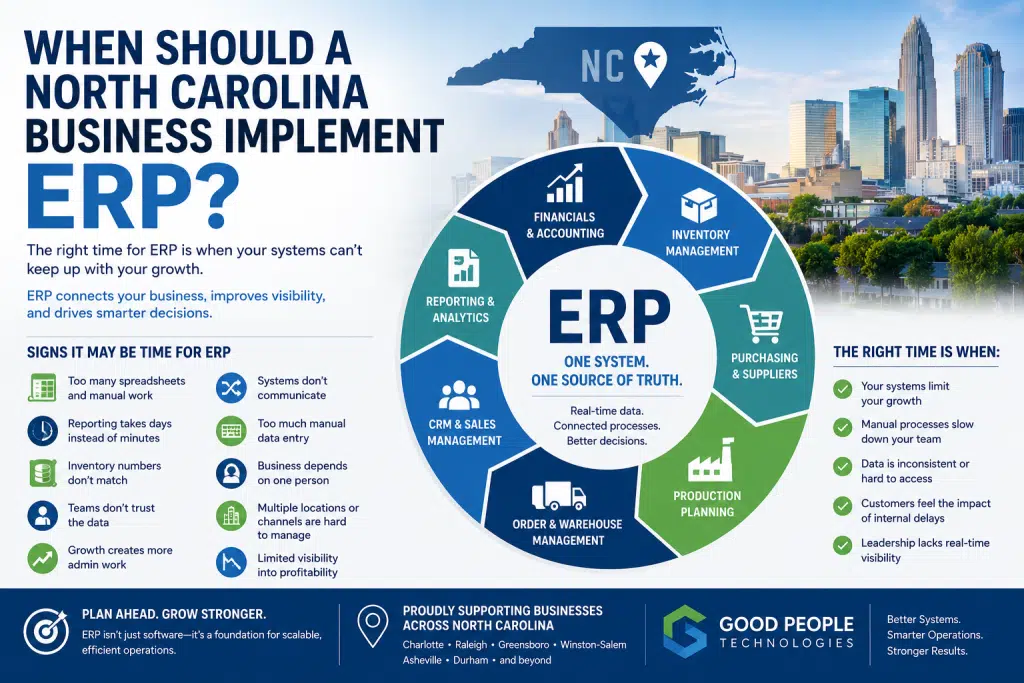
North Carolina ERP implementation becomes worth considering when a growing business can no longer manage operations efficiently with spreadsheets, QuickBooks, disconnected software, manual reporting, and department-by-department workarounds. For many companies, the need for ERP does not appear suddenly. It builds over time as inventory becomes harder to trust, reporting takes longer, teams duplicate data entry, and leadership loses clear visibility into the business.
A North Carolina business may continue growing for years before realizing its systems are holding it back. Sales may look strong, customer demand may be healthy, and employees may be working hard. However, behind the scenes, operations can become slower, more manual, and more dependent on individual knowledge.
That is usually the moment when business leaders need to ask a serious question: are the current systems still supporting growth, or are they now creating friction?
ERP, or Enterprise Resource Planning, can help companies centralize core operations such as accounting, inventory, purchasing, order management, production planning, customer data, reporting, and workflow automation. However, ERP should not be implemented just because a company is growing. It should be implemented when operational complexity, manual work, and disconnected data begin limiting performance.
This article explains when a North Carolina business should implement ERP, which signs matter most, how to avoid implementing too early or too late, and how companies can prepare for a successful ERP project.
ERP Is Not Just for Large Enterprises Anymore
Many business owners still think of ERP as something only large corporations need.
That used to be more true than it is today.
Modern ERP systems are now more accessible to small and mid-sized businesses, especially companies with operational complexity. A business does not need thousands of employees to benefit from ERP. It may only need enough complexity that the current tools can no longer manage operations cleanly.
For example, ERP may become relevant for businesses that manage:
- inventory
- purchasing
- production
- fulfillment
- customer orders
- multiple sales channels
- accounting
- project costing
- vendor relationships
- recurring workflows
- operational reporting
A growing manufacturer in Greensboro, an e-commerce business in Charlotte, a product-based company in Raleigh, or a service business in Asheville may all reach a point where the current system stack becomes inefficient.
That does not always mean ERP should be implemented immediately. Sometimes the first step is integration, automation, or reporting cleanup. Still, once the business depends on too many disconnected tools, ERP becomes a serious option.
Why Timing Matters for North Carolina ERP implementation
ERP timing is important.
Implementing ERP too early can create unnecessary complexity. The company may not have enough process maturity, operational volume, or internal readiness to justify the investment.
Waiting too long creates a different problem. The business may spend years building workarounds, spreadsheets, disconnected processes, and messy data habits that later make ERP implementation harder.
The best timing is usually when the company has enough complexity to benefit from ERP, but not so much operational chaos that implementation becomes overwhelming.
For many growing businesses, the right moment appears when leaders start noticing repeated problems instead of isolated issues.
One delayed report may not justify ERP.
Recurring reporting delays across departments are different.
A single inventory mistake may be normal.
Consistent inventory mismatches between systems suggest a deeper problem.
Occasional manual data entry is expected.
Constant duplicate data entry across teams indicates that the system environment needs improvement.
ERP should be considered when operational friction becomes predictable.
Sign 1: Your Business Relies Too Heavily on Spreadsheets
Spreadsheets are useful tools.
They are flexible, familiar, and fast to set up. Many successful businesses use spreadsheets for planning, analysis, and temporary workflows.
The problem begins when spreadsheets become core infrastructure.
If your business uses spreadsheets to manage inventory, production schedules, purchasing decisions, fulfillment status, customer data, or financial reporting, the company may be carrying operational risk.
Spreadsheet dependency often creates several problems:
- only one or two people understand the file
- formulas break without anyone noticing
- different versions circulate across the team
- data becomes outdated quickly
- reports require manual cleanup
- employees spend time copying information between systems
- leadership questions whether the numbers are accurate
A spreadsheet can support a process. It should not be the process.
When spreadsheets become the system of record for important business functions, ERP may be worth evaluating.
For a North Carolina manufacturer, this might mean production planning depends on one shared spreadsheet. For an e-commerce business, it might mean inventory is tracked manually outside the sales platform. And for a service company, it may mean project profitability is calculated in custom files that are difficult to maintain.
At that point, growth increases risk.
More customers, more products, more vendors, and more orders all make spreadsheet-based operations harder to control.
Sign 2: QuickBooks Is No Longer Enough
QuickBooks is a strong accounting tool for many small businesses.
It often works well in the early stages of growth. Companies can manage invoices, expenses, payroll, basic reporting, and financial records without needing a more complex system.
Eventually, however, some businesses outgrow QuickBooks.
The issue is not that QuickBooks fails. The issue is that the business needs more than accounting.
A growing company may need connected visibility across:
- inventory
- purchasing
- sales orders
- fulfillment
- production
- job costing
- customer records
- supplier performance
- operational reporting
- multi-location activity
When QuickBooks remains separate from the rest of operations, finance may have numbers that do not fully reflect what is happening in the business.
This creates extra work.
Employees export reports, compare data, update spreadsheets, and reconcile numbers manually. Finance becomes responsible for cleaning operational data instead of analyzing it.
A company should consider ERP when accounting and operations need to work together more closely.
For example, if purchasing decisions affect cash flow, inventory affects profitability, and production delays affect revenue recognition, then accounting cannot sit separately from operations.
That is one reason North Carolina ERP implementation becomes more relevant for growing businesses that need better visibility between finance and daily operations.
Sign 3: Inventory Numbers Do Not Match
Inventory problems are one of the clearest signs that a business may need ERP.
This is especially true for manufacturers, distributors, wholesalers, and e-commerce companies.
Inventory discrepancies often appear when different systems show different numbers.
The warehouse may have one count.
The e-commerce platform may show another.
Accounting may reflect something else.
A spreadsheet may be used to “correct” all of them manually.
At first, the team may treat this as a normal inconvenience. Over time, inaccurate inventory creates serious business problems.
Common consequences include:
- overselling products
- stockouts
- excess inventory
- delayed fulfillment
- poor purchasing decisions
- customer frustration
- inaccurate financial reporting
- cash tied up in slow-moving stock
Inventory issues rarely stay isolated.
They affect purchasing, fulfillment, sales, accounting, customer service, and leadership decisions.
ERP helps by creating a more centralized approach to inventory management. When inventory data connects with orders, purchasing, accounting, and fulfillment, the business can make decisions from a more reliable source of truth.
A company does not need ERP just because inventory is occasionally off. However, recurring inventory mismatch is a strong signal that the current systems may not support the level of complexity in the business.
Sign 4: Reporting Takes Days Instead of Minutes
Reporting delays are another major sign that ERP may be needed.
Leadership needs timely information to make decisions about hiring, cash flow, inventory, pricing, purchasing, sales, production, and customer commitments.
If reports require manual exports, spreadsheet cleanup, department follow-ups, and reconciliation work, the business is operating with delayed visibility.
That creates a dangerous gap.
The company may be making decisions based on information that is already outdated.
For example, leadership may want to know:
- which product lines are most profitable
- which customers are driving growth
- what inventory is available
- which orders are delayed
- where costs are increasing
- how much cash is tied up in inventory
- whether production is meeting demand
- which department is creating operational delays
These questions should not take days to answer.
When reporting is slow, teams become reactive. Problems are discovered late, opportunities are missed, and decision-making becomes less confident.
ERP can improve reporting by centralizing operational and financial data. It does not automatically solve every reporting problem, but it creates a stronger foundation for real-time visibility.
Before starting a North Carolina ERP implementation, a company should clearly define which reports matter most and which decisions those reports need to support.
Sign 5: Manual Data Entry Is Increasing
Manual data entry is one of the most common reasons businesses evaluate ERP.
A growing company may have employees manually entering the same information into multiple systems.
This can include:
- order details
- customer information
- inventory updates
- purchase orders
- invoices
- shipping details
- production data
- vendor records
- payment information
- reporting inputs
Each task may seem small. Together, they create a large operational cost.
Manual data entry slows teams down, increases the risk of errors, and prevents information from moving quickly across the business.
It also affects morale.
Employees do not want to spend hours copying data between systems. Most teams would rather solve problems, serve customers, improve processes, and support growth.
When manual data entry increases with every new customer, order, product, or location, the business is not scaling efficiently.
ERP can reduce manual data entry by connecting workflows and centralizing data. Integrations and automation can also help, especially when the company is not ready for a full ERP implementation yet.
The important point is this: manual data entry should not become the default way systems communicate.
Sign 6: Teams Do Not Trust the Data
A business has a data problem when employees constantly ask, “Which number is right?”
This happens when systems do not match, reports are delayed, and teams maintain separate records.
Sales may trust the CRM.
Operations may trust a spreadsheet.
Finance may trust accounting software.
The warehouse may trust its own count.
Leadership may not fully trust any of them.
When this happens, meetings become focused on reconciling data instead of making decisions.
Data distrust creates operational drag.
Employees spend time checking numbers, confirming status, explaining discrepancies, and building side reports. Eventually, each department develops its own version of reality.
ERP can help by creating clearer data ownership.
That does not mean every piece of data must live in one system forever. However, the business needs to know which system owns which type of information.
For example:
- ERP may own inventory and operational data
- accounting may own financial records
- CRM may own sales pipeline activity
- e-commerce platforms may own online order origination
- reporting dashboards may display combined performance data
The stronger the data structure, the less time people spend debating accuracy.
A successful North Carolina ERP implementation should begin with this type of data clarity, not just software selection.
Sign 7: Growth Is Creating More Administrative Work
Growth should create leverage.
As a business gets larger, its systems should help employees handle more volume with better efficiency.
In many companies, the opposite happens.
Higher order volume increases administrative work. A larger customer base creates more coordination demands. Additional product lines make inventory and purchasing harder to manage. New locations or sales channels add reporting complexity.
Revenue may rise, but internal workflows become heavier.
This is a sign that the business model is growing faster than the operating system.
At that point, leadership may be tempted to solve the problem by hiring more administrative staff. Sometimes that is necessary. However, if the root cause is disconnected systems, adding people only treats the symptom.
The better question is whether the business has the right infrastructure for scale.
ERP can help companies grow without requiring every new layer of complexity to be handled manually.
For many companies, North Carolina ERP implementation becomes a serious conversation when growth starts creating more friction instead of more efficiency.
Sign 8: Customer Experience Is Being Affected
Customers usually do not see internal system problems.
They see the outcome.
If an order is delayed, they do not care whether the issue came from inventory mismatch, production scheduling, shipping data, or manual entry. They only know the company did not deliver as expected.
System problems can affect customer experience in many ways:
- delayed order updates
- inaccurate delivery timelines
- wrong inventory availability
- slow quote creation
- inconsistent customer records
- billing mistakes
- poor communication between sales and operations
- delayed service responses
Customer-facing teams often feel these problems first.
They may need to chase updates across departments before answering customers. Sales may promise timelines without real visibility into production or fulfillment. Support teams may spend time explaining issues that were caused by internal process gaps.
ERP can improve customer experience by connecting internal information.
When sales, operations, finance, and fulfillment work from more reliable data, customers receive better communication and more accurate expectations.
Sign 9: The Business Depends Too Much on Individual Knowledge
Many growing companies rely on key employees who know how everything works.
That knowledge is valuable.
It can also become a bottleneck.
If one person knows how to update reports, fix inventory discrepancies, manage a spreadsheet, process special orders, or interpret system data, the business becomes dependent on that person.
This creates risk when the employee is unavailable, overloaded, promoted, or leaves the company.
ERP helps reduce this risk by standardizing workflows and making information easier to access. It does not replace experienced employees, but it reduces the need for critical processes to live in someone’s head.
A company should evaluate ERP when daily operations depend too heavily on informal knowledge and undocumented workarounds.
The goal is not to remove human judgment. Instead, the goal is to make the business less fragile.
Sign 10: Multiple Locations, Channels, or Departments Are Hard to Coordinate
ERP becomes more valuable when a business operates across multiple locations, departments, or sales channels.
For example, a company may manage:
- multiple warehouses
- multiple retail or distribution locations
- e-commerce and wholesale channels
- field service teams
- separate production facilities
- multiple departments using different software
- sales teams across different regions
Coordination becomes harder as the business expands.
Without connected systems, each location or team may develop its own processes. Reports become inconsistent. Inventory visibility weakens. Customer data becomes fragmented. Leadership struggles to compare performance across the business.
ERP can create more consistent processes across the organization.
It helps standardize workflows while giving leadership better visibility into performance.
This is especially important for companies planning expansion.
Implementing ERP before growth becomes chaotic can be much easier than waiting until every team has already built its own workaround.
North Carolina ERP Implementation: When Timing Matters
North Carolina ERP implementation should happen when the cost of operational inefficiency becomes greater than the cost and effort of improving the system.
That does not mean the business must be in crisis.
Actually, the best time to evaluate ERP is before the company is overwhelmed.
If a business waits until operations are already chaotic, implementation becomes harder. Data may be messy, employees may be frustrated, processes may be unclear, and leadership may feel pressure to move too quickly.
A better approach is to evaluate ERP when early warning signs become consistent.
These signs include:
- reporting delays
- inventory mismatch
- duplicate data entry
- spreadsheet dependency
- disconnected departments
- poor visibility into margins
- manual purchasing workflows
- slow customer communication
- difficulty scaling operations
- too much reliance on individual knowledge
The right timing depends on the business.
A manufacturer may need ERP when production planning and inventory become too complex. An e-commerce company may need ERP when order volume, fulfillment, inventory, and accounting no longer sync cleanly. A service company may need ERP when project costing, resource planning, and financial reporting become difficult to manage.
The common factor is operational complexity.
When complexity becomes difficult to control with current systems, ERP should be evaluated.
ERP vs Integrations: Which Comes First?
Not every company that has operational problems needs ERP immediately.
Sometimes the first step is integration.
If the business already uses strong tools, but those tools do not communicate, integrations may solve many problems.
For example, a company may need to connect:
- Shopify and accounting software
- CRM and ERP
- warehouse systems and inventory tools
- purchasing platforms and finance
- reporting dashboards and operational systems
- fulfillment systems and customer notifications
Integrations can reduce manual work and improve data flow without replacing the entire system environment.
ERP becomes more important when the business needs a central platform to manage core operations.
The question is not always “ERP or integrations?”
In many cases, the answer is both.
ERP may become the central operational system, while integrations connect surrounding tools into a more complete technology environment.
If a North Carolina ERP implementation is being considered, the company should also review which integrations will be needed before, during, and after the project.
What to Do Before Implementing ERP
ERP implementation should not begin with software demos.
It should begin with operational clarity.
Before choosing a platform, companies should review the business from the inside out.
Important preparation steps include:
- Map current workflows
Identify how orders, inventory, purchasing, production, accounting, and reporting currently move through the business. - List manual processes
Document where employees copy, paste, export, import, reconcile, or update information manually. - Identify system gaps
Determine which tools do not communicate and where data gets stuck. - Define the source of truth
Clarify which system should own customer data, inventory data, financial data, order data, and reporting data. - Clean important data
Review customer records, vendor information, inventory data, product details, and financial records. - Prioritize business outcomes
Decide what ERP must improve: reporting speed, inventory accuracy, purchasing, production planning, fulfillment, profitability visibility, or workflow automation. - Involve the right people
Include leadership, finance, operations, sales, warehouse, production, and customer-facing teams. - Plan integrations early
Decide which systems need to connect with ERP and what data needs to move between them.
These steps reduce implementation risk.
ERP projects fail or underperform when companies choose software without understanding their actual processes. A clear preparation phase helps ensure that the system supports the business instead of forcing the business into a poor workflow.
Composite Example: A Raleigh Business Evaluating ERP
Consider a growing product-based business near Raleigh.
The company sells through its website, wholesale accounts, and a few regional distribution partners. It uses QuickBooks for accounting, Shopify for online sales, spreadsheets for inventory planning, and a separate fulfillment provider.
For several years, this setup worked.
Then order volume increased.
Inventory started becoming harder to trust. Some products appeared available online even when the warehouse was nearly out. Wholesale orders required manual coordination. Finance had to reconcile data from multiple sources. Leadership could not easily see which channels were most profitable.
The team was not failing.
The systems were simply no longer strong enough for the business.
At first, the company considered hiring another operations coordinator. After reviewing the workflows, leadership realized that much of the extra work came from disconnected systems.
The company began evaluating three options:
- improve integrations between existing platforms
- automate high-volume manual tasks
- implement ERP as the central operational system
After mapping the process, it became clear that ERP would likely be needed within the next growth stage. However, the business also identified immediate integration improvements that could reduce friction before the full ERP project.
This phased approach helped the company avoid rushing into software while still making progress.
For many growing companies, that is the right path. ERP does not need to be an emergency decision. It should be part of a practical technology roadmap.
Composite Example: A Charlotte Manufacturer Waiting Too Long
Now consider a manufacturer near Charlotte.
The company has grown steadily for a decade and now manages hundreds of SKUs, multiple suppliers, production schedules, and customer-specific orders.
The leadership team knows reporting is slow. Inventory numbers are often questioned. Purchasing is reactive. Production planning depends heavily on spreadsheets. Finance spends too much time reconciling operational data.
Everyone agrees the business needs better systems.
The problem is that the company waited too long.
By the time ERP becomes urgent, the data environment is messy. Processes vary by department. Employees have built workarounds that are not documented. Some reports depend on one person. Inventory cleanup requires significant effort.
ERP is still possible, but the project becomes more difficult because the business is trying to fix years of complexity at once.
This example shows why timing matters.
A business does not need to implement ERP too early. Waiting until the operation is strained creates avoidable risk.
The best time to evaluate ERP is when the signs are clear, but before the company reaches operational crisis.
How Good People Technologies Helps Businesses Evaluate ERP Readiness
Good People Technologies helps growing businesses review their systems, identify operational bottlenecks, and determine whether ERP, integrations, automation, or process improvements should come first.
This can include:
- reviewing current software
- mapping workflows
- identifying manual data entry
- evaluating reporting delays
- analyzing inventory and operational visibility
- reviewing integration needs
- clarifying ERP readiness
- helping plan phased technology improvements
The goal is not to force every company into ERP.
Some businesses need ERP now. Others need better integrations first. Some need automation around existing systems before making a larger platform decision.
A good ERP strategy starts with the business problem, not the software.
If your company is starting to feel operational friction from disconnected systems, Good People Technologies can help assess what is happening and recommend a practical path forward.
Final Thoughts
North Carolina ERP implementation should be considered when a growing business can no longer manage complexity with its current systems.
The signs are usually clear: too many spreadsheets, slow reporting, manual data entry, inventory mismatch, disconnected departments, unreliable data, customer communication delays, and leadership blind spots.
ERP can help by centralizing operations, improving visibility, reducing manual work, and creating a stronger foundation for growth.
However, ERP should not be rushed.
The best approach is to evaluate workflows, identify bottlenecks, clean data, define goals, and determine whether ERP, integrations, automation, or a phased roadmap makes the most sense.
For North Carolina businesses, the right timing is not when everything breaks. The right timing is when current systems begin limiting growth, but the company still has enough stability to make thoughtful improvements.
Frequently Asked Questions
When should a North Carolina business implement ERP?
A North Carolina business should implement ERP when spreadsheets, disconnected systems, manual data entry, inventory issues, and slow reporting begin limiting growth. ERP is most useful when operational complexity becomes too difficult to manage with the company’s current tools.
What are the signs that a company needs ERP?
Common signs include unreliable inventory data, heavy spreadsheet use, duplicate data entry, delayed reporting, poor visibility into margins, disconnected departments, and too much dependence on individual knowledge or manual workarounds.
Is ERP only for manufacturing companies?
No. ERP can help manufacturers, e-commerce companies, distributors, product-based businesses, service companies, and organizations that need better visibility across operations, finance, inventory, purchasing, customers, and reporting.
Should a business try integrations before ERP?
Sometimes, yes. If the company already has useful systems but they do not communicate well, integrations may solve many problems. ERP becomes more important when the business needs one central system to manage core operations.
Can ERP replace QuickBooks?
In some cases, yes. Some ERP systems include accounting and financial management tools that replace QuickBooks. In other cases, businesses may integrate QuickBooks with other systems before moving to a full ERP platform.
How long does ERP implementation take?
ERP implementation timelines vary depending on company size, data quality, integrations, workflow complexity, and platform selection. Some implementations can be phased gradually, while more complex projects may take several months.
What should a business do before choosing ERP software?
Before choosing ERP software, a business should map workflows, identify manual processes, review system gaps, clean important data, define reporting needs, and clarify which business outcomes the ERP system must support.
What is the biggest mistake companies make with ERP?
One of the biggest mistakes is choosing software before understanding business processes. ERP works best when the company clearly defines workflows, data ownership, reporting needs, integrations, and success goals before implementation.
How can ERP improve reporting?
ERP improves reporting by centralizing operational and financial data. This reduces the need for manual exports and spreadsheet cleanup, allowing leadership to access more accurate information faster.
How can Good People Technologies help with ERP readiness?
Good People Technologies helps businesses review current systems, identify bottlenecks, evaluate ERP readiness, improve integrations, automate workflows, and build a practical technology roadmap for scalable growth.

Roman is a B2B marketing specialist focused on technology, ERP systems, business automation, and digital growth strategies. At Good People Technologies, he helps translate complex technology solutions—such as ERP integrations, system integrations, and business process automation—into clear insights for founders, operators, and growing companies.
His work focuses on content strategy, SEO, and thought leadership that helps businesses understand how the right technology infrastructure can support scalable operations and sustainable growth.
At Good People Technologies, Roman contributes to content that explores ERP implementation, automation strategies, and system integration best practices for companies navigating rapid growth and operational complexity.