
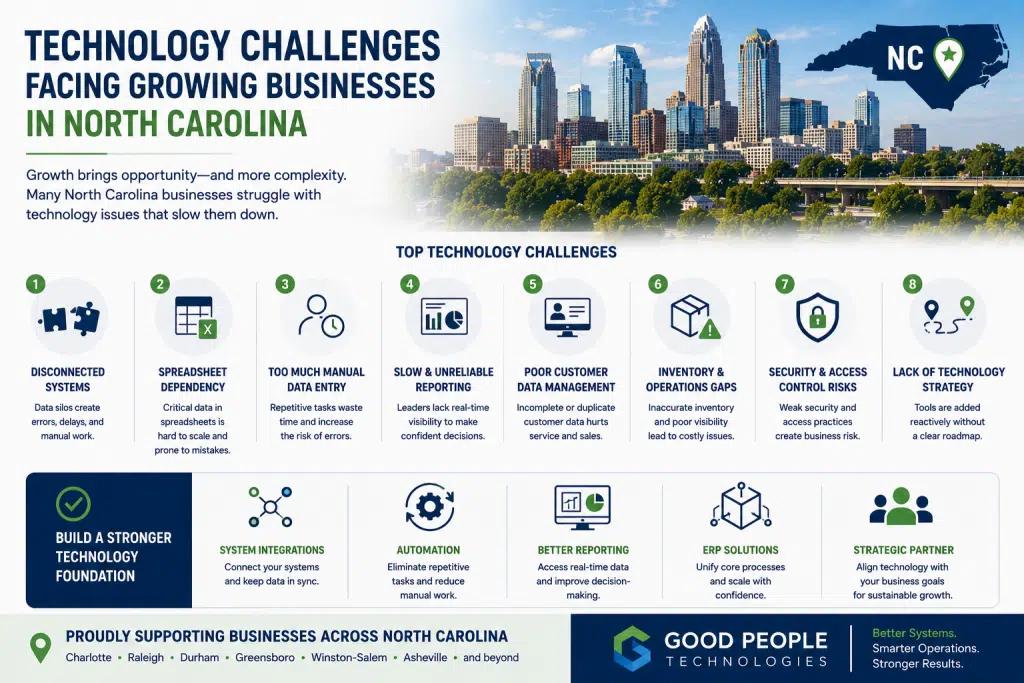
North Carolina business technology challenges are becoming more visible as growing companies rely on more software, more data, more workflows, and more customer-facing systems than ever before. A business can have strong demand, a capable team, and a clear growth opportunity, but still struggle because its technology foundation is not keeping up with daily operations.
For companies across Charlotte, Raleigh, Durham, Greensboro, Winston-Salem, Asheville, and other parts of North Carolina, technology problems often show up as operational problems first. Reports take too long. Systems do not share data. Employees rely on spreadsheets. Customer updates require manual follow-up. Inventory numbers do not match. Finance spends too much time reconciling information. Leadership lacks the visibility needed to make fast, confident decisions.
These issues may not feel like major technology failures at first. In many cases, the business still works. Orders still move. Customers still get served. Teams still complete tasks.
However, the company becomes slower as it grows.
That is the real risk. Technology challenges do not always stop a business immediately. More often, they quietly limit scalability, reduce efficiency, increase manual work, and make growth harder than it needs to be.
This article explains the most common technology challenges facing growing businesses in North Carolina, why they happen, and how companies can create better systems through integrations, automation, ERP, reporting improvements, and practical technology strategy.
Why Technology Becomes a Growth Constraint
Many growing companies build their technology stack gradually.
A business starts with simple tools because simple tools are enough. QuickBooks handles accounting. A spreadsheet tracks inventory. A CRM manages leads. Shopify or WooCommerce supports online sales. Project management software organizes tasks. Email handles approvals. Reporting happens manually at the end of the week or month.
At an early stage, this can work.
The team is small enough to communicate directly. One person may understand the spreadsheet. A manager can manually check orders. Finance can clean up reports when needed. Leadership may still have a clear sense of what is happening.
Growth changes the environment.
More customers create more records. Additional products or services increase complexity. More employees require clearer handoffs. Higher transaction volume creates more reporting pressure. New sales channels introduce more data. Customer expectations become harder to meet without real-time visibility.
The same tools that once supported growth may begin slowing the business down.
This is where technology becomes a constraint.
The company may not need “more software.” In many cases, it needs better architecture, cleaner workflows, stronger integrations, and clearer ownership of data.
A growing business should not measure technology success by how many tools it uses. The better question is whether those tools help the business operate faster, more accurately, and with less manual effort.
Why North Carolina Companies Feel This Pressure
North Carolina has a diverse business landscape.
Manufacturers, e-commerce brands, distributors, professional service firms, healthcare-related companies, local retailers, outdoor product businesses, food and beverage companies, and technology-enabled service providers all face different operational realities.
Still, many growing businesses across the state experience similar technology pressure.
A manufacturer near Greensboro may struggle with inventory, purchasing, production planning, and financial reporting.
An e-commerce company in Charlotte may need better connections between Shopify, fulfillment, accounting, customer support, and inventory.
A service business in Raleigh or Durham may face disconnected CRM, project management, billing, and reporting workflows.
A regional company in Asheville may rely on spreadsheets and manual updates because its tools were added over time without a long-term plan.
The industries differ, but the pattern is similar: growth creates more operational complexity than the current system environment can handle.
That is why North Carolina business technology challenges should be treated as business challenges, not just IT problems.
Technology affects how quickly a company can serve customers, process orders, manage cash flow, track inventory, report performance, and scale efficiently.
Challenge 1: Disconnected Systems
Disconnected systems are one of the most common technology problems in growing businesses.
A company may use several platforms that each work well on their own, but do not communicate properly.
For example:
- CRM holds customer data
- accounting software tracks invoices
- e-commerce software manages orders
- warehouse tools handle fulfillment
- spreadsheets support reporting
- project management software tracks tasks
- email handles approvals and exceptions
Each tool solves a specific problem. The issue appears when information does not move between them automatically.
Employees become the bridge between systems.
They copy data, export reports, check records, update spreadsheets, and reconcile information manually. Over time, this creates delays and errors.
Disconnected systems often lead to:
- duplicate data entry
- inconsistent customer records
- delayed reporting
- poor visibility
- manual reconciliation
- customer service delays
- inventory mismatch
- department silos
This is one of the biggest North Carolina business technology challenges because it affects every department. Sales, finance, operations, fulfillment, and leadership all depend on accurate information moving across the business.
System integrations can help solve this problem by connecting the platforms a company already uses. When designed properly, integrations reduce manual work, improve data accuracy, and help teams operate from a more reliable source of truth.
Challenge 2: Too Much Manual Data Entry
Manual data entry is often accepted as normal.
Someone enters a customer record into two systems. Another person copies order details into accounting software. A manager updates a spreadsheet after fulfillment. Finance exports transaction data and cleans it manually.
At first, these tasks may seem small.
As volume increases, they become expensive.
Manual data entry creates several problems:
- employees lose time on repetitive work
- errors become more likely
- reports become delayed
- customer information becomes inconsistent
- data is not available in real time
- departments become dependent on manual updates
A typo, missed update, wrong quantity, or delayed entry can create larger problems later. This is especially true in businesses that handle inventory, orders, invoices, projects, or customer service workflows.
The real problem is not that employees are inefficient. Usually, the system environment is forcing them to do work that should happen automatically.
Automation can reduce manual data entry by moving information between systems, creating tasks, updating records, sending notifications, and triggering workflows without requiring a person to repeat the same action every time.
For growing companies, reducing manual data entry is often one of the fastest ways to improve efficiency.
Challenge 3: Spreadsheet Dependency
Spreadsheets are useful.
They are flexible, familiar, and easy to create. Many businesses use spreadsheets for planning, tracking, forecasting, and analysis.
The problem begins when spreadsheets become core infrastructure.
A growing company may rely on spreadsheets for:
- inventory tracking
- production planning
- customer lists
- purchasing decisions
- project management
- financial reporting
- sales forecasting
- order exceptions
- workflow approvals
This creates risk.
A spreadsheet can become outdated quickly. Multiple versions may circulate across the team. Formulas can break. Important knowledge may live with one person. Data may not connect with the systems that actually run the business.
Spreadsheet dependency also slows growth.
A business that relies on manual spreadsheet updates cannot easily scale operations. Every new customer, order, product, supplier, or location adds more work to the same fragile process.
Spreadsheets should support decisions. They should not be the main operating system for a growing company.
When spreadsheets become essential to daily operations, the business should evaluate whether it needs better integrations, workflow automation, reporting systems, or ERP.
Challenge 4: Slow and Unreliable Reporting
Leadership teams need timely information.
They need to understand sales performance, profitability, inventory, operations, cash flow, customer activity, project status, fulfillment, and team capacity.
In many growing businesses, reports are still built manually.
A manager exports data from one system, pulls numbers from another, checks a spreadsheet, formats the report, asks another department for updates, and sends a summary to leadership.
By the time the report is ready, the information may already be outdated.
Slow reporting creates leadership blind spots.
A business may not see margin pressure quickly enough. Inventory issues may remain hidden until they affect customers. Cash flow problems may become visible too late. Operational bottlenecks may appear as isolated problems instead of patterns.
Reliable reporting depends on clean data and connected systems.
If data lives across disconnected tools, reporting will remain difficult. Better dashboards can help, but dashboards are only useful when the underlying data is accurate and updated.
This is why reporting is one of the most important North Carolina business technology challenges. Without visibility, growth becomes harder to manage.
Challenge 5: Poor Customer Data Management
Customer data becomes more valuable as a business grows.
Sales, support, finance, operations, and leadership all need accurate customer information.
Problems begin when customer data is spread across multiple systems.
A CRM may contain one version of the customer record. Accounting may contain another. Support tools may have separate notes. E-commerce platforms may show purchase history. Spreadsheets may track special requests.
When customer data is fragmented, teams struggle to serve customers efficiently.
Common problems include:
- duplicate customer records
- incomplete customer history
- delayed follow-ups
- inconsistent communication
- billing confusion
- missed renewal or reorder opportunities
- poor handoffs between sales and delivery
Customer-facing teams often feel this first.
They may need to search multiple systems before answering a question. Sales may not see support issues. Finance may not have updated customer details. Operations may not receive important customer requirements.
Better system integrations and data ownership rules can improve customer visibility.
A business should know where customer data lives, which system owns it, and how updates move across the organization.
Challenge 6: Inventory and Operations Visibility Problems
Product-based businesses face a special set of technology challenges.
Manufacturers, e-commerce companies, distributors, retailers, and wholesalers all need accurate visibility into inventory and operations.
When inventory systems do not connect with sales, accounting, purchasing, fulfillment, or reporting, problems appear quickly.
A business may experience:
- inventory mismatch
- overselling
- stockouts
- excess inventory
- delayed fulfillment
- poor purchasing decisions
- inaccurate inventory valuation
- customer service issues
Inventory problems often begin as data problems.
One system shows a product as available. Another platform shows it committed. A spreadsheet shows a different number. The warehouse has its own view.
When teams do not know which number to trust, manual checks become part of the daily workflow.
Operational visibility matters beyond inventory as well. Companies need to understand order status, purchasing needs, production schedules, fulfillment activity, project progress, and workload.
When visibility is weak, leadership cannot manage growth effectively.
For product-based companies, ERP, integrations, automation, and better warehouse processes can create a stronger operational foundation.
Challenge 7: Technology Tools Added Without a Strategy
Many businesses add software reactively.
A problem appears, and the company finds a tool to solve it.
This approach works in the short term. Over time, it can create a messy technology stack.
The company may end up with too many tools, overlapping features, unclear ownership, and no integration plan.
Employees may not know which system to use. Data may be duplicated. Departments may choose tools independently. Leadership may lack a clear picture of the full environment.
Technology should support business strategy.
Before adding new software, a company should ask:
- What problem are we solving?
- Which system should own the data?
- Does this tool integrate with our existing stack?
- Who will manage it?
- What workflow will change?
- How will success be measured?
- Will this reduce complexity or create more?
Buying software without a technology strategy often creates more work, not less.
A practical roadmap can help companies decide whether they need automation, integrations, ERP, reporting improvements, or process redesign.
North Carolina Business Technology Challenges
North Carolina business technology challenges often share the same root cause: the business has grown faster than its systems.
A company may be successful, but its technology environment may still reflect an earlier stage of growth. Tools were added one at a time. Processes were created manually. Reports were built in spreadsheets. Data ownership was never fully defined.
As the company grows, those gaps become more expensive.
Manual work increases. Reports take longer. Employees rely on workarounds. Customers experience delays. Leadership loses visibility. More software gets added, but the overall system does not become more connected.
Solving North Carolina business technology challenges requires a shift in thinking.
Instead of asking, “What tool should we buy next?” companies should ask, “What process is slowing us down, and what system structure would fix it?”
That question leads to better decisions.
Sometimes the answer is system integrations. Other times it is workflow automation, ERP, data cleanup, reporting redesign, or clearer process ownership.
Challenge 8: Cybersecurity and Access Control Gaps
As companies grow, more people need access to more systems.
Employees, contractors, vendors, partners, and service providers may all need different levels of access. Without strong controls, the business can become exposed to unnecessary risk.
Common problems include:
- shared passwords
- outdated user accounts
- unclear permission levels
- lack of multi-factor authentication
- poor offboarding processes
- sensitive data stored in spreadsheets
- too many people with admin access
Security is not only a large-enterprise concern.
Small and mid-sized businesses also need basic controls, especially when they handle customer data, financial information, employee records, payment data, or operational systems.
A growing company should regularly review who has access to which tools and whether those permissions still make sense.
Good technology strategy includes security, not just efficiency.
Challenge 9: Lack of Internal Technology Ownership
Many growing businesses do not have a clear technology owner.
Different departments manage their own tools. Finance controls accounting software. Sales manages CRM. Operations owns spreadsheets. Marketing manages website platforms. Leadership only gets involved when something breaks.
This creates fragmentation.
Nobody owns the full system environment.
A company does not always need a full internal IT department immediately, but it does need clear accountability. Someone should understand how tools connect, which systems matter most, what data is critical, and which technology improvements are priorities.
Without ownership, technology decisions become reactive.
The business fixes problems as they appear instead of building a better long-term foundation.
External partners can help, but internal responsibility still matters. A successful technology roadmap needs both strategic guidance and internal alignment.
Challenge 10: ERP Readiness Confusion
Many growing businesses eventually ask whether they need ERP.
The answer is not always simple.
ERP can help centralize accounting, inventory, purchasing, operations, reporting, customer data, and workflows. However, implementing ERP too early can create unnecessary complexity. Waiting too long may allow messy processes and disconnected systems to become harder to fix.
A company may be ready to evaluate ERP when:
- accounting and operations are disconnected
- inventory is difficult to trust
- reporting takes too long
- purchasing is reactive
- spreadsheets run core workflows
- departments maintain separate records
- leadership lacks real-time visibility
- growth creates more administrative work
ERP is not only a software decision. It is an operational decision.
Before choosing a platform, the business should map workflows, review data quality, define reporting needs, identify integrations, and clarify which outcomes matter most.
For many companies, the best first step is not immediately buying ERP. It may be evaluating readiness, improving integrations, automating manual work, and building a phased roadmap.
Composite Example: A Growing Charlotte Business With Too Many Tools
Consider a growing product-based company in Charlotte.
The business uses Shopify for sales, QuickBooks for accounting, spreadsheets for inventory, a CRM for wholesale relationships, email for approvals, and a fulfillment provider for shipping.
Each tool was added for a good reason.
Together, they create problems.
Orders need manual review. Inventory numbers do not always match. Finance spends time reconciling sales and payment data. Customer service checks multiple systems before giving updates. Leadership waits for weekly reports because data must be cleaned manually.
The company considers hiring another operations coordinator.
After reviewing workflows, leadership realizes that many problems are caused by disconnected systems.
The improvement plan includes:
- connecting e-commerce and accounting data
- improving inventory sync
- automating customer notifications
- reducing spreadsheet dependency
- building better reporting dashboards
- evaluating ERP readiness for the next growth stage
The business does not need to replace every tool immediately. It needs a technology roadmap that reduces friction and supports growth.
This is a common scenario for growing North Carolina companies.
Composite Example: A Raleigh Service Company With Reporting Problems
A service company near Raleigh faces a different challenge.
The team uses a CRM for sales, project management software for delivery, accounting software for invoices, and spreadsheets for internal reporting.
Revenue is growing, but leadership struggles to see profitability by project type. Sales handoffs are inconsistent. Finance waits for project updates before invoicing. Managers manually prepare weekly reports.
The business does not have an inventory problem. It has a workflow and reporting problem.
After reviewing the process, the company identifies several improvements:
- connect CRM and project management workflows
- automate project handoff tasks
- trigger billing updates from project milestones
- reduce spreadsheet-based reporting
- clarify which system owns customer and project data
- create dashboards for leadership visibility
The result is a cleaner process, faster reporting, and less manual work.
Technology improvement does not always mean ERP. Sometimes the most valuable first step is connecting the right systems and automating the right workflows.
How to Start Solving Technology Challenges
Growing companies can start with a practical review.
The goal is to understand where technology is slowing the business down.
Useful questions include:
- Which tasks are manual and repetitive?
- Where does the same data get entered more than once?
- Which reports take too long?
- What information does leadership not trust?
- Which systems do not communicate?
- Where do employees rely on spreadsheets?
- What customer issues are caused by internal visibility gaps?
- Which workflows depend too much on one person?
- What problems repeat every month?
- Which tools are no longer supporting growth?
After answering these questions, the company can prioritize improvements.
High-impact areas often include manual data entry, reporting delays, inventory visibility, customer communication, finance reconciliation, and system handoffs.
A company should avoid solving everything at once. The better approach is to identify the most expensive bottlenecks and improve them first.
If your team is unsure where technology is slowing operations, Good People Technologies can help review your systems and identify the most practical improvement opportunities.
How Good People Technologies Helps Growing Businesses
Good People Technologies helps growing businesses improve operations through system integrations, workflow automation, ERP support, and practical technology strategy.
This can include:
- reviewing the current software stack
- mapping workflows
- identifying manual processes
- improving integrations
- automating repetitive tasks
- evaluating ERP readiness
- improving reporting visibility
- reducing spreadsheet dependency
- clarifying data ownership
- building scalable technology roadmaps
The work starts with understanding the business problem.
Some companies need better integrations between existing tools. Others need automation around repetitive tasks. More complex organizations may need ERP or ERP optimization. A few may need process cleanup before technology changes create meaningful value.
Good technology strategy does not begin with software. It begins with operations.
The goal is to help teams work with better data, fewer manual tasks, clearer visibility, and systems that support growth instead of slowing it down.
Final Thoughts
North Carolina business technology challenges are becoming more important because growing companies depend on software, data, and connected workflows to operate efficiently.
Disconnected systems, manual data entry, spreadsheet dependency, slow reporting, fragmented customer data, inventory problems, cybersecurity gaps, and ERP readiness confusion can all limit growth.
These problems do not always appear as major failures. More often, they show up as daily friction.
Employees spend more time checking information. Leaders wait longer for reports. Customers experience delays. Finance reconciles data manually. Operations relies on workarounds.
The good news is that these challenges can be solved gradually.
With the right combination of system integrations, automation, ERP planning, reporting improvements, and process design, growing businesses can build a stronger operational foundation.
For companies across North Carolina, technology should not be a drag on growth. It should be the system that makes growth easier to manage.
Frequently Asked Questions
What are the biggest technology challenges for growing businesses?
The biggest technology challenges include disconnected systems, manual data entry, spreadsheet dependency, slow reporting, poor customer data management, inventory visibility problems, cybersecurity gaps, unclear technology ownership, and ERP readiness confusion.
Why do growing businesses struggle with technology?
Growing businesses often struggle with technology because tools are added over time without a clear strategy. As the company expands, disconnected systems and manual workflows become harder to manage.
How do disconnected systems affect business growth?
Disconnected systems slow growth by creating duplicate data entry, reporting delays, inconsistent customer records, poor visibility, and manual reconciliation. Teams spend more time maintaining processes instead of improving the business.
When should a business consider system integrations?
A business should consider system integrations when employees enter the same data into multiple tools, reports take too long, systems show conflicting information, or teams rely on manual work to keep platforms aligned.
How can automation help growing companies?
Automation helps growing companies reduce repetitive tasks, improve accuracy, speed up reporting, automate customer updates, streamline approvals, and reduce manual work between systems.
When does a growing business need ERP?
A growing business may need ERP when accounting, inventory, purchasing, operations, reporting, and customer data become too complex for disconnected tools and spreadsheets.
Why are spreadsheets risky for growing businesses?
Spreadsheets become risky when they manage core operations. They can become outdated, inconsistent, hard to control, dependent on one person, and disconnected from real-time business systems.
How can companies improve reporting?
Companies can improve reporting by connecting systems, cleaning data, defining key metrics, reducing manual exports, and creating dashboards that pull from reliable sources.
What should a business do before buying new software?
Before buying new software, a business should map workflows, define the problem, identify data ownership, review integration needs, and decide how success will be measured.
How can Good People Technologies help with technology challenges?
Good People Technologies helps businesses review systems, identify bottlenecks, improve integrations, automate workflows, evaluate ERP readiness, and build scalable technology roadmaps.

Roman is a B2B marketing specialist focused on technology, ERP systems, business automation, and digital growth strategies. At Good People Technologies, he helps translate complex technology solutions—such as ERP integrations, system integrations, and business process automation—into clear insights for founders, operators, and growing companies.
His work focuses on content strategy, SEO, and thought leadership that helps businesses understand how the right technology infrastructure can support scalable operations and sustainable growth.
At Good People Technologies, Roman contributes to content that explores ERP implementation, automation strategies, and system integration best practices for companies navigating rapid growth and operational complexity.