
Problems like inventory mismatch between systems rarely start as major business emergencies.
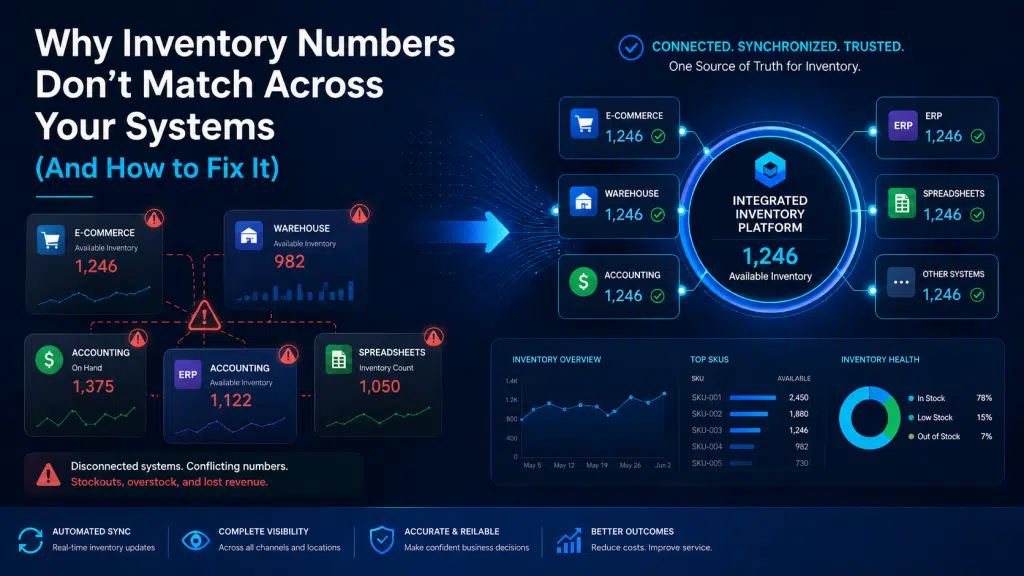
At first, the numbers are just slightly off. Shopify shows one quantity. The warehouse system shows another. The accounting platform has a different figure. Meanwhile, a spreadsheet that someone on the operations team still uses shows something else entirely.
Initially, this may seem like a small operational issue. However, as order volume grows, these small mismatches can turn into delayed shipments, oversold products, customer complaints, inaccurate purchasing decisions, and unreliable reporting.
For growing businesses, inventory mismatch between systems is often not just an inventory problem. More often, it is a systems problem.
At Good People Technologies, we help companies identify the operational gaps behind inventory discrepancies, disconnected software, and manual workflows. In many cases, the issue is not that teams are careless. Instead, the business has outgrown the way its systems communicate.
In this guide, we’ll break down why inventory numbers don’t match across systems, what these discrepancies cost businesses, and how integrations, automation, and ERP systems can help fix the problem.
Why Inventory Accuracy Matters More Than Most Businesses Realize
Inventory accuracy affects almost every part of a product-based business.
When inventory numbers are reliable, teams can make better decisions. Sales teams can trust product availability. Operations teams can fulfill orders more efficiently. Finance teams can produce more accurate reports. Leadership teams can forecast demand and cash flow with more confidence.
However, when inventory data is unreliable, every department starts making decisions based on incomplete or incorrect information.
The impact can be significant.
Research on inventory record inaccuracies has found that inaccurate inventory records can cost retailers approximately 4% of annual sales1. Another retail study found that improving inventory records can increase sales by 4–8%2. In other words, better inventory accuracy is not just an operational improvement. It can directly affect revenue.
Inventory accuracy benchmarks also show how common the problem is. According to inventory management research cited by NetSuite, the average inventory accuracy rate for businesses in 2024 was 83%3. Many experts consider 90% a realistic benchmark, while 95% is considered top-tier4 in many cases.
That gap matters.
If a business is operating at 80–85% inventory accuracy, leadership may believe operations are “mostly fine.” However, even a 10–15% error rate can create serious problems at scale, especially for e-commerce businesses, wholesalers, manufacturers, and companies selling across multiple channels.
The Hidden Cost of Inventory Mismatch Between Systems
Inventory discrepancies create visible and invisible costs.
The visible costs are easy to see:
- oversold products
- delayed orders
- customer complaints
- stockouts
- emergency purchasing
- fulfillment errors
However, the hidden costs are often more damaging.
When inventory data cannot be trusted, teams spend hours reconciling systems manually. Managers delay decisions because reports are inconsistent. Purchasing teams order too much or too little. Customer service teams handle problems that could have been prevented. Meanwhile, leadership loses confidence in operational reporting.
Over time, this creates a cycle:
Bad data creates bad decisions.
Bad decisions create operational problems.
Operational problems create more manual work.
More manual work creates more errors.
Eventually, growth becomes harder because the systems underneath the business are no longer reliable.
If inventory discrepancies are affecting fulfillment, reporting, or purchasing decisions, Good People Technologies can help identify where your systems are breaking down. Schedule a consultation to review your current workflows.
Why Inventory Numbers Don’t Match Across Systems
Inventory mismatch between systems usually comes from a combination of technology, process, and data flow problems.
Here are the most common causes.
1. Disconnected Software Platforms
Most growing businesses use multiple platforms to run operations.
A typical e-commerce or product-based company may use:
- Shopify or WooCommerce
- Amazon Seller Central
- QuickBooks
- inventory management software
- warehouse management tools
- fulfillment software
- spreadsheets
- ERP systems
- CRM systems
Each platform may work well individually. However, when these systems are not properly connected, inventory data becomes fragmented.
For example, a customer places an order through Shopify. Shopify updates inventory immediately. However, the accounting system does not receive the update until later. Meanwhile, the warehouse team is working from a different system. As a result, three different systems may show three different inventory numbers.
At low order volume, teams may be able to fix these issues manually. However, as the business grows, manual reconciliation becomes slower, more expensive, and less reliable.
2. Manual Data Entry
Manual data entry is one of the biggest causes of inventory errors.
Teams often enter the same information into multiple systems:
- order details
- product quantities
- purchase orders
- inventory adjustments
- returns
- warehouse transfers
Even careful employees make mistakes. A mistyped SKU, delayed spreadsheet update, or missed inventory adjustment can create a mismatch that spreads across multiple systems.
Some industry sources estimate that companies using manual inventory processes may experience error rates of 20–40%, compared with less than 1% for automated systems. Even if exact error rates vary by business, the pattern is clear: manual workflows increase the risk of inaccurate inventory data.
The problem becomes more serious as the business scales.
A process that works for 50 orders per week may fail at 500 orders per week. Similarly, a spreadsheet that worked for one warehouse may become unreliable when the company adds multiple locations, sales channels, or fulfillment partners.
3. Delayed Syncing Between Systems
Some businesses have integrations in place but still experience inventory mismatch.
Why?
Because not all integrations update data in real time.
In some cases, inventory may sync every hour, every few hours, or overnight. That may sound acceptable, but in a fast-moving e-commerce environment, even short delays can create problems.
For example, a product may sell on Amazon, Shopify, and a wholesale channel within the same hour. If inventory updates are delayed, one platform may continue showing stock as available even after the product has already sold elsewhere.
Consequently, the business may oversell inventory without realizing it until fulfillment begins.
This is especially risky during:
- product launches
- seasonal peaks
- promotions
- flash sales
- holiday shopping periods
During these periods, delayed synchronization can create inventory discrepancies quickly.
4. Multiple Sales Channels
Multi-channel selling creates more revenue opportunities. However, it also increases operational complexity.
Many businesses sell through:
- Shopify
- Amazon
- Walmart Marketplace
- wholesale partners
- retail locations
- direct sales teams
- B2B portals
Each channel may have its own rules, reporting structure, and inventory timing.
Without a centralized system or well-designed integration architecture, each channel becomes its own version of reality. As a result, inventory numbers can drift apart across platforms.
This is one reason many growing businesses eventually need stronger system integrations or ERP infrastructure. As channel complexity increases, disconnected tools become harder to manage.
5. Returns and Exchanges Are Not Processed Consistently
Returns are a major source of inventory mismatch.
When a customer returns a product, several things need to happen correctly:
- the return must be received
- the product must be inspected
- the item must be marked as resellable, damaged, or unavailable
- inventory must be updated
- accounting must reflect the transaction
- customer service may need to issue a refund or exchange
If any step is delayed or missed, inventory numbers can become inaccurate.
For example, a returned item may physically exist in the warehouse but not be available for resale. Alternatively, a system may mark the product as available before the warehouse has inspected it.
Both scenarios create operational risk.
6. Warehouse Processes Are Not Aligned With System Logic
Inventory systems depend on accurate warehouse processes.
If warehouse teams move items, adjust stock, receive shipments, or process damaged goods without updating the correct system, inventory records become unreliable.
Common warehouse-related causes include:
- missed receiving updates
- unrecorded damaged inventory
- incorrect bin transfers
- inconsistent cycle counting
- delayed stock adjustments
- picking and packing errors
Technology can reduce these issues, but it cannot fully compensate for unclear operational procedures.
That is why inventory accuracy requires both systems and process discipline.
7. Spreadsheets Remain Part of the Workflow
Many businesses invest in software but still rely heavily on spreadsheets.
This usually happens when systems do not fully support the team’s actual workflows.
For example, employees may use spreadsheets to track:
- inventory adjustments
- purchase planning
- warehouse counts
- backorders
- supplier updates
- manual reconciliations
Spreadsheets are flexible, but they often become hidden operational systems. Unfortunately, they usually do not sync automatically with ERP, accounting, or e-commerce platforms.
Consequently, spreadsheet-based workflows can become a major cause of inventory discrepancies.
If your team still needs spreadsheets to “make the system work,” that may be a sign that your software environment needs better integration, automation, or ERP optimization.
8. Systems Were Added Over Time Without a Technology Architecture
Many businesses do not start with a planned technology ecosystem.
Instead, they add tools as problems appear.
First, they add an e-commerce platform. Then they add accounting software. Later, they add an inventory tool, a fulfillment provider, a CRM, a reporting platform, and several spreadsheets.
Each tool solves a short-term problem. However, over time, the overall system becomes fragmented.
Eventually, no single platform owns the truth.
This is where inventory mismatch becomes a symptom of a bigger problem: the company has outgrown its technology architecture.
Case Study: How ERP and Integrations Can Reduce Operational Friction
Good People Technologies has worked on technology environments where ERP performance, integrations, and workflow automation were critical to improving operations.
In one Good People Technologies case-study example, the team helped streamline ERP functionality by troubleshooting bugs, integrating new importing and emailing features, automating website access controls, and improving the overall technology environment. Another Good People Technologies service example describes a 10x increase in ERP operational speed5, saving thousands of staff hours yearly while reducing manual work and customer service calls.
Although every business has different systems and operational challenges, the lesson is relevant to inventory accuracy:
When ERP systems, integrations, and automation workflows are improved, teams spend less time fighting disconnected tools and more time running the business.
For companies struggling with inventory mismatch, the same principle applies. The goal is not simply to “fix inventory.” The goal is to improve the way systems exchange information, how workflows are automated, and how teams access reliable operational data.
Composite Example: A Multi-Channel E-Commerce Business With Inventory Mismatches
Consider a growing e-commerce company selling through Shopify, Amazon, and wholesale accounts.
The business uses:
- Shopify for its online store
- Amazon Seller Central for marketplace sales
- QuickBooks for accounting
- a warehouse management tool
- spreadsheets for purchase planning
Initially, this setup works.
However, as order volume increases, problems begin to appear.
Inventory numbers in Shopify do not match Amazon. Warehouse counts are updated manually. QuickBooks reflects financial transactions but not real-time inventory changes. Meanwhile, purchasing decisions are still being made from spreadsheets.
The business starts experiencing:
- oversold products
- delayed fulfillment
- inaccurate purchasing decisions
- customer service complaints
- slow reporting
- time-consuming manual reconciliation
After reviewing the operational workflow, the root problem becomes clear: inventory data is moving through too many disconnected systems.
The fix may include:
- integrating Shopify, Amazon, accounting, and warehouse systems
- reducing spreadsheet-based workflows
- defining one source of truth for inventory
- automating order and inventory updates
- improving reporting dashboards
- evaluating whether ERP is needed as the central operational platform
This kind of scenario is common for growing businesses. More importantly, it shows why inventory mismatch is rarely just a warehouse problem. It is often a systems architecture problem.
How to Fix Inventory Mismatch Between Systems
Fixing inventory discrepancies requires more than one quick software change.
The right approach depends on the business, but most companies should start with a structured operational review.
Step 1: Identify Every System That Stores Inventory Data
Start by listing every place where inventory appears.
This may include:
- e-commerce platforms
- marketplaces
- accounting software
- ERP systems
- warehouse systems
- fulfillment partners
- spreadsheets
- reporting tools
Many businesses are surprised by how many places inventory data exists.
This first step matters because inventory mismatch cannot be fixed until the full data environment is visible.
Step 2: Choose a Source of Truth
Every business needs one primary source of truth for inventory.
Depending on the company, that may be:
- an ERP system
- an inventory management platform
- a warehouse management system
- another central operational platform
The key is clarity.
If every system is allowed to define inventory independently, discrepancies will continue.
Step 3: Map Inventory Data Flow
Next, map how inventory data moves.
Ask:
- Where does inventory originate?
- Which system updates inventory first?
- Which systems receive updates?
- How often do updates happen?
- Where does manual work still occur?
- Which workflows depend on spreadsheets?
This often reveals the real cause of mismatch.
In many cases, the issue is not the software itself. Instead, the problem is unclear or inconsistent data flow.
Step 4: Audit Existing Integrations
If integrations already exist, audit them carefully.
Look for:
- delayed syncs
- broken workflows
- duplicate integrations
- outdated connectors
- one-way data flow where two-way sync is needed
- missing error alerts
Integrations should not be treated as “set it and forget it.”
As businesses change, integrations often need to be adjusted, improved, or rebuilt.
Step 5: Automate High-Risk Manual Workflows
Manual inventory workflows should be reduced wherever possible.
Common automation opportunities include:
- order imports
- inventory adjustments
- stock level updates
- fulfillment triggers
- purchase order workflows
- reporting updates
- customer notifications
Automation reduces error risk and improves operational speed.
However, automation should be implemented carefully. Automating a broken process can make problems happen faster. Therefore, workflow design matters.
Step 6: Improve Operational Governance
Technology alone is not enough.
Businesses also need clear inventory procedures.
This includes:
- cycle counting policies
- return handling rules
- damaged inventory processes
- warehouse transfer procedures
- purchasing controls
- inventory adjustment approvals
When process governance improves, systems become more reliable.
Step 7: Evaluate Whether ERP Is Needed
Integrations can solve many inventory problems.
However, some businesses eventually need ERP because their operations are too complex for disconnected tools.
ERP may be appropriate when:
- multiple systems are difficult to manage
- inventory data is unreliable
- reporting takes too long
- manual reconciliation is constant
- purchasing decisions are inaccurate
- leadership lacks real-time operational visibility
In this situation, ERP can create a centralized operational foundation.
That said, ERP is not always the first answer. Some businesses need better integrations first. Others need automation. Some need ERP optimization rather than a full replacement.
This is why an operational technology assessment is valuable.
When to Call a Technology Partner
If inventory mismatch is affecting customer experience, reporting, or purchasing decisions, it may be time to involve a technology partner.
A strong partner can help you answer questions like:
- Where is inventory data breaking down?
- Which system should be the source of truth?
- Are current integrations working correctly?
- Which manual processes should be automated?
- Do we need ERP, better integrations, or both?
- What is the lowest-risk path to improving inventory accuracy?
At Good People Technologies, we help businesses evaluate systems, identify operational bottlenecks, and design integrations, automation workflows, and ERP solutions that support scalable growth.
If your inventory numbers don’t match across systems, the problem is usually solvable. The first step is understanding where the mismatch begins.
Final Thoughts
Inventory mismatch between systems is more than a reporting issue.
It affects revenue, fulfillment, customer experience, purchasing, forecasting, and leadership decision-making.
Although warehouse errors can contribute to the problem, the root cause is often deeper. Disconnected systems, manual workflows, delayed syncs, spreadsheet-based processes, and unclear data ownership all create inventory inaccuracies.
Fortunately, businesses can fix these problems.
By improving integrations, automating data flow, strengthening operational processes, and implementing ERP where appropriate, companies can build more reliable inventory systems.
The result is more than cleaner data.
It is faster fulfillment, better customer experience, stronger reporting, and more confident growth.
If your team is spending too much time reconciling inventory numbers, it may be time to look at the systems behind the problem.
Schedule a consultation with Good People Technologies to identify where your inventory data is breaking down and how integrations, automation, or ERP improvements can help.
Inventory numbers often differ because software platforms are disconnected, syncs are delayed, manual updates are inconsistent, or teams use multiple systems without one clear source of truth.
Inventory mismatch between systems happens when different platforms show different stock quantities for the same product. For example, Shopify, Amazon, accounting software, and warehouse systems may all show different inventory levels.
Integrations improve inventory accuracy by allowing systems to exchange data automatically. As a result, inventory updates can move between e-commerce platforms, warehouses, accounting tools, and ERP systems with less manual work.
ERP can help reduce inventory discrepancies by centralizing operational data and creating a single source of truth. However, ERP still needs proper implementation, integrations, and process governance to be effective.
The best approach is to identify every inventory data source, choose a source of truth, map data flow, audit integrations, automate manual workflows, and improve inventory processes. In some cases, ERP implementation or optimization may also be needed.
- Source: Farias, Li, and Peng, “Fixing Inventory Inaccuracies At Scale,” arXiv, 2020. The paper notes that inaccurate inventory records can cost retailers approximately 4% in annual sales.
https://arxiv.org/abs/2006.13126 ↩︎ - Source: ECR Retail Loss, “Measuring the Sales Impact of Improving Inventory Records,” 2020. The research states that improving inventory record accuracy can grow sales by 4–8%.
https://ecrloss.com/research-paper/improving-inventory-records/ ↩︎ - Source: NetSuite, “Inventory Accuracy: What It Is and How to Improve It,” 2025. NetSuite cites CAPS Research data stating that the average inventory accuracy rate for businesses in 2024 was 83%.
https://www.netsuite.com/portal/resource/articles/inventory-management/inventory-accuracy.shtml ↩︎ - Source: NetSuite, “Inventory Accuracy: What It Is and How to Improve It,” 2025. The article discusses common inventory accuracy benchmarks, including 90% as a realistic target and 95% as a top-tier benchmark in many cases.
https://www.netsuite.com/portal/resource/articles/inventory-management/inventory-accuracy.shtml ↩︎ - Source: Good People Technologies, Technology Case Studies. The case-study material describes ERP optimization work, operational improvements, automation, and performance gains including a 10x increase in ERP operational speed.
https://goodpeopletech.com/technology-case-studies/ ↩︎

Roman is a B2B marketing specialist focused on technology, ERP systems, business automation, and digital growth strategies. At Good People Technologies, he helps translate complex technology solutions—such as ERP integrations, system integrations, and business process automation—into clear insights for founders, operators, and growing companies.
His work focuses on content strategy, SEO, and thought leadership that helps businesses understand how the right technology infrastructure can support scalable operations and sustainable growth.
At Good People Technologies, Roman contributes to content that explores ERP implementation, automation strategies, and system integration best practices for companies navigating rapid growth and operational complexity.