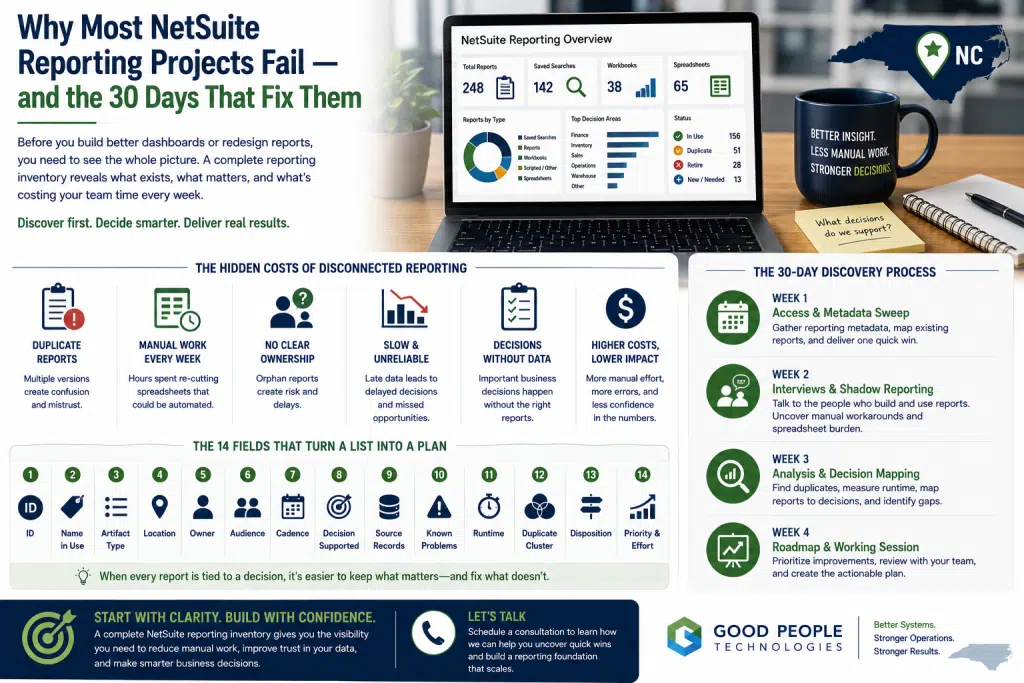
A NetSuite reporting inventory is often the missing first step in reporting projects that begin with good intentions but struggle to produce results people actually trust. Leadership can usually feel the problem before anyone has fully documented it. Two teams bring different numbers to the same meeting, a report that used to run quickly now takes too long, or someone in operations has been rebuilding the same spreadsheet by hand every week because the system version does not answer the real question.
These issues rarely happen because people are careless.
In most cases, the reporting environment has simply grown over time without being fully mapped. Finance creates custom reports. Operations builds workbooks. IT maintains scheduled outputs. Managers export data into spreadsheets, adjust the numbers manually, and send final versions to leadership. Over time, several versions of the same number can start circulating through the business.
When that happens, the instinct is often to start with architecture.
A team may want a new dashboard suite, a formal roadmap, a reporting redesign, or a broader data strategy. Those projects can be valuable, but they often fail when they start too far downstream.
Before rebuilding dashboards, a business needs to understand what already exists, who uses it, what decision each report supports, and where manual reporting work is hiding.
That is why the first 30 days of a reporting improvement project should focus on discovery, not redesign. The most important early deliverable is not a polished dashboard. It is a complete report inventory that turns a confusing reporting environment into something the team can see, discuss, prioritize, and improve.
Why Reporting Projects Usually Start in the Wrong Place
Reporting projects often begin when frustration becomes visible.
A leadership meeting exposes conflicting numbers. Finance questions a report. Operations says the dashboard is missing context. One department admits that the “real” version lives in a spreadsheet. Another team explains that five reports appear to answer the same question, but each produces slightly different results.
The natural response is to fix the reporting layer.
That response makes sense at first. If reports are confusing, building better reports feels like the logical next step.
However, many reporting projects fail because the team tries to redesign the future before understanding the current estate.
Without inventory, every decision is partly a guess.
Teams may not know how many saved searches exist. Some reports may still be running even though nobody trusts them. Workbooks might be shared with users who no longer need them. Scheduled outputs may continue sending emails that nobody opens. Spreadsheets can quietly carry business-critical decisions that never appear in a system audit.
A reporting project that skips discovery risks rebuilding the wrong things.
It may spend time improving a report nobody uses. Another project might retire a report that quietly supports a key weekly decision. A new dashboard could be built without addressing the spreadsheet that leadership actually trusts.
The result is familiar: the reporting environment looks cleaner on paper, but the team still does not fully trust the numbers.
A better approach starts by making the reporting estate visible.
What a NetSuite Reporting Inventory Really Is
A NetSuite reporting inventory is a working document that captures every reporting artifact people use to make decisions. It is usually maintained as a spreadsheet or structured tracker, but the format is not the most important part. The value comes from the discipline behind it.
This inventory should include every artifact that produces a number, status, exception list, performance view, or operational signal someone uses.
In a NetSuite environment, that usually includes:
- Saved searches
- Standard reports
- Custom reports
- SuiteAnalytics workbooks
- Datasets
- Scheduled email outputs
- Scripted reports
- Automated custom record outputs
- Connected third-party reports
- Dashboards
- Exported spreadsheets
- Manual reporting processes
The last two categories are especially important.
System metadata can show what exists inside NetSuite. It usually cannot show the full reporting reality outside NetSuite.
A team may export a saved search every Monday, re-cut the numbers in Excel, add manual notes, and send the final version to leadership. Another department might keep a private workbook because the official report does not reflect how decisions are actually made. Finance may maintain a reconciliation spreadsheet because operational data arrives from several different sources.
Those artifacts matter because they often carry the real work.
A NetSuite reporting inventory gives the team one place to document official reports, unofficial workarounds, duplicate outputs, ownership gaps, and the decisions each report supports.
The Reporting Estate Is Usually Bigger Than Expected
Most companies underestimate the size of their reporting estate.
This is not a criticism of the team. Reporting environments grow gradually because people need answers.
A saved search gets built for one period-end process. Later, a custom report is created for leadership. Operations adds a workbook. Someone in finance creates a spreadsheet because the system output is not quite right. Another department then builds a similar report with slightly different filters.
Over time, the reporting estate becomes larger, older, and more fragmented than anyone realizes.
This happens even in well-run businesses.
People build reports because they need to make decisions. Teams create workarounds because they are trying to keep operations moving. Manual spreadsheets often exist because someone took responsibility for a gap that the system did not solve.
The issue is not effort.
The issue is visibility.
If nobody has a complete list, the company cannot make confident reporting decisions. It cannot know which reports to keep, which ones to consolidate, which ones to rebuild, and which ones to retire.
A complete inventory helps replace assumptions with evidence.
The Shadow Reporting Estate
Every reporting environment has an official side and a shadow side.
The official side includes reports, searches, dashboards, and workbooks that live inside NetSuite or connected systems.
By contrast, the shadow side includes everything people export, rebuild, correct, format, or maintain manually outside the system.
This may include:
- Weekly spreadsheets rebuilt from exported data
- PDFs circulated by email
- Private workbooks
- Manually adjusted inventory reports
- Finance reconciliation files
- Department-level trackers
- Leadership summaries created from multiple systems
- Temporary spreadsheets that became permanent
- Manual exception lists
- Reports maintained by one person because no system version works well enough
The shadow estate is not a sign of failure.
Usually, it is evidence that people are trying to solve real business problems with the tools available to them.
That distinction matters.
If discovery feels like an audit of people, teams may hide the workarounds. When discovery is framed as a way to reduce burden, improve trust, and protect the business, people are more likely to explain what actually happens.
Some of the highest-value reporting improvements come from the shadow estate.
A slow saved search may be annoying. A manager spending four hours every week rebuilding a report by hand is a recurring operational cost. Once that manual burden is visible, it can be prioritized, estimated, and fixed.
Why the First 30 Days Matter
The first 30 days of a reporting project set the tone for everything that follows.
If the project starts with a large architecture discussion, the team may feel like improvement is far away. People may have heard promises before. They may be skeptical that a new reporting roadmap will actually reduce their day-to-day pain.
A focused 30-day discovery phase does something different.
It creates clarity quickly.
The goal is not to solve every reporting problem in a month. Instead, the goal is to build the foundation that makes the next decisions smarter.
By the end of 30 days, the team should know:
- What reports exist
- Who owns them
- Who uses them
- Which decisions they support
- Which ones are duplicated
- Which ones are manual
- Which ones are slow
- Which ones are no longer trusted
- Which reports have no clear owner
- Which decisions lack a reliable report
- Which improvements should happen first
This kind of discovery turns reporting improvement from a vague initiative into a prioritized plan.
It also builds trust.
A small, visible improvement during the first week can show the team that the project is not only theoretical. Meanwhile, the inventory gives leadership a concrete view of what the reporting estate is actually costing the business.
The 14 Fields Every Report Inventory Should Include
A useful inventory is not just a list of report names.
Report names can be misleading. The same report may be called one thing in NetSuite and something completely different in a meeting. A saved search may have an unclear title but support a critical process. Another report may look important but no longer support any current decision.
A stronger inventory should include 14 fields.
1. ID
Every row needs a stable reference ID.
This makes it easier to discuss the report in tickets, meetings, backlog reviews, and project notes without confusion.
2. Name in Use
The inventory should capture what people actually call the report.
System names may be technical, outdated, or unclear. Business names are often more useful during interviews and prioritization.
3. Artifact Type
Artifact type identifies whether the row is a saved search, report, workbook, dataset, script output, spreadsheet, dashboard, manual process, or third-party report.
This helps the team understand how reporting work is distributed across the environment.
4. Location
The inventory should document where the report lives and how people access it.
A report that is hard to find may still be business-critical.
5. Owner
Every report should have a named owner.
Rows without owners are early findings. They represent risk because nobody is clearly responsible for maintenance, accuracy, or business context.
6. Audience
The inventory should show who consumes the report by role or team.
This helps reveal whether a report is actually used and who needs to be involved before any change is made.
7. Cadence
Reports should be tagged by cadence: daily, weekly, monthly, period-end, ad hoc, scheduled, or on demand.
Cadence matters because a daily report with a small issue may create more cost than a monthly report with a larger issue.
8. Decision Supported
This is the most important field.
A report should support a decision, action, review, reconciliation, exception check, or management process. If nobody can explain what decision the report supports, it may not need to be rebuilt.
This field prevents the team from improving reports that no longer matter.
9. Source Records
The inventory should identify the underlying data the report reads.
This helps with duplicate detection, reporting architecture, performance review, and data ownership.
10. Known Problems
Known problems should be written in the words of the people who use the report.
A technical description is useful later. During discovery, the lived experience matters more.
11. Runtime
Runtime should be measured, not guessed.
A report that “feels slow” may not be the biggest issue. Another report may only run twice a month but consume a major amount of time.
12. Duplicate Cluster
The inventory should identify reports that answer substantially similar questions.
Duplicate clusters are often the root cause of conflicting numbers.
13. Disposition
Every row should eventually receive a recommended disposition: keep, consolidate, rebuild, retire, replace, or create new.
The reasoning should be documented.
14. Priority and Effort
Priority should connect expected value to required effort.
A report that returns 10 hours per month with a small rebuild may deserve attention before a complex dashboard project with unclear adoption.
Together, these fields turn a list into a decision-making tool.
A NetSuite reporting inventory should help the business prioritize work, not simply document clutter.
The Most Important Question: What Decision Does This Support?
Many reporting projects focus on reports.
Better reporting projects focus on decisions.
That difference is important.
A report may look useful because it contains data. A decision-supported report is useful because someone acts on it.
During discovery, every report should be traced back to a decision or business action.
For example:
- Does this report help purchasing decide what to reorder?
- Does finance use it to close the month?
- Does operations use it to identify delayed orders?
- Does leadership use it to review margin?
- Does customer service use it to answer account questions?
- Does inventory use it to catch stock discrepancies?
- Does the executive team use it to decide where to invest?
If the answer is unclear, the report may need to be challenged.
That does not mean it should be deleted immediately. It means the team should understand whether the report still has a business purpose.
Decision tracing also reveals gaps.
Sometimes the problem is not that a report is broken. The real issue is that an important decision has no report behind it at all.
A company may have dozens of reports but no reliable view of product profitability. Another business may track sales closely but lack visibility into fulfillment delays. Finance may have revenue data but not enough operational context to understand margin pressure.
A list of reports shows what exists.
A list of decisions shows what the business actually needs.
How the Inventory Gets Collected
A strong inventory is usually collected through three parallel sweeps: metadata, people, and shadow reporting.
Each sweep reveals a different part of the truth.
The Metadata Sweep
The metadata sweep starts with a read-only review of reporting artifacts inside NetSuite and related systems.
This step creates the skeleton of the inventory.
It helps identify saved searches, reports, workbooks, datasets, scheduled outputs, dashboards, owners, sharing, and usage signals where available.
The metadata sweep should happen early because it gives interviews a stronger starting point.
Instead of asking people to remember every report from scratch, the team can ask about specific artifacts. Conversations become more efficient, and it becomes easier to reveal which reports are used, ignored, duplicated, or misunderstood.
Access should be least-privilege and read-only.
The purpose is to document the environment, not change it.
The People Sweep
The people sweep includes short conversations with the people who produce, consume, or depend on reports.
These conversations should include teams such as finance, operations, planning, buying, customer service, warehouse or field teams, leadership, and IT.
The most important questions are simple:
- What decision does this report support?
- What do you do when the number is wrong?
- Which reports do you trust?
- Which reports do you avoid?
- What takes too long?
- What do you export and fix by hand?
- Which report would you be nervous to lose?
- Which report creates the most confusion?
These interviews should not feel like performance reviews.
They are discovery conversations. The goal is to understand how reporting actually works.
The Shadow Sweep
The shadow sweep is where manual reporting work becomes visible.
This is often the most valuable part of the project.
People may not mention manual work unless they are asked directly and safely. A good question is:
“What do you export and then fix by hand?”
That question often reveals the real reporting burden.
A person may explain that the official report is close, but not quite right. Someone else may show a spreadsheet that takes hours to rebuild each week. Another team may admit that they ignore the dashboard and use an export because it gives them more control.
This information should be treated carefully.
Manual workarounds are not evidence of bad behavior. They are evidence that the current system does not fully support the team’s needs.
A NetSuite reporting inventory should capture these workarounds because they often identify the highest-return improvements.
What the Finished Inventory Reveals
When the inventory is complete, leadership gets a much clearer view of the reporting environment.
The finished inventory usually reveals six categories of insight.
1. The True Size of the Reporting Estate
Most teams discover that the estate is larger than expected.
There may be a long tail of reports that have not been reviewed in years, saved searches with unclear ownership, or spreadsheets that support key workflows.
2. Duplicate Clusters
Duplicate clusters are groups of reports that answer similar questions in slightly different ways.
These clusters often explain why different teams bring different numbers to meetings.
3. Orphan Reports
Orphan reports have no clear owner, or the listed owner has left the company.
They create risk because nobody is accountable for maintaining them or explaining their logic.
4. Manual Reporting Burden
The inventory can convert shadow reporting into hours.
This matters because leadership can finally see the cost of manual reporting work.
5. Real Reporting Gaps
Some decisions may not be supported by any reliable report.
These gaps are often more important than improving old reports.
6. A Prioritized Backlog
The inventory should produce a sequence of work.
That sequence should not be based only on opinion. It should reflect business value, manual burden, reporting risk, user trust, and estimated effort.
When the NetSuite reporting inventory is finished, the business has a roadmap grounded in evidence.
A Practical 30-Day Reporting Discovery Plan
A 30-day discovery phase should be structured enough to create momentum, but realistic enough to avoid overwhelming the team.
The goal is clarity, trust, and a prioritized backlog.
Week 1: Access, Metadata, and One Visible Fix
The first week should focus on read-only access, metadata collection, interview scheduling, and one small visible improvement.
This quick improvement should be chosen for speed and confidence, not maximum strategic importance.
It might be a small report cleanup, a performance issue, a confusing saved search name, or a simple dashboard adjustment that reduces friction for one team.
A quick win helps create trust.
It shows that the project is not only collecting information. The team can see that the work is also paying attention to the people who live with the reporting environment every day.
Week 2: Interviews and Shadow Reporting
The second week should focus on conversations with report producers and consumers.
This is where the team learns which reports are trusted, which ones are avoided, which spreadsheets fill gaps, and which decisions depend on manual work.
The shadow estate should be collected during these conversations.
By the end of week two, the first version of the inventory should be shared with the internal team for correction.
Week 3: Clustering, Runtime, and Decision Mapping
The third week should turn the draft inventory into an analytical tool.
Duplicate clusters should be identified. Runtime should be measured where possible. Reports should be mapped to decisions. Known problems should be reviewed for patterns.
This is also the moment to identify gaps.
Which decisions are unsupported, and which duplicate clusters create confusion?
Which reports have no owner?
Where is the largest manual burden?
Week 4: Roadmap and Working Session
The final week should produce the finished inventory, a prioritized roadmap, and a working session with the team.
This working session matters because reporting changes should not be imposed without discussion.
Every recommended disposition should be reviewed. Reports should not be retired, rebuilt, or consolidated without the owning team’s agreement.
By the end of the 30 days, the company should have a clear path forward.
The project can then move from discovery into execution with much stronger trust.
Boundaries That Make the Process Work
Discovery needs clear boundaries.
Without boundaries, reporting projects can feel threatening. People may worry that their workarounds will be judged, their reports will be removed, or their processes will be changed without input.
Clear boundaries help avoid that.
A strong discovery process should state:
- Access remains read-only during discovery
- Nothing is retired without explicit sign-off
- The inventory documents systems and processes, not personal performance
- Manual workarounds are treated as evidence of business need
- One quick win may be shipped only if agreed
- Every recommendation is reviewed before execution
- Teams that own reports participate in disposition decisions
These boundaries create safety.
When people trust the process, they share more accurate information. Better information leads to better decisions.
A NetSuite reporting inventory works best when it is collaborative, not punitive.
Why This Belongs in Month One
Reporting improvement should start with inventory because inventory creates the evidence base.
Without it, the team may spend weeks debating opinions.
With it, the team can see the estate.
The inventory shows what exists, what is duplicated, what is manual, what is trusted, what is slow, what lacks ownership, and what decisions are unsupported.
This changes the conversation.
Instead of asking, “Which dashboard should we build?” the team can ask, “Which reporting improvement returns the most value first?”
That is a much better question.
Month one should not be spent designing a perfect future state from incomplete information. It should be spent building the map that makes the future state possible.
How Good People Technologies Helps With Reporting Discovery
Good People Technologies helps NetSuite-run businesses improve reporting, visibility, automation, integrations, and operational decision-making.
For reporting projects, this can include:
- Building a NetSuite reporting inventory
- Reviewing saved searches, reports, workbooks, and dashboards
- Identifying duplicate reporting clusters
- Mapping reports to business decisions
- Finding manual spreadsheet workarounds
- Measuring reporting burden
- Clarifying ownership
- Prioritizing reporting improvements
- Improving NetSuite dashboards and saved searches
- Supporting integrations and reporting architecture
The work starts with discovery because reporting problems are rarely solved by dashboards alone.
A better reporting environment requires trust, clean data, clear ownership, and a realistic sequence of improvements.
If your team is spending too much time rebuilding spreadsheets, debating numbers, or waiting for reports, Good People Technologies can help identify what your reporting estate is actually costing and build a practical roadmap for improving it.
Final Thoughts
Most reporting projects do not fail because teams lack effort.
They fail because the reporting estate is not fully visible before redesign begins.
A company may have saved searches, reports, workbooks, dashboards, spreadsheets, scheduled outputs, and manual processes spread across departments. Some are useful. Others are duplicated. A few are risky because they have no owner. Several may be rebuilt by hand every week outside the system.
Until that environment is documented, reporting improvement is partly guesswork.
A NetSuite reporting inventory gives the business a better starting point.
It shows what exists, who uses it, what decisions it supports, where manual work is hiding, and which improvements should happen first.
The first 30 days should create that clarity.
Once the inventory is complete, the company can move into reporting improvements with more trust, better priorities, and a stronger case for change.
Good reporting does not start with the perfect dashboard.
It starts with knowing what the business is already using, what it actually needs, and what is costing the team time every week.
Frequently Asked Questions
What is a NetSuite reporting inventory?
A NetSuite reporting inventory is a structured list of reports, saved searches, workbooks, dashboards, spreadsheets, automated outputs, and manual reporting processes used to support business decisions.
Why do reporting projects fail?
Reporting projects often fail because teams start redesigning dashboards before documenting the existing reporting estate, duplicate reports, manual spreadsheets, ownership gaps, and decision needs.
What should be included in a report inventory?
A report inventory should include the report name, type, location, owner, audience, cadence, decision supported, source records, known problems, runtime, duplicate cluster, disposition, priority, and estimated effort.
Why are spreadsheets important in reporting discovery?
Spreadsheets are important because many teams export system data and rebuild reports manually. These shadow reporting processes often reveal the largest recoverable time loss.
How long should reporting discovery take?
A focused reporting discovery phase can often be structured around 30 days. The goal is not to solve every reporting problem, but to build the inventory, identify priorities, and create a roadmap.
What is the shadow reporting estate?
The shadow reporting estate includes spreadsheets, PDFs, manual trackers, private workbooks, and other unofficial reporting outputs that people use because the system reports do not fully meet their needs.
Should old reports be retired immediately?
No. Reports should not be retired without reviewing ownership, audience, decision support, and team sign-off. Discovery should produce recommendations, not unilateral changes.
How does decision mapping improve reporting?
Decision mapping connects each report to the business decision it supports. This helps teams avoid rebuilding reports that no longer matter and identify important decisions that lack reliable reporting.
Can NetSuite dashboards fix reporting problems?
NetSuite dashboards can help, but dashboards alone do not fix unclear data, duplicate reports, manual workarounds, or weak ownership. Discovery should come first.
How can Good People Technologies help with NetSuite reporting?
Good People Technologies helps businesses inventory their reporting estate, identify manual burden, improve saved searches and dashboards, reduce spreadsheet dependency, and build practical reporting roadmaps.
Need hands-on NetSuite help? See our NetSuite implementation and support services.

Roman is a B2B marketing specialist focused on technology, ERP systems, business automation, and digital growth strategies. At Good People Technologies, he helps translate complex technology solutions—such as ERP integrations, system integrations, and business process automation—into clear insights for founders, operators, and growing companies.
His work focuses on content strategy, SEO, and thought leadership that helps businesses understand how the right technology infrastructure can support scalable operations and sustainable growth.
At Good People Technologies, Roman contributes to content that explores ERP implementation, automation strategies, and system integration best practices for companies navigating rapid growth and operational complexity.