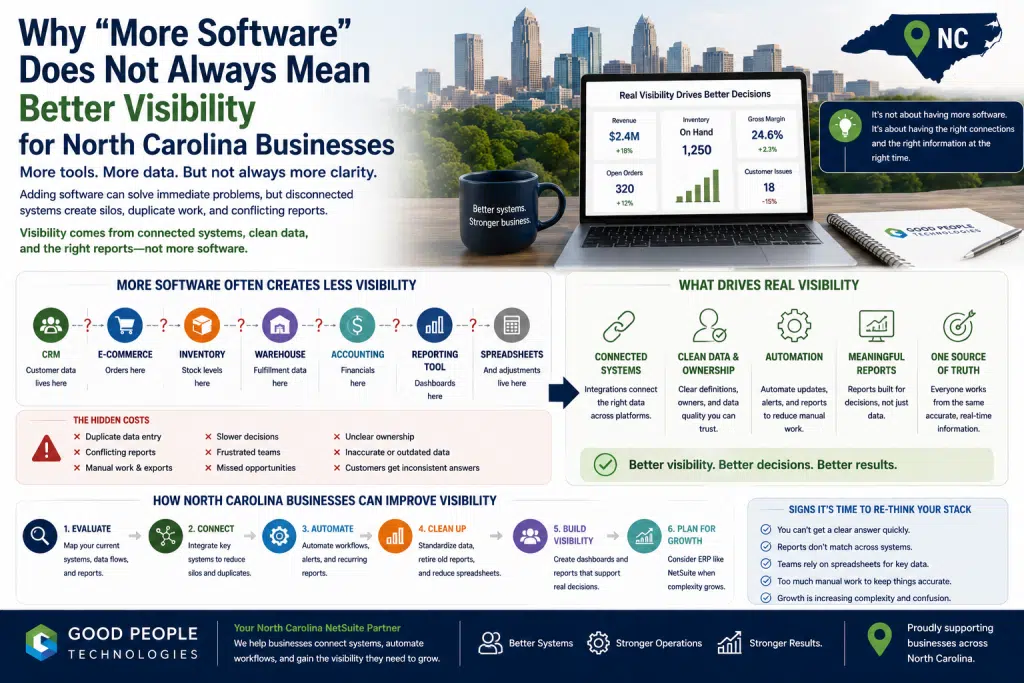
A company may add a CRM to improve sales visibility. Accounting software handles finance. An e-commerce platform manages online orders. A warehouse tool supports fulfillment. A project management system tracks work. A reporting dashboard gives leadership more charts. Later, a few spreadsheets still remain because teams need views that the systems do not provide.
None of those tools are necessarily bad.
In many cases, each one solved a real problem at the time it was added.
The challenge begins when the business has more software but less clarity. Data lives in different places. Teams define metrics differently. Reports do not match. Manual exports continue. Customer service still has to check several systems before answering questions. Finance still reconciles data by hand. Leadership still waits for someone to explain which number is correct.
For businesses across Charlotte, Raleigh, Durham, Greensboro, Winston-Salem, Asheville, Wilmington, and other parts of North Carolina, this issue can appear during growth. More customers, more channels, more employees, more products, more locations, and more reporting needs can all expose gaps between systems.
This article explains why more software does not always mean better visibility, how disconnected tools create hidden costs, and how North Carolina companies can improve visibility through system integration, automation, reporting cleanup, ERP planning, and NetSuite readiness.
Why Businesses Add More Software in the First Place
Most companies add software for good reasons.
A team needs to move faster. A department needs better tracking. Leadership wants better reporting. Finance needs more control. Sales wants cleaner account records. Operations needs workflow visibility. Customer service needs better response tools.
Software usually enters the business as a solution to a specific problem.
A CRM may help sales manage leads and customer relationships. Accounting software may improve financial organization. Inventory tools may help track stock. E-commerce platforms may support online growth. Project management systems may help teams coordinate work. Business intelligence dashboards may give leadership a cleaner view of performance.
At the beginning, each tool may improve something.
The issue is that companies rarely add software in a perfect sequence.
Tools are often added department by department, season by season, or problem by problem. One team chooses a platform for its own workflow. Another department creates a reporting process around a different system. Later, operations builds manual bridges between them.
That pattern is normal.
Growing companies are usually trying to solve practical problems quickly.
Over time, however, the stack can become difficult to see clearly. The business may have more data than before, but not necessarily better answers. That is where North Carolina business systems visibility becomes a strategic issue rather than a simple software issue.
More Tools Can Create More Places for Data to Hide
Every new system creates another place where information can live.
That may be useful when the system has a clear role. It becomes risky when data is duplicated, delayed, or interpreted differently across tools.
For example, customer information may live in a CRM, accounting software, e-commerce platform, email inboxes, and support tools. Order data may appear in Shopify, NetSuite, warehouse software, shipping tools, spreadsheets, and payment processors. Inventory may be tracked in several systems at once, with each platform showing a slightly different version of availability.
The business may technically have the data.
Teams still may not have a clear answer.
A sales manager might look at one customer record. Finance may rely on another. Operations may track fulfillment in a third platform. Customer service may use notes that do not sync anywhere else. Leadership may receive a manually combined spreadsheet at the end of the week.
More software can make data easier to collect but harder to reconcile.
This is why visibility should not be measured by how many tools a company owns.
A better question is: can the business see what matters without manual chasing?
If employees still need to export, compare, copy, clean, and explain data every day, the software stack may be producing activity without producing clarity.
The Difference Between Access and Visibility
Access and visibility are not the same thing.
A business may have access to many systems. Employees may be able to log in, run reports, export data, and review dashboards. That does not mean the company has true operational visibility.
Visibility means people can understand what is happening quickly enough to make good decisions.
A company with access but limited visibility may experience several problems:
- reports are available but not trusted
- dashboards exist but do not answer the real question
- teams can find data but only after checking multiple tools
- numbers exist but definitions are unclear
- exports are possible but require manual cleanup
- software captures activity but does not show business meaning
This distinction matters for North Carolina companies that are growing quickly.
A leadership team may believe the business has enough software because every department has a tool. Yet decisions may still be delayed because the tools do not connect the full picture.
Real visibility comes from connected workflows, shared definitions, clear ownership, and reporting that supports decisions.
Software provides the foundation.
System design turns that foundation into visibility.
Why Dashboards Alone Do Not Fix Visibility Problems
Dashboards are useful when the underlying data is reliable.
They are less useful when the data is fragmented, delayed, duplicated, or poorly defined.
A dashboard can make unclear data look more polished. It can organize charts, KPIs, and summaries in one place. That may help with presentation, but it does not automatically solve the deeper reporting issue.
If the source data is inconsistent, the dashboard will reflect that inconsistency.
If teams disagree on definitions, the dashboard may create more debate.
When manual spreadsheets are still required to adjust the numbers, the dashboard may become another output instead of the trusted view.
A better dashboard project starts before the dashboard.
The company should ask:
- Which decisions does this dashboard support?
- Where does the data come from?
- Who owns each metric?
- Which systems need to sync?
- How often should the data update?
- What manual steps happen before the dashboard is trusted?
- Which reports already exist?
- Where do teams disagree about numbers?
Without those answers, the business may invest in a better-looking reporting layer without improving visibility.
North Carolina business systems visibility depends on the quality of the data flow underneath the dashboard, not just the dashboard itself.
Why Teams Keep Using Spreadsheets After Buying Software
One of the clearest signs of limited visibility is spreadsheet dependency.
A business may invest in several platforms and still rely on spreadsheets for reporting, inventory planning, reconciliation, customer lists, order exceptions, or leadership summaries.
That does not mean the software failed.
It often means the systems do not fully match the workflow.
Spreadsheets are flexible. They allow employees to combine data, adjust formats, add context, and create views that software may not provide quickly. Teams use them because they need answers.
The risk appears when spreadsheets become the real operating system.
A spreadsheet may become the source leadership trusts most. Finance may use one for reconciliation. Operations may use another for inventory exceptions. Customer service may keep its own tracker. Sales may rely on a separate file for account notes.
Each spreadsheet may solve a short-term problem.
Together, they can create a visibility gap.
Spreadsheets often sit outside the core system environment. Updates may not flow back into software. Formulas may depend on one person’s knowledge. Different teams may work from different versions. Manual changes may not be documented clearly.
A company does not need to eliminate every spreadsheet.
Some are useful for analysis and planning.
The larger goal is to make sure critical business visibility does not depend on fragile manual files.
North Carolina Business Systems Visibility
North Carolina business systems visibility becomes difficult when companies add software without connecting the workflows, data definitions, and reporting processes behind it. More tools may create more activity, but they do not automatically create one trusted view of the business.
This issue often appears across several areas:
- sales reporting
- customer records
- inventory availability
- order management
- warehouse workflows
- finance reconciliation
- purchasing decisions
- customer service visibility
- project tracking
- leadership dashboards
- operational reporting
- cash flow planning
The pattern is usually not caused by one bad system.
It comes from gaps between systems.
A CRM may work well for sales, but not connect clearly to finance. Accounting software may be accurate, but not show enough operational context. Inventory tools may track stock, but not sync quickly with e-commerce or fulfillment. Dashboards may summarize performance, but still rely on manual spreadsheets.
The business may have many tools and still lack confidence in the numbers.
Improving visibility requires looking at the full system environment, not just adding another platform.
The Hidden Cost of Tool Overlap
Tool overlap happens when different systems perform similar functions or hold similar data.
At first, this may not seem serious.
Several teams may each have a tool that works for them. Sales has one view of customers. Finance has another. Operations tracks status somewhere else. Leadership receives a compiled report.
The hidden cost appears in coordination.
Employees spend time deciding which system is correct. Reports need to be reconciled. Data is entered more than once. Customers may receive inconsistent answers. Managers spend time clarifying what happened instead of deciding what to do next.
Tool overlap can also create ownership confusion.
Which system owns customer status? Where should inventory availability be updated? Who maintains product data? Which report is official? What happens when numbers conflict?
Without clear ownership, the software stack becomes harder to manage.
Every team may be doing reasonable work inside its own system.
The business still loses visibility across the whole operation.
A system review can help identify where tools overlap, where one platform should become the source of truth, and where integrations should reduce duplicate work.
More Software Can Increase Manual Work
Software is often purchased to reduce manual work.
Sometimes it accidentally increases it.
This happens when tools do not connect cleanly.
A team may need to enter customer information in two places. Order data may need to be exported from one system and uploaded into another. Finance may reconcile payment records manually. Operations may update status in both a project tool and a spreadsheet. Customer service may copy notes from email into a CRM.
The work becomes spread across the business.
No single manual task may look large enough to justify a system project. Combined across departments, those small tasks can consume significant time and attention.
Manual work also creates risk.
Data can be entered incorrectly. Updates may happen late. A task may depend on one person. Reports may reflect outdated information. Customers may receive slower responses because teams are checking systems instead of using one clear view.
When software increases manual work, the issue is usually not the tool itself.
The problem is the handoff between tools.
Better integrations and automation can reduce those handoffs. ERP or NetSuite may become relevant when the company needs a stronger shared foundation across finance, operations, inventory, orders, customers, and reporting.
Why Visibility Problems Often Show Up in Finance
Finance often feels visibility problems because it has to reconcile the final result.
Sales may happen in one system. Payments may be processed in another. Orders may be fulfilled elsewhere. Inventory may be adjusted by operations. Refunds, discounts, taxes, vendor bills, and customer credits may all touch different workflows.
Eventually, finance has to bring those pieces together.
If the systems do not connect, reconciliation takes longer.
A company may know revenue is growing but not clearly understand margin, cash flow, product profitability, customer profitability, or operational cost. Finance may spend more time cleaning data than analyzing performance.
That limits the value finance can provide to leadership.
Better visibility helps finance move from reporting what happened to helping the business understand what is changing.
For North Carolina businesses, this can be especially important during growth periods, seasonal demand, expansion into new channels, or operational complexity.
When financial reporting depends on too many disconnected tools, better system design becomes a business priority.
Inventory Visibility Requires More Than an Inventory Tool
Inventory visibility is not just about having inventory software.
It depends on how inventory connects to orders, purchasing, warehouse operations, sales channels, finance, fulfillment, and reporting.
A business may have an inventory system and still struggle to answer basic questions.
What is on hand, and what is available? What is committed, and what is on order? Which items are delayed? Which products are slow-moving? What inventory is tying up cash? Which channels are creating stockout risk?
These questions require connected data.
An inventory tool may show one part of the picture. E-commerce platforms may show another. Warehouse systems may hold operational details. Finance may track inventory value. Purchasing may use spreadsheets for reorder planning.
When those views do not align, teams create workarounds.
Sales checks availability manually. Purchasing keeps a separate file. Warehouse teams maintain exception lists. Finance reconciles inventory value later. Leadership waits for reports.
North Carolina business systems visibility improves when inventory data is connected to the decisions it supports.
A tool can track stock.
A system can help the business understand inventory.
Customer Service Needs Connected Context
Customer service visibility often suffers when software is added in pieces.
A company may have a CRM, help desk, order system, shipping tool, accounting software, and warehouse platform. Each system may contain useful information. The customer service team still may not have one clear view of the customer relationship.
That creates delays.
A representative may need to check order status in one tool, payment history in another, shipment details somewhere else, and internal notes in a spreadsheet or email thread.
Customers do not see the system complexity.
They only experience the response.
A delay may feel like poor service even when the team is working hard. An inconsistent answer may reduce trust even when the underlying issue is a data gap.
Connected customer context helps teams answer faster and more accurately.
That may include customer records, order history, open issues, invoices, shipment status, returns, account notes, and service activity.
More customer service software does not automatically improve service.
Better visibility comes when the systems behind customer service support the full customer experience.
Why Leadership Still Waits for Answers
Leadership teams often invest in software because they want faster answers.
Yet many growing businesses still wait for reports.
This happens when the path from activity to insight is too manual.
Orders may be recorded quickly, but reporting may require cleanup. Inventory may update in one place, but not in another. Finance may have accurate numbers after reconciliation, but leadership needs earlier visibility. Customer service may track issues, but the patterns may not appear in management reports.
As a result, decisions are delayed.
A business may wait to reorder inventory. Staffing decisions may rely on incomplete workload data. Marketing campaigns may continue without clear margin visibility. Customer issues may be addressed after patterns become obvious.
Leadership does not need every detail in real time.
It needs the right signals at the right cadence.
That requires deciding which metrics matter, where the data should come from, who owns the definitions, and how reports should be delivered.
Software can support that process.
It cannot replace the need for reporting design.
How to Tell Whether Your Software Stack Is Helping or Hiding
A growing business can evaluate its software stack by looking at how decisions are made.
Useful questions include:
- Do teams trust the reports they use?
- Which systems contain the same data?
- Where do numbers conflict?
- What information gets exported into spreadsheets?
- Which workflows require duplicate entry?
- Who owns each key metric?
- Which reports take too long to prepare?
- Can customer-facing teams answer questions quickly?
- Does finance spend too much time reconciling?
- Can leadership see operational issues early enough to act?
- Are teams using software because it helps, or because the process requires it?
These questions help separate software quantity from business visibility.
A company may discover that its tools are useful but poorly connected. Another business may find that old workflows were copied into new platforms without being redesigned. Some teams may need reporting cleanup before any new software is considered.
A practical review should not start with blame.
The goal is to understand where the stack supports the business and where it creates friction.
When Integration Is Better Than Adding Another Tool
When visibility problems appear, adding another tool may feel tempting.
A better first question is whether existing systems need to be connected more effectively.
System integration can help data move between platforms automatically. This reduces manual exports, duplicate entry, delayed updates, and reporting confusion.
For North Carolina companies, common integration opportunities include:
- CRM and accounting software
- e-commerce and inventory systems
- Shopify and NetSuite
- warehouse tools and ERP
- fulfillment platforms and customer service systems
- payment processors and finance workflows
- project management and billing tools
- reporting dashboards and operational systems
Integrations work best when they are tied to a specific workflow.
A company should not integrate systems just because it can.
The integration should solve a real business problem: faster order visibility, cleaner inventory updates, better reconciliation, stronger customer context, or more reliable reporting.
For many businesses, integration is the step that turns software tools into a usable operating system.
When Automation Helps Improve Visibility
Automation can improve visibility when information is delayed because people are repeating the same steps.
A workflow may require someone to update a status, send a report, flag an exception, copy data, notify a manager, or check a threshold manually.
Automation can support:
- recurring reports
- low-stock alerts
- order status updates
- approval routing
- invoice creation
- customer notifications
- exception alerts
- dashboard refreshes
- task assignments
- payment reminders
- return workflows
- finance reconciliation steps
The value of automation is not only time savings.
It also helps information move sooner.
A delayed manual update can hide a problem. An automated alert can surface it while the team still has time to act.
Automation should be designed carefully.
A broken process should not simply be automated. First, the business should understand the workflow, define the trigger, clarify ownership, and decide what should happen when an exception appears.
When done well, automation helps teams spend less time moving information and more time using it.
When ERP or NetSuite Becomes the Better Foundation
Sometimes integration and automation are enough.
In other cases, visibility problems are spread across too many core workflows.
ERP or NetSuite becomes more relevant when finance, inventory, orders, purchasing, fulfillment, customer records, reporting, and operations all need to work from a more unified foundation.
This usually happens when:
- reports are slow or inconsistent
- inventory is difficult to trust
- finance reconciliation takes too much time
- order management depends on manual updates
- customer information is scattered
- purchasing lacks clear demand signals
- warehouse workflows are disconnected
- leadership relies on manually prepared reports
- spreadsheets carry critical operations
- growth is increasing complexity faster than systems can support
NetSuite can help businesses connect core operational and financial workflows, depending on configuration, modules, integrations, data quality, and process design.
The important point is that ERP should not be treated as “more software.”
For the right company, ERP is a system foundation decision.
It should simplify visibility, not add another disconnected layer.
Why Process Ownership Matters
Visibility problems are not only technical.
They are also organizational.
A company may have the right tools but unclear ownership. Nobody may know who owns customer data, item records, report definitions, dashboard logic, inventory adjustments, or integration errors.
Without ownership, visibility breaks down.
Systems require maintenance. Reports need review. Data definitions must be updated. Workflows change as the business grows. Integrations need monitoring. Dashboards need to remain aligned with decisions.
A strong software stack needs clear process ownership.
That does not mean every employee needs to become technical.
It means the business should know who is responsible for each important workflow and metric.
For example:
- Finance may own revenue and margin definitions.
- Operations may own fulfillment status.
- Purchasing may own reorder logic.
- Sales may own pipeline stages.
- Customer service may own issue categories.
- Leadership may define priority KPIs.
- IT or systems partners may support integration reliability.
When ownership is clear, visibility improves because data has accountability behind it.
Why Reporting Cleanup Should Come Before New Software
Before adding another reporting tool, companies should review the reporting environment they already have.
Many businesses have more reports than they realize.
Some are useful. Others are duplicated. A few may be outdated. Several may support decisions that no longer matter. Important decisions may have no reliable report at all.
Reporting cleanup helps answer key questions:
- Which reports are actually used?
- Who owns each report?
- Which decisions do they support?
- Where do reports overlap?
- Which numbers conflict?
- What gets exported and rebuilt manually?
- Which dashboards are trusted?
- Which reports should be retired, consolidated, rebuilt, or improved?
This process can reveal whether the business needs new software or simply better use of existing systems.
A reporting inventory is especially valuable in NetSuite environments because saved searches, reports, workbooks, dashboards, and spreadsheets can accumulate over time.
Improving North Carolina business systems visibility often starts by mapping what already exists.
Composite Example: A Charlotte Product-Based Business
Consider a growing product-based business in Charlotte.
The company uses an e-commerce platform, accounting software, a CRM, a fulfillment tool, several dashboards, and spreadsheets for planning. Each system was added for a good reason.
At first, the stack works well enough.
As the company grows, visibility becomes harder. Sales and inventory reports do not always match. Customer service checks several systems before answering order questions. Finance manually reconciles sales, refunds, shipping costs, and inventory adjustments. Leadership reviews a weekly spreadsheet because it feels more complete than any single dashboard.
The issue is not lack of software.
The business has plenty of tools.
After reviewing workflows, the company finds that the biggest problems are handoffs between systems, unclear metric definitions, and manual reporting work.
The first improvements are not new platforms. Instead, the business connects order, inventory, fulfillment, and accounting data more clearly. Reports are cleaned up. Ownership is assigned. A few recurring alerts are automated.
Later, the company evaluates whether ERP or NetSuite would provide a stronger foundation for future growth.
The result is better visibility without adding unnecessary complexity.
Composite Example: A Raleigh Service Company
A service company near Raleigh has a different version of the same problem.
The business uses CRM software, scheduling tools, accounting software, project tracking, and spreadsheets. Each team has a system that supports its daily work.
Growth creates more coordination needs.
Leadership wants a clear view of customer demand, open work, team capacity, billing status, and project profitability. Managers can find the information, but only after collecting it from several places.
Reports take longer than expected.
Customer service uses one system, operations relies on another, and finance has the final billing data. No one system shows the full picture.
The company reviews its software stack and realizes that the problem is not tool quality. The deeper issue is that workflows and reports were never designed across departments.
A better plan emerges.
The company defines key metrics, connects scheduling and billing data, automates recurring reports, and improves dashboards around decisions leadership actually makes.
For this business, North Carolina business systems visibility improves when software becomes more coordinated, not more numerous.
How Good People Technologies Helps Improve Visibility
Good People Technologies helps growing businesses improve visibility through system integrations, workflow automation, NetSuite consulting, ERP planning, reporting improvements, and practical technology strategy.
For companies dealing with disconnected tools or unclear reporting, this can include:
- reviewing current systems and workflows
- identifying duplicate data entry
- mapping manual reporting work
- improving integrations between key platforms
- reducing spreadsheet dependency
- cleaning up dashboards and reports
- clarifying process ownership
- evaluating ERP or NetSuite readiness
- automating recurring workflows
- building phased system roadmaps
The work starts with understanding what visibility the business actually needs.
Some companies need targeted integrations. Others need reporting cleanup. A few need automation around repeatable workflows. More complex businesses may need NetSuite or a broader ERP roadmap.
If your team has added more software but still struggles to see the business clearly, Good People Technologies can help identify which system improvements would create the most practical value.
Final Thoughts
More software does not always mean better visibility for North Carolina businesses.
A company can have many tools and still struggle with manual reports, inconsistent numbers, disconnected workflows, unclear ownership, slow decisions, and spreadsheet dependency.
The problem is rarely that teams chose the wrong tool for every situation.
More often, software was added to solve real problems, but the overall system environment was never fully connected.
North Carolina business systems visibility improves when companies move from tool-by-tool thinking to workflow-by-workflow thinking.
That means understanding where data lives, how it moves, who owns it, which decisions it supports, and where manual effort still fills the gaps.
Some businesses need integrations. Others need automation, reporting cleanup, ERP planning, or NetSuite improvements. The right answer depends on the company’s stage, complexity, and growth goals.
The goal is not more software.
The goal is clearer visibility, stronger operations, better decisions, and systems that help people work with less friction.
Frequently Asked Questions
Why does more software not always improve visibility?
More software does not always improve visibility because new tools can create additional data silos if they are not connected, clearly owned, and aligned with business workflows.
What is business systems visibility?
Business systems visibility is the ability to see accurate, useful, and timely information across finance, operations, sales, inventory, customer service, reporting, and other key workflows.
Why do businesses still use spreadsheets after buying software?
Teams often keep using spreadsheets because software systems do not fully match their reporting, reconciliation, planning, or workflow needs.
Can dashboards solve visibility problems?
Dashboards can help, but only when the underlying data is accurate, connected, and clearly defined. A dashboard alone cannot fix disconnected systems or inconsistent metrics.
How do integrations improve visibility?
Integrations improve visibility by helping data move automatically between systems, reducing manual exports, duplicate entry, delayed updates, and inconsistent reporting.
When should a business consider automation?
Automation is useful when teams repeat the same reporting, updating, approval, notification, or exception-handling tasks manually.
When does NetSuite become relevant?
NetSuite becomes more relevant when visibility problems affect finance, inventory, orders, purchasing, fulfillment, customer records, reporting, and operations at the same time.
Should every North Carolina business move to ERP?
No. Some businesses only need targeted integrations, automation, or reporting cleanup. ERP becomes more relevant when complexity requires a stronger shared foundation.
What should companies review before buying more software?
Companies should review workflows, data sources, manual work, reporting gaps, metric definitions, system ownership, integrations, and the decisions teams need to make.
How can Good People Technologies help?
Good People Technologies helps businesses improve visibility through integrations, automation, reporting cleanup, NetSuite consulting, ERP planning, and phased system roadmaps.

Roman is a B2B marketing specialist focused on technology, ERP systems, business automation, and digital growth strategies. At Good People Technologies, he helps translate complex technology solutions—such as ERP integrations, system integrations, and business process automation—into clear insights for founders, operators, and growing companies.
His work focuses on content strategy, SEO, and thought leadership that helps businesses understand how the right technology infrastructure can support scalable operations and sustainable growth.
At Good People Technologies, Roman contributes to content that explores ERP implementation, automation strategies, and system integration best practices for companies navigating rapid growth and operational complexity.