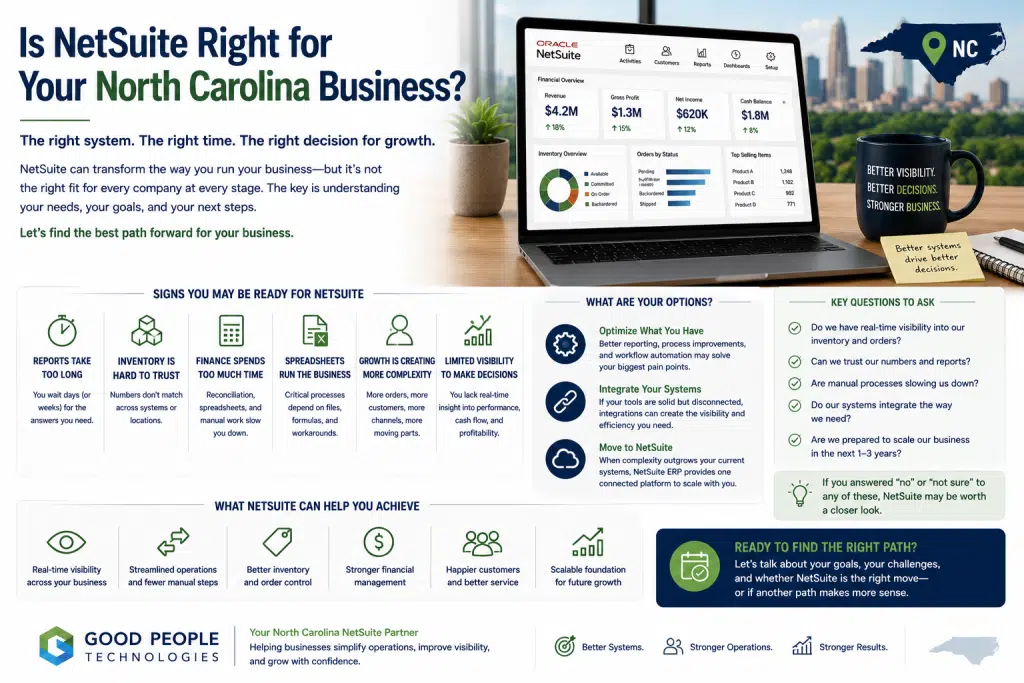
Is NetSuite right for your North Carolina business? That question usually becomes important when growth starts creating more operational complexity than your current systems can comfortably support. A business may still be successful, profitable, and well-managed, but the tools that worked at an earlier stage may no longer give teams the visibility, speed, or coordination they need.
For companies across Charlotte, Raleigh, Durham, Greensboro, Winston-Salem, Asheville, Wilmington, and other parts of North Carolina, this question can come up in many different ways.
A product-based business may struggle with inventory accuracy. A distributor may need better order and warehouse visibility. A manufacturer may need stronger production, purchasing, and reporting workflows. An e-commerce company may need cleaner connections between Shopify, accounting, fulfillment, customer service, and finance. A service-based company may want better project visibility, billing accuracy, or operational reporting.
The issue is rarely one isolated problem.
More often, several small signs appear at the same time. Reports take longer to prepare. Teams use spreadsheets to fill system gaps. Finance spends too much time reconciling data. Customer service checks multiple tools before answering basic questions. Leadership wants clearer visibility, but the data lives in different places.
That is when NetSuite becomes part of the conversation.
However, NetSuite is not automatically the right answer for every growing company. ERP is a serious business decision. It affects finance, operations, inventory, reporting, purchasing, fulfillment, customer records, integrations, and daily workflows.
This article explains how to decide whether NetSuite is right for your North Carolina business, which signs usually point toward ERP readiness, when integrations may be enough, and how to approach the decision without rushing into a system change too early.
What NetSuite Is Really Meant to Solve
NetSuite is often described as ERP software, but that phrase can sound too technical.
At a practical level, NetSuite is meant to help a business manage core operations in a more connected way.
Instead of keeping finance, inventory, orders, purchasing, customer records, fulfillment, and reporting in separate tools, ERP helps bring those workflows into a more unified operating environment.
That matters because growing businesses often reach a point where disconnected tools create more work than they solve.
A company may use QuickBooks for accounting, spreadsheets for reporting, Shopify for e-commerce, a warehouse tool for fulfillment, a CRM for customer relationships, and several manual processes between them. At a certain stage, people become the connection between systems.
Someone exports data. Another person cleans a spreadsheet. A manager checks inventory manually. Finance compares reports from different platforms. Operations follows up by email. Leadership waits for the final numbers.
These workflows may be manageable at one stage of growth.
Later, they become expensive.
NetSuite can help when the business needs one stronger foundation for financial visibility, order management, inventory control, purchasing, reporting, and connected workflows. The value comes from designing the system around how the business actually operates, not simply moving old processes into new software.
Why North Carolina Businesses Start Considering NetSuite
North Carolina has a mix of growing industries: manufacturing, distribution, wholesale, e-commerce, professional services, technology, retail, outdoor and lifestyle brands, healthcare-related services, and product-based businesses.
Each industry has different needs, but the same operational pattern often appears.
The company grows. More customers arrive. Order volume increases. More employees touch the same workflows. Product lines expand. Reporting becomes more complicated. Leadership wants better visibility across the business.
At first, teams compensate with manual work.
That can be a reasonable short-term solution.
Eventually, the workaround becomes the operating model.
A spreadsheet becomes the real inventory tracker. A manual report becomes the only way leadership sees performance. A finance reconciliation process depends on one person who knows where every file lives. Customer service relies on Slack, email, and system checks to answer order questions.
When that happens, the business is not necessarily broken.
It has simply outgrown a system environment that was built for an earlier stage.
For many companies, the question becomes: should we keep improving the current stack, or is it time for ERP?
That is the real decision behind “Is NetSuite right for your North Carolina business?”
The First Sign: Reporting Takes Too Long
Reporting delays are one of the clearest signs that a business may need a stronger system foundation.
Leadership needs timely answers:
- What sold this week?
- Which products are most profitable?
- Where are orders delayed?
- How much inventory is available?
- Which customers are growing?
- What is cash flow likely to look like?
- Which locations, channels, or teams need attention?
- Are margins improving or shrinking?
When the answers require manual exports, spreadsheet cleanup, cross-system reconciliation, or repeated explanation, reporting becomes a bottleneck.
This is especially difficult during growth periods.
A report that arrives late may still describe what happened, but it may not help the business act in time.
NetSuite can support stronger reporting when finance, inventory, orders, purchasing, customers, and operations are connected more clearly. Dashboards, saved searches, workbooks, KPIs, and reporting workflows can help teams see important information faster when configured around real business decisions.
ERP reporting should not be treated as a collection of dashboards.
A useful report should help someone take action.
If reporting delays are slowing decisions across your company, NetSuite may be worth evaluating.
The Second Sign: Inventory Is Hard to Trust
Inventory problems often push product-based businesses toward ERP.
A company may have inventory data in several places: accounting software, e-commerce platforms, warehouse systems, spreadsheets, purchase order records, and manual adjustments.
Different tools may show different numbers.
One system may show what is physically on hand. Another may show what is available for sale. A spreadsheet may include expected receipts. Sales may consider committed inventory differently from operations. Finance may care about inventory value, while warehouse teams focus on location and quantity.
These differences are normal, but they become risky when the business cannot quickly answer basic inventory questions.
What is available, and what is committed? What is on order, and what is delayed? Which products are moving quickly? What inventory is tying up cash? Where are stockouts likely?
When inventory visibility is weak, teams often create manual safety nets.
They double-check before confirming orders. Purchasing overbuys because reports are not trusted. Sales waits for warehouse confirmation. Finance spends extra time explaining adjustments.
NetSuite can help connect inventory with purchasing, orders, fulfillment, finance, and reporting. For businesses with warehouses, multiple locations, bins, or more complex fulfillment needs, ERP planning may also involve warehouse management processes and related integrations.
Inventory does not need to be perfect before ERP is considered.
In fact, inventory difficulty is often one reason companies begin the conversation.
The Third Sign: Finance Spends Too Much Time Reconciling
Finance teams often feel system limitations before the rest of the business fully sees them.
As a company grows, finance has to manage more transactions, invoices, payments, refunds, vendor bills, inventory value, customer terms, revenue recognition considerations, expenses, cash flow, and reporting expectations.
If operational data lives outside the accounting system, reconciliation becomes harder.
Finance may need to compare sales data, inventory records, payment processor reports, fulfillment costs, purchase orders, spreadsheets, and customer records. This creates delays and increases the chance of inconsistencies.
The deeper issue is visibility.
A company may know revenue increased, but not understand profitability clearly enough. Higher sales can hide fulfillment costs, discounts, returns, inventory issues, rush shipping, manual labor, or purchasing problems.
NetSuite may be useful when finance needs a more connected view of operations.
Instead of treating accounting as separate from the rest of the business, ERP can connect financial data with the workflows that create it. That gives leadership a better understanding of performance, not just transactions.
The Fourth Sign: Teams Rely on Spreadsheets for Core Operations
Spreadsheets are useful tools.
They help with analysis, planning, quick comparisons, modeling, and one-off reviews.
Problems begin when spreadsheets become the place where the business actually operates.
A company may use spreadsheets for inventory planning, order exceptions, customer notes, pricing, purchasing, fulfillment status, reporting, project tracking, or margin analysis. Over time, those spreadsheets become critical.
That creates risk.
The file may depend on one person. Formulas may break. Versions may conflict. Manual updates may be missed. Information may not flow back into the main systems. Leadership may trust a spreadsheet more than the software because the spreadsheet reflects the real workflow.
This does not mean the team is doing anything wrong.
Usually, it means the current systems are not supporting the way the business needs to work.
NetSuite can reduce spreadsheet dependency when core workflows are moved into a more connected system. Some spreadsheets may still be useful for analysis, but they should not be the only source of operational truth.
A practical test is simple: if your business would struggle because one spreadsheet disappeared, that workflow deserves attention.
Is NetSuite Right for Your North Carolina Business?
Is NetSuite right for your North Carolina business if your current tools still work?
Possibly, but the answer depends on what “work” really means.
A system may work because employees are compensating for gaps every day. Reports may be available because someone manually builds them. Inventory may appear manageable because the warehouse checks it by hand. Finance may close the books because the team spends extra time reconciling data. Customers may receive answers because service teams chase information across systems.
That kind of work can keep the business moving.
It may not scale well.
NetSuite becomes more relevant when the cost of manual coordination begins to limit growth, slow decisions, reduce visibility, or create operational risk.
The better question is not only whether current systems still function.
A stronger question is whether they can support the company’s next stage.
If the business plans to add channels, expand locations, increase order volume, improve reporting, serve larger customers, manage more complex inventory, or reduce manual work, ERP may deserve serious consideration.
When Integrations May Be Enough
NetSuite is not always the first or best step.
Sometimes a company does not need ERP yet. It may need better integrations between existing tools.
For example, an e-commerce business may need Shopify, accounting, fulfillment, and customer service tools to sync more reliably. A service business may need CRM, scheduling, billing, and reporting systems connected. A product-based company may need inventory and accounting data to flow more cleanly.
Targeted integrations can solve specific problems without a full ERP implementation.
This approach may make sense when:
- the core business model is still simple
- the current accounting system is sufficient
- inventory complexity is limited
- reporting needs are manageable
- teams can clearly identify one or two disconnected workflows
- manual work is painful but not company-wide
- growth plans do not require a major system foundation change yet
Integrations can create meaningful improvement.
They may also help prepare the business for ERP later by cleaning up data flow and clarifying system ownership.
Good People Technologies often looks at ERP and integrations together because the right answer depends on stage, complexity, and business goals.
When NetSuite May Be Too Early
Choosing NetSuite too early can create unnecessary complexity.
A business should be careful if it has not yet clarified processes, reporting needs, data ownership, and operational priorities.
ERP requires commitment.
It affects how people work. Teams need to define workflows. Data needs cleanup. Roles and permissions matter. Reporting must be designed. Integrations require planning. Leadership has to support adoption.
If a company is still changing its business model rapidly, a large ERP implementation may be premature.
NetSuite may also be too early when the company’s issues are limited to a small number of workflows that can be solved with better tools, automations, or integrations.
A thoughtful decision should consider both the pain of staying the same and the effort of changing.
The goal is not to buy the most powerful system.
The goal is to choose the right foundation for the business stage.
When NetSuite May Be Too Late
Waiting too long can also be expensive.
A company may delay ERP because the team is still managing somehow. That can feel reasonable until system limitations start affecting customers, margins, employees, or leadership visibility.
NetSuite may be considered late when:
- reporting delays regularly affect decisions
- finance reconciliation consumes too much time
- inventory accuracy causes customer issues
- order management depends heavily on manual updates
- key workflows rely on one person
- teams disagree about basic numbers
- spreadsheets have become operational infrastructure
- customer service cannot access reliable information
- growth requires more headcount just to maintain the same processes
At that point, the business may still be performing well, but operational friction is absorbing time and attention.
ERP does not remove every challenge.
It can create a stronger foundation for the company to manage complexity with more control.
What Industries Should Consider NetSuite?
NetSuite can be relevant across several North Carolina business types.
Manufacturers may need better visibility into purchasing, production, inventory, finance, orders, and reporting. Distributors and wholesalers may need stronger inventory, warehouse, customer account, and order management workflows. E-commerce companies may need integrated order, fulfillment, inventory, returns, and financial visibility.
Service-based businesses may evaluate NetSuite when project financials, billing, revenue, reporting, and resource coordination become more complex.
Retail and product-based companies may consider ERP when multiple channels, locations, inventory workflows, and customer expectations become harder to manage through disconnected tools.
Industry matters, but complexity matters more.
A small company in a complex operating model may need ERP sooner than a larger company with simple workflows. Another business may have strong revenue but still not require NetSuite because its systems remain manageable.
The right question is not whether companies in your industry use NetSuite.
The right question is whether your operating model now requires a more connected foundation.
What to Review Before Choosing NetSuite
Before deciding whether NetSuite is the right fit, a business should review several areas.
Start with workflows.
How do orders move through the company? Where do approvals happen? Which steps require manual updates? What information gets copied between systems? Where do delays appear?
Next, review reporting.
Which reports does leadership rely on? How are they built? Who owns them? Which reports are trusted? Where do numbers conflict? What decisions lack reliable visibility?
Inventory deserves careful attention for product-based companies.
Where does inventory data live? How accurate is it? What is committed, available, on order, returned, or delayed? How does inventory affect purchasing, finance, sales, and fulfillment?
Finance should map reconciliation pain.
Which data has to be cleaned manually? Where do operational systems disagree with accounting? How long does reporting take? Which month-end or period-end tasks depend on manual work?
Customer experience should also be reviewed.
Can teams answer order, account, billing, fulfillment, or service questions quickly? Which customer issues are caused by limited visibility?
Finally, leadership should define the future state.
What does the business need to see faster? Which processes need to scale? What growth plans would current systems struggle to support?
This review makes the NetSuite decision more grounded.
Common Mistakes Businesses Make When Evaluating ERP
One common mistake is focusing only on software features.
Features matter, but ERP success depends on process design, data quality, implementation planning, integrations, training, and adoption.
Another mistake is treating ERP as a technology project only.
NetSuite affects how finance, operations, sales, purchasing, warehouse, customer service, and leadership teams work. Business process decisions need to be made before and during implementation.
Companies also sometimes underestimate reporting.
Dashboards and reports should be planned early. Otherwise, teams may go live with improved workflows but still lack the visibility they expected.
Data cleanup is another important area.
Customer records, item records, vendor details, chart of accounts, pricing, inventory data, and historical information need careful review. Poor data can reduce confidence in a new system.
A final mistake is trying to solve everything at once.
ERP should support a practical roadmap. The business should prioritize the workflows that matter most, then build from there.
How a Phased Roadmap Can Reduce Risk
A phased roadmap can make the NetSuite decision easier.
Rather than treating ERP as one large all-or-nothing move, a business can evaluate steps.
The first phase may be discovery: mapping systems, workflows, reports, manual work, integrations, and operational pain points.
A second phase may focus on quick improvements. These could include targeted automations, integration fixes, reporting cleanup, or dashboard improvements.
The third phase may involve ERP readiness. This includes data review, process design, requirements gathering, implementation planning, and team alignment.
Later phases may include NetSuite implementation, integrations, reporting improvements, optimization, and additional modules or workflows.
This approach helps the business avoid rushing.
It also gives leadership a clearer view of what should happen now, what can wait, and what requires deeper investment.
If your team is unsure whether NetSuite is the right next step, Good People Technologies can help review your systems and build a phased roadmap around business priorities.
Composite Example: A Charlotte Product-Based Business
Consider a product-based business in Charlotte.
The company sells through e-commerce, wholesale accounts, and occasional retail partners. It uses accounting software, Shopify, spreadsheets, a fulfillment tool, and manual reporting.
At first, the setup works.
As the company grows, several issues become more visible. Inventory does not always match across systems. Finance spends extra time reconciling sales and fulfillment costs. Customer service checks multiple tools before answering order questions. Leadership wants clearer margin and product performance reporting.
The team does not immediately need to assume NetSuite is the answer.
A practical review would compare three options: improve integrations, automate specific workflows, or move toward ERP.
After discovery, the company may find that targeted integrations solve the most urgent problems. Another business in the same situation may discover that inventory, finance, fulfillment, and reporting are too connected to improve separately.
That is why the decision should be based on workflow reality, not a generic software recommendation.
Composite Example: A Greensboro Distributor
A distributor near Greensboro faces a different situation.
The business manages a large product catalog, multiple suppliers, customer-specific pricing, open orders, backorders, warehouse activity, and purchasing decisions.
Several teams are doing good work, but coordination depends on manual updates.
Sales wants better inventory visibility. Purchasing needs clearer demand signals. Warehouse teams need more accurate fulfillment data. Finance wants cleaner reporting. Leadership wants a more reliable view of margins, inventory value, and customer activity.
In this case, NetSuite may be more clearly worth evaluating.
The business does not only have one disconnected workflow. It has operational complexity across several areas that all depend on the same data.
For a distributor like this, NetSuite could potentially provide a stronger foundation for inventory, orders, purchasing, warehouse visibility, customer records, finance, and reporting.
The next step would still be discovery.
ERP should be evaluated carefully against business requirements, data readiness, integrations, implementation effort, and expected operational value.
How Good People Technologies Helps With the NetSuite Decision
Good People Technologies helps growing businesses evaluate ERP readiness, improve system integrations, automate workflows, strengthen reporting, and build practical technology roadmaps.
For companies asking whether NetSuite is the right fit, this can include:
- reviewing current systems and workflows
- identifying disconnected data
- mapping manual work
- evaluating reporting delays
- reviewing inventory and order visibility
- assessing finance reconciliation pain
- documenting integration needs
- improving existing systems where possible
- building NetSuite readiness roadmaps
- supporting NetSuite reporting, dashboards, saved searches, and integrations
The goal is not to force every business into ERP.
A good recommendation should match the company’s stage, complexity, budget, team capacity, and growth plans.
Sometimes NetSuite is the right next step. Other times, the better move is integration cleanup, reporting improvement, automation, or process redesign first.
If your company is asking whether NetSuite is right for your North Carolina business, the most useful starting point is a clear review of what is slowing your team down today and what your systems need to support next.
Final Thoughts
Is NetSuite right for your North Carolina business? The answer depends on complexity, not just company size.
NetSuite may be worth evaluating when your current systems create too much manual work, reporting delays, inventory uncertainty, finance reconciliation, disconnected customer information, order management friction, or leadership visibility gaps.
At the same time, ERP should not be rushed.
Some businesses need targeted integrations first. Others need better reporting, workflow automation, or process cleanup before a full ERP move makes sense. More complex companies may already be at the stage where NetSuite deserves serious consideration.
The best decision starts with discovery.
Map your workflows. Review your reports. Identify manual work. Understand where data is disconnected. Clarify what leadership needs to see. Then decide whether integrations, automation, NetSuite, or a phased roadmap is the right path.
ERP is not just a software purchase.
For the right business, it can become the foundation for clearer decisions, stronger operations, better reporting, and more scalable growth.
Frequently Asked Questions
Is NetSuite right for every North Carolina business?
No. NetSuite is not right for every business. It is usually more relevant when a company has complex operations, disconnected systems, manual reporting, inventory challenges, finance reconciliation issues, or growth plans that require a stronger system foundation.
When should a business consider NetSuite?
A business should consider NetSuite when current systems make it hard to manage finance, inventory, orders, purchasing, reporting, customer records, fulfillment, or operational visibility.
Can integrations be a better option than NetSuite?
Yes. If the company has a few specific disconnected workflows, targeted integrations may be enough. NetSuite becomes more relevant when the business needs a more unified operating foundation.
What are signs that a company has outgrown QuickBooks?
Common signs include manual reporting, inventory visibility issues, disconnected operations, finance reconciliation delays, limited reporting, and workflows that depend heavily on spreadsheets.
Can NetSuite help with inventory management?
Yes. NetSuite can help connect inventory with orders, purchasing, fulfillment, finance, and reporting, depending on configuration, modules, and business requirements.
Does NetSuite help with reporting?
Yes. NetSuite can support dashboards, saved searches, workbooks, KPIs, and reporting workflows when configured around the decisions the business needs to make.
Should a company implement NetSuite before cleaning up data?
No. Data cleanup should be part of ERP preparation. Customer records, item records, vendor records, pricing, accounting structures, and inventory data should be reviewed before or during implementation planning.
How long does it take to know whether NetSuite is the right fit?
The timeline depends on business complexity, but a focused discovery process can usually clarify whether the company needs ERP, integrations, automation, reporting cleanup, or a phased roadmap.
What should be reviewed before choosing NetSuite?
Businesses should review workflows, reporting, inventory, finance reconciliation, customer visibility, integrations, manual work, data quality, and future growth plans.
How can Good People Technologies help?
Good People Technologies helps businesses evaluate NetSuite readiness, improve integrations, automate workflows, clean up reporting, and build practical ERP roadmaps.
Need hands-on NetSuite help? See our NetSuite implementation and support services.

Roman is a B2B marketing specialist focused on technology, ERP systems, business automation, and digital growth strategies. At Good People Technologies, he helps translate complex technology solutions—such as ERP integrations, system integrations, and business process automation—into clear insights for founders, operators, and growing companies.
His work focuses on content strategy, SEO, and thought leadership that helps businesses understand how the right technology infrastructure can support scalable operations and sustainable growth.
At Good People Technologies, Roman contributes to content that explores ERP implementation, automation strategies, and system integration best practices for companies navigating rapid growth and operational complexity.