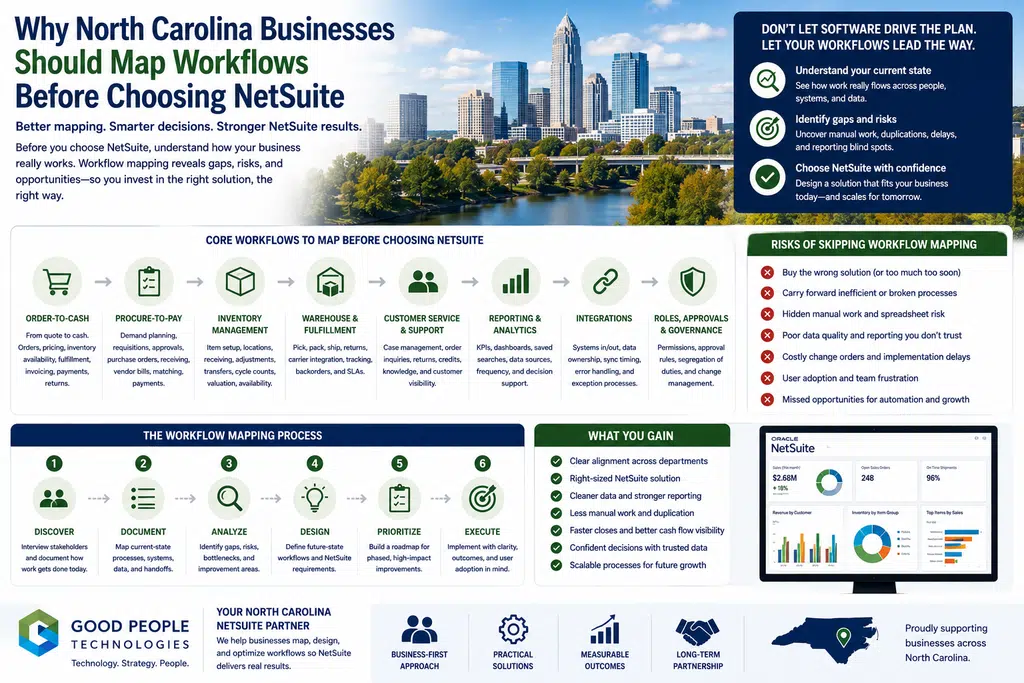
North Carolina NetSuite workflow mapping should happen before a company chooses, configures, or implements ERP because software decisions are only as strong as the business process behind them. NetSuite can help growing companies connect finance, inventory, purchasing, orders, reporting, customers, fulfillment, and operations. However, before a business can decide whether NetSuite is the right fit, it needs to understand how work actually moves through the company today.
For businesses across Charlotte, Raleigh, Durham, Greensboro, Winston-Salem, Wilmington, Asheville, and other North Carolina markets, NetSuite often becomes part of the conversation during growth. Reports take longer to prepare. Teams rely on spreadsheets. Inventory is harder to trust. Finance spends more time reconciling. Customer service checks several systems before answering questions. Leadership wants better visibility, but the data lives in too many places.
Those are real signals.
Still, they do not automatically mean the company should move straight into ERP selection.
A better first step is workflow mapping.
Before choosing NetSuite, a company should map how orders enter the business, how inventory moves, how purchasing decisions happen, how finance receives data, how reports get built, how customer issues get resolved, and where manual work fills the gaps.
This process helps the business see what NetSuite would need to support. It also helps avoid a common mistake: buying powerful software before the company has defined the workflows, data rules, owners, reports, and decisions the system must serve.
This article explains why North Carolina businesses should map workflows before choosing NetSuite, what to include in a workflow map, which areas matter most, and how workflow mapping can reduce ERP risk, improve system design, and create a more practical path toward growth.
Why Workflow Mapping Should Come Before ERP Selection
Choosing ERP is a major business decision.
It affects finance, operations, inventory, purchasing, customer records, reporting, roles, approvals, integrations, and daily work. Because of that, the company needs more than a list of software features. It needs a clear picture of how the business actually operates.
Many companies start by asking, “What can NetSuite do?”
That question matters, but it should not come first.
A stronger starting question is: “What do our workflows need?”
That shift changes the ERP conversation.
Instead of reviewing software in the abstract, the company can evaluate NetSuite against real business needs. How does the order process work today? Where do approvals slow down? Which spreadsheets support critical decisions? What data gets entered twice? Which reports are trusted? Where do customers experience delays? Which tasks depend on one person’s knowledge?
Without those answers, ERP selection becomes harder.
The company may focus on features that look useful but do not solve the biggest workflow problems. It may underestimate data cleanup. Teams may disagree about priorities. Implementation may copy old workarounds instead of improving them.
Workflow mapping helps prevent that.
It gives the company a clear operating picture before it makes a system decision.
What Workflow Mapping Actually Means
Workflow mapping means documenting how work moves through the business from start to finish.
It is not only a technical diagram.
A useful workflow map shows people, systems, data, decisions, handoffs, approvals, exceptions, reports, and pain points.
For example, an order-to-cash workflow map may show:
- how the customer places an order
- which system captures the order
- who reviews it
- how inventory availability gets checked
- when fulfillment begins
- how shipping updates move
- when the invoice gets created
- how payment gets recorded
- what reports leadership reviews
- where delays or manual steps happen
A purchasing workflow map may show demand signals, reorder points, vendor records, purchase approvals, expected receipts, warehouse receiving, invoice matching, and inventory updates.
A reporting workflow map may show which systems hold data, who exports reports, which spreadsheets get rebuilt, who reviews the final numbers, and what decisions those reports support.
North Carolina NetSuite workflow mapping helps turn these moving parts into something the company can review before choosing software.
The goal is not to create a perfect document.
The goal is to understand reality clearly enough to make better decisions.
Why Growing Businesses Often Skip This Step
Many growing businesses skip workflow mapping because daily work feels urgent.
The team may already know there are problems. Leadership may feel pressure to choose a new system quickly. Employees may be tired of manual processes. Finance may want cleaner data. Operations may want better visibility. Customer service may want fewer system checks.
Because the pain is obvious, mapping can feel like a delay.
However, skipping workflow mapping often creates more delay later.
When a company chooses NetSuite without enough workflow clarity, key questions move into implementation. At that point, the business must make process decisions under pressure. Teams may debate ownership, approvals, data rules, reports, integrations, and exceptions while the project is already moving.
That can increase cost, frustration, and confusion.
Workflow mapping before selection gives the business time to think.
It helps leadership separate symptoms from root causes. It also helps teams decide whether they need NetSuite now, targeted integrations first, reporting cleanup, automation, process redesign, or a phased roadmap.
In other words, mapping does not slow the project down.
Done well, it helps the company avoid the wrong project.
North Carolina NetSuite Workflow Mapping
North Carolina NetSuite workflow mapping is especially useful for companies that are growing across departments, locations, sales channels, product lines, or customer segments. These businesses often have strong momentum, but their internal processes may not have evolved at the same pace as revenue, headcount, or operational complexity.
A company may use several tools at once:
- accounting software
- e-commerce platforms
- CRM systems
- inventory tools
- warehouse software
- spreadsheets
- payment processors
- shipping platforms
- project management tools
- reporting dashboards
- customer service systems
Each tool may solve a real problem.
Still, the handoffs between those tools may create delays, duplicate work, and reporting gaps.
Workflow mapping helps identify where those handoffs happen.
For example, a Charlotte e-commerce company may discover that order data moves through several systems before finance sees it. A Greensboro distributor may find that purchasing depends on spreadsheets because demand signals are scattered. A Raleigh service business may learn that billing delays start earlier in the scheduling workflow.
These discoveries matter before choosing NetSuite.
They show what the ERP system must support, what integrations may still be needed, and which processes need cleanup before implementation.
Workflow Mapping Reveals Manual Work
Manual work often hides inside growing businesses.
A company may have modern software and still rely on people to move data between systems. Someone exports orders. Another person updates a spreadsheet. Finance reconciles payments by hand. Customer service checks multiple tools before answering a question. Purchasing reviews inventory manually before placing orders.
These tasks may not seem large on their own.
However, they become expensive when they repeat every day or every week.
Workflow mapping makes manual work visible.
It helps the business ask:
- Where does the same data get entered twice?
- Which reports require exports?
- Who updates spreadsheets by hand?
- What information gets copied between systems?
- Which approvals happen by email?
- Where do employees check multiple tools for one answer?
- Which tasks depend on one person’s knowledge?
Once the company sees these steps, it can decide which ones NetSuite should replace, which ones need automation, and which ones may require integrations.
This is one reason North Carolina businesses should map workflows before choosing NetSuite.
The map shows whether the company needs a full ERP foundation or whether targeted improvements could solve the most urgent problems first.
Workflow Mapping Helps Separate Symptoms From Root Causes
Business system problems often appear as symptoms.
Reports are late. Inventory is wrong. Customers wait for updates. Finance works too much in spreadsheets. Orders take too long to process. Purchasing reacts too late. Leadership cannot see the full picture.
Those symptoms are important.
Still, they may not show the root cause.
For example, reporting delays may come from disconnected systems, unclear metric definitions, poor data ownership, manual exports, or duplicated reports. Inventory issues may come from item data problems, weak receiving processes, sales channel sync delays, or unclear available-versus-committed rules.
Without workflow mapping, the company may fix the symptom.
With mapping, the team can find the process behind the problem.
That matters during NetSuite evaluation.
A business may think it needs a new dashboard, but the real issue may be that data enters the system too late. Another company may think it needs more warehouse tools, while the root problem sits in order entry or purchasing. A third may blame reporting, yet the deeper issue is unclear ownership across departments.
Workflow mapping helps the company make better system decisions because it shows where the problem starts.
Mapping Order-to-Cash Before Choosing NetSuite
Order-to-cash is one of the most important workflows to map.
This workflow covers how a customer order moves from sale to fulfillment, invoicing, payment, and reporting.
For many North Carolina businesses, order-to-cash touches sales, customer service, inventory, warehouse teams, finance, e-commerce, shipping, and leadership reporting.
A workflow map should show:
- how orders enter the business
- which systems capture order data
- how pricing gets applied
- how inventory availability gets checked
- who approves special orders or exceptions
- how fulfillment begins
- when shipping updates move
- how invoices get created
- how payments get matched
- what happens with returns or credits
- which reports track order performance
This map can reveal issues that software demos may miss.
For example, the business may discover that sales promises inventory before committed stock is visible. Finance may not receive fulfillment data soon enough. Customer service may rely on warehouse updates that happen outside the system. Leadership may review order reports that do not include margin or fulfillment cost.
NetSuite can support many order-to-cash needs, but the system must match the real workflow.
Mapping helps define that workflow before the company chooses or configures the system.
Mapping Procure-to-Pay Before Choosing NetSuite
Procure-to-pay covers how the business identifies a purchasing need, creates a purchase order, receives goods or services, reviews vendor bills, and pays suppliers.
For distributors, wholesalers, manufacturers, and product-based companies, this workflow can have a major impact on cash flow, inventory, margins, and customer service.
A strong procure-to-pay map should show:
- where demand signals come from
- how reorder needs are identified
- who creates purchase orders
- which approvals are required
- how vendor lead times are tracked
- how expected receipts are reviewed
- who receives goods
- how quantity or price issues get handled
- how vendor bills get matched
- when finance approves payment
- which reports show purchasing performance
This process often reveals spreadsheet dependency.
Purchasing may use a side file to track reorder needs. Operations may monitor supplier delays manually. Finance may reconcile purchase orders and bills by hand. Warehouse teams may update receiving status outside the main system.
These are not failures.
They are signals.
They show where the future system must improve visibility.
North Carolina NetSuite workflow mapping helps companies decide whether NetSuite purchasing, demand planning, supply planning, approvals, reporting, or integrations should become part of the roadmap.
Mapping Inventory Workflows Before Choosing NetSuite
Inventory workflows need careful review before ERP selection.
Inventory is not just a number.
It connects sales promises, purchasing decisions, warehouse work, finance reporting, customer service, and cash flow.
A workflow map should clarify:
- how items are created
- who owns item data
- how inventory gets received
- how locations or bins are used
- how stock moves between locations
- how adjustments happen
- who approves changes
- how returns re-enter inventory
- how damaged goods are handled
- what counts as available
- what counts as committed
- how inventory value reaches finance
- which reports teams trust
This review can uncover hidden problems.
Sales may use one view of availability. Warehouse teams may use another. Finance may focus on value. Purchasing may track reorder needs separately. Customer service may ask operations for confirmation before giving customers an answer.
If the business chooses NetSuite without mapping these differences, implementation may become harder.
Clear inventory mapping helps define item records, locations, approval rules, availability logic, fulfillment workflows, reporting needs, and integrations.
As a result, the company can evaluate NetSuite more realistically.
Mapping Reporting and Dashboards Before Choosing NetSuite
Reporting should not wait until after implementation.
Many companies focus on transactions first and reporting later. That can create frustration because teams expect better visibility from ERP, but they have not defined what better visibility means.
Before choosing NetSuite, leadership should map the reporting environment.
That includes:
- which reports exist today
- who owns each report
- who reads them
- how often they matter
- what decision each report supports
- which reports are duplicated
- which numbers conflict
- which dashboards are trusted
- which spreadsheets get rebuilt manually
- which reports take too long
- what visibility leadership needs next
This process helps companies avoid building dashboards that only display available data.
Instead, the business can design reporting around decisions.
For example, leadership may need visibility into margin by channel, inventory at risk, open orders, delayed fulfillment, purchasing needs, cash flow, customer service pressure, or project profitability.
NetSuite can support dashboards, saved searches, reports, workbooks, and KPIs. However, the company still needs to define which reports matter and what action they should support.
Workflow mapping gives reporting a business purpose before the system gets configured.
Mapping Customer Experience Workflows
Customer experience often depends on internal systems.
A customer may ask about order status, inventory availability, billing, returns, delivery timing, service progress, or account history. The answer may require data from sales, finance, inventory, fulfillment, customer service, and warehouse systems.
If those workflows are unclear, customers feel the delay.
Before choosing NetSuite, businesses should map how customer questions move through the company.
Useful questions include:
- Where does customer data live?
- Which teams update customer records?
- How does customer service check order status?
- Can sales see billing or fulfillment context?
- How are returns handled?
- What happens when a customer asks about availability?
- Which systems hold account notes?
- How are customer credits or disputes resolved?
- What information does the team need faster?
This map helps the business understand whether customer visibility is a CRM issue, ERP issue, integration issue, workflow issue, or reporting issue.
In many cases, the answer involves more than one system.
That is why mapping matters.
NetSuite may become the central operating foundation, but the company may still need integrations with CRM, e-commerce, shipping, customer service, or field tools.
Mapping Roles, Permissions, and Approvals
Roles and approvals shape how work happens inside NetSuite.
If a company does not map them early, users may receive too much access, too little access, or confusing access. Approvals may also become too slow, too loose, or disconnected from business risk.
Before choosing or configuring NetSuite, the business should review:
- who needs access to which records
- what each role should be able to see
- which tasks each team performs
- who approves purchases
- who approves discounts
- who approves inventory adjustments
- who can change item or customer records
- which exceptions require review
- what should happen when approvals stall
- who owns role changes over time
This is not only a technical topic.
It is a business workflow topic.
Permissions should support how people work responsibly. Approvals should protect the business without slowing routine tasks unnecessarily.
Workflow mapping helps define that balance.
Then NetSuite roles, permissions, and workflows can reflect real business needs rather than guesswork.
Mapping Integrations Before Choosing NetSuite
NetSuite may become the core business system, but most companies still need other tools.
A business may use Shopify, Amazon, CRM software, warehouse tools, shipping platforms, payment processors, tax tools, project management software, EDI, customer portals, or reporting platforms.
Integrations decide how those tools work together.
Before choosing NetSuite, companies should map current and future integrations.
The map should show:
- which systems create data
- which systems consume data
- which system owns each record
- how often data needs to sync
- what happens when a sync fails
- who reviews integration errors
- which data fields matter
- which reports depend on integrated data
- which workflows need real-time updates
- where manual exports still happen
This prevents a common issue.
A company may implement ERP but keep old data silos because integration planning came too late.
North Carolina NetSuite workflow mapping helps the business decide which integrations matter most before implementation begins.
That improves project planning and reduces surprises.
Why Workflow Mapping Helps With Change Management
ERP changes how people work.
Even when the software improves operations, employees still need to understand new workflows, roles, reports, approvals, and expectations.
Workflow mapping supports change management because it includes the people who live with the process.
Teams can explain what actually happens today. They can point out exceptions. They can show where systems do not match daily work. They can identify workarounds that leadership may not see.
This makes the future design stronger.
It also helps employees feel heard.
When people see that the company mapped real workflows before choosing software, they are more likely to trust the project. The implementation feels less like a system forced onto the team and more like a practical effort to improve how work gets done.
Change management does not begin at training.
It begins when the business starts listening to how work happens.
Workflow mapping creates that starting point.
Workflow Mapping Can Show That NetSuite Is Not the First Step
Sometimes workflow mapping confirms that NetSuite is the right next move.
Other times, it shows that the business should take a different step first.
That is useful.
A company may discover that its main problem is one disconnected integration, not a full ERP gap. Another business may need reporting cleanup before choosing software. A third may need to define inventory rules, clean item data, or assign process ownership before any major system change.
NetSuite may still become part of the future roadmap.
However, choosing the right sequence matters.
A phased path may look like this:
- map current workflows
- identify manual work
- clean key data
- improve reporting
- connect the highest-impact systems
- automate repeatable steps
- evaluate ERP readiness
- choose and implement NetSuite when the business case is clear
This approach reduces risk.
It also helps the company avoid overbuilding.
The goal is not to buy the most powerful system as quickly as possible. The goal is to build the right operating foundation at the right time.
Workflow Mapping Helps Avoid Overbuilding NetSuite
NetSuite is flexible.
That flexibility is valuable, but it can also create risk if the company overbuilds the system.
Overbuilding happens when a business adds too much complexity too early. The company may create too many custom workflows, too many fields, too many approvals, too many reports, or too many exceptions before it fully understands what users need.
Workflow mapping helps avoid this.
By documenting real workflows, the team can see which steps happen often, which exceptions are rare, and which controls matter most.
A common task should be easy.
A high-risk exception should receive proper review.
A report should support a decision.
An approval should protect the business.
A field should serve a clear purpose.
Without workflow mapping, the company may design around assumptions. With mapping, it can design around actual work.
This makes NetSuite easier to use, easier to maintain, and easier to improve over time.
Workflow Mapping Helps Avoid Underbuilding NetSuite
Underbuilding creates the opposite problem.
A company may implement NetSuite too simply and leave important business needs unsupported.
That can happen when the project focuses on basic transactions but misses reporting, integrations, approvals, item data, customer visibility, or warehouse exceptions.
Users may then return to spreadsheets and side processes after go-live.
This is frustrating because the company invested in ERP but still relies on manual work.
Workflow mapping helps prevent underbuilding by showing which needs are truly important.
If purchasing depends on supplier lead times, the system design should support that. If customer service needs order and fulfillment context, the workflow should include it. When finance relies on operational data, integrations and reports need planning. If leadership needs margin visibility, reporting should be part of the design from the start.
A balanced NetSuite setup does not need to solve every possible future problem.
It should solve the workflows that matter most now and create a foundation for the next stage.
What a Strong Workflow Map Should Include
A strong workflow map should include more than process steps.
It should show the full business context.
Key elements include:
- workflow name
- business purpose
- teams involved
- systems used
- data created
- data consumed
- decision points
- approvals
- exceptions
- manual steps
- spreadsheets
- reports
- owners
- pain points
- customer impact
- finance impact
- integration needs
- automation opportunities
- priority level
This makes the map more useful for ERP planning.
The company can look at each workflow and ask:
- Does this process work today?
- What breaks as volume grows?
- Which step creates the most delay?
- Where does data become unreliable?
- Which team owns the process?
- What should NetSuite support?
- What can be automated?
- Which reports should come from this workflow?
- What should we improve before implementation?
These questions turn workflow mapping into a planning tool.
Who Should Be Involved in Workflow Mapping
Workflow mapping should include the people who understand the work.
Leadership should participate, but it should not be the only voice.
A useful workflow review may include:
- finance
- operations
- purchasing
- sales
- customer service
- warehouse teams
- IT or systems owners
- reporting users
- department managers
- employees who maintain spreadsheets
- employees who handle exceptions
The people closest to the process often know where the real friction lives.
They know which reports are trusted, which workarounds are necessary, which fields do not get used, and which system steps slow everyone down.
Their input helps the business avoid designing a process that looks good in a meeting but fails in daily use.
Good workflow mapping is collaborative.
It should not feel like an audit of employees.
The goal is to understand the work so the company can improve the system around it.
Common Mistakes to Avoid
One common mistake is mapping only the ideal process.
The ideal process matters, but the business also needs to map what actually happens.
Exceptions often reveal the most important system needs.
Another mistake is ignoring spreadsheets.
A spreadsheet may look like a side tool, but it may support purchasing, reporting, finance, customer service, inventory, or leadership decisions. If the company does not map it, the future system may miss a critical workflow.
Some teams also map departments separately without reviewing cross-department handoffs.
That creates gaps because many ERP problems happen between teams.
A fourth mistake is skipping reporting.
Reports should connect to workflows from the beginning. Otherwise, the company may complete implementation and still lack the visibility it expected.
Finally, businesses sometimes treat workflow mapping as a one-time document.
Workflows change as the company grows.
The map should become a living reference for system improvement.
Composite Example: A Charlotte Product-Based Business
Consider a growing product-based business in Charlotte.
The company sells through e-commerce, wholesale accounts, and a few retail partners. It uses accounting software, Shopify, spreadsheets, a fulfillment tool, and manual reports.
Leadership is considering NetSuite because the business has grown.
Before choosing a system, the company maps key workflows.
The order-to-cash map shows that orders enter through several channels, but finance receives clean information only after manual cleanup. The inventory map reveals that available inventory is not always the same as on-hand inventory. The purchasing map shows that buyers rely on spreadsheets because demand signals are scattered. The reporting map shows that leadership trusts a weekly spreadsheet more than any system dashboard.
These findings change the ERP conversation.
The company now understands what NetSuite would need to support: multi-channel orders, inventory availability, purchasing visibility, fulfillment updates, finance reconciliation, and reporting tied to decisions.
The team also sees which steps can improve before ERP.
That makes the NetSuite decision more practical and less abstract.
Composite Example: A Greensboro Distributor
A distributor near Greensboro faces a different situation.
The company manages a broad catalog, supplier lead times, customer-specific pricing, open orders, backorders, warehouse workflows, and finance reporting.
Teams are working hard, but coordination depends on manual updates.
Sales checks availability with the warehouse. Purchasing tracks reorder needs in spreadsheets. Customer service uses shared notes for backorder updates. Finance reconciles inventory adjustments at month-end. Leadership wants clearer visibility into margin and customer demand.
The company maps workflows before choosing NetSuite.
It finds that the core problem is not one system gap. Instead, sales, inventory, purchasing, warehouse, finance, and reporting all depend on the same data, but that data moves through too many manual steps.
In this case, NetSuite becomes a stronger candidate.
However, the workflow map also shows preparation work: clean item data, define available inventory, review vendor records, clarify approval rules, and plan integrations.
Because the business mapped workflows first, ERP selection becomes more focused.
How Good People Technologies Helps With Workflow Mapping
Good People Technologies helps growing businesses review systems, map workflows, improve reporting, automate processes, connect tools, evaluate ERP readiness, and plan NetSuite roadmaps.
For companies considering NetSuite, this can include:
- mapping current workflows
- identifying manual work and spreadsheet dependency
- reviewing order-to-cash and procure-to-pay processes
- mapping inventory and fulfillment workflows
- reviewing reporting and dashboard needs
- clarifying process ownership
- identifying integration gaps
- evaluating automation opportunities
- reviewing data readiness
- building phased NetSuite readiness plans
The work starts with understanding how the business operates today.
Some companies need NetSuite soon. Others need integrations, automation, reporting cleanup, data cleanup, or process ownership first. A few need a phased roadmap that prepares the business for ERP over time.
If your company is considering NetSuite but is not fully sure where to start, Good People Technologies can help map the workflows that matter most and build a practical path forward.
Final Thoughts
North Carolina businesses should map workflows before choosing NetSuite because ERP decisions should come from business reality, not assumptions.
NetSuite can support finance, inventory, purchasing, orders, reporting, customers, and operations. Still, the company needs to know how those workflows happen today before it can design the right future system.
Workflow mapping helps reveal manual work, disconnected data, unclear ownership, reporting gaps, approval issues, integration needs, and process problems that may not appear in a software demo.
It also helps the company decide whether NetSuite is the right next step.
Sometimes the answer is yes. Sometimes the business needs targeted integrations, reporting cleanup, automation, or data preparation first. Either way, the decision becomes stronger when it starts with workflow clarity.
Good ERP planning does not begin with software.
It begins with understanding the work.
Frequently Asked Questions
What is workflow mapping?
Workflow mapping is the process of documenting how work moves through a business, including people, systems, data, decisions, approvals, reports, exceptions, and manual steps.
Why should businesses map workflows before choosing NetSuite?
Businesses should map workflows before choosing NetSuite because ERP should support real business processes, not assumptions. Mapping helps define what the system needs to solve.
What workflows should a company map before NetSuite?
Companies should map order-to-cash, procure-to-pay, inventory, fulfillment, reporting, customer service, finance, approvals, roles, permissions, and integrations.
Can workflow mapping show that NetSuite is not needed yet?
Yes. Workflow mapping may show that the business needs targeted integrations, automation, reporting cleanup, or process redesign before a full ERP move.
How does workflow mapping reduce ERP risk?
Workflow mapping reduces ERP risk by revealing manual work, data gaps, unclear ownership, reporting needs, integration requirements, and process issues before implementation.
Who should participate in workflow mapping?
Finance, operations, sales, purchasing, customer service, warehouse teams, IT, reporting users, managers, and employees who handle spreadsheets or exceptions should participate.
Why are spreadsheets important in workflow mapping?
Spreadsheets often reveal system gaps. They may support reporting, finance, inventory, purchasing, customer service, or leadership decisions outside the main software.
How does workflow mapping help with NetSuite reporting?
Workflow mapping helps identify which reports are needed, who uses them, what decisions they support, where data comes from, and which dashboards should be built.
Can Good People Technologies help with workflow mapping?
Yes. Good People Technologies helps businesses map workflows, review systems, identify integration gaps, improve reporting, evaluate NetSuite readiness, and build ERP roadmaps.
Is workflow mapping only needed before implementation?
No. Workflow mapping is useful before choosing NetSuite, during implementation, and during ongoing optimization as the business grows.
Need hands-on NetSuite help? See our NetSuite implementation and support services.

Roman is a B2B marketing specialist focused on technology, ERP systems, business automation, and digital growth strategies. At Good People Technologies, he helps translate complex technology solutions—such as ERP integrations, system integrations, and business process automation—into clear insights for founders, operators, and growing companies.
His work focuses on content strategy, SEO, and thought leadership that helps businesses understand how the right technology infrastructure can support scalable operations and sustainable growth.
At Good People Technologies, Roman contributes to content that explores ERP implementation, automation strategies, and system integration best practices for companies navigating rapid growth and operational complexity.